Witcher 3 Extra Settings
⚪ Last updated 2017Preview
🔍 Analysis
- 👍 8.7% endorsement rate — high engagement, a strong quality signal
- 🏆 #45 of 276 User Interface mods in this game by downloads
📋 About This Mod
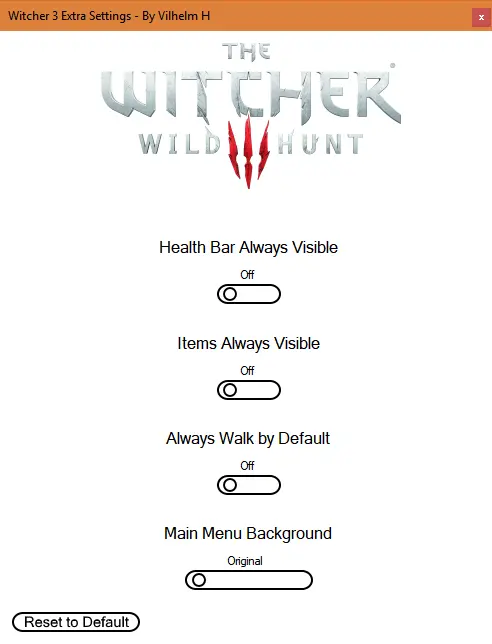
This is a small program that lets you switch between the three Main menu backgrounds and toggle Health Bar/ Item visibility. As well as turning Always Walk on by default.
-
[]Completely redesigned the UI to a more clean look as well as adding an option to turn on Always Walk by default .
General Information
This is a small program that lets you:
- [
[]Toggle Always Walk on by default
[]Change between the three main menu backgrounds
Mod info
This mod uses the following files:
-
[]r4Game.ws
[
]commonMainMenuBase.ws[]hudModuleItemInfo.ws
[]hudModuleWolfHead.ws
[]player.ws
Installation Guide
- []Unzip Witcher3ExtraSettings.zip
- Place the Witcher3ExtraSettings.exe and the other folders ( mods and W3ES ) inside The Witcher 3 Wild Hunt folder
Default installation folder for GOG:
C:\GOG Games\The Witcher 3 Wild Hunt
Default installation folder for Steam:
C:\Program Files (x86)\Steam\steamapps\common\The Witcher 3 Wild Hunt
Uninstall Guide
Remove Witcher3ExtraSettings.exe and W3ES folder and modWitcher3ExtraSettings folder from the mods folder.
📊 Mod Details
- Game
- Witcher3 Mods
- Author
- Leymora
- Version
- v2.1
- Downloads
- 538
- Endorsements
- 47
- Category
- User Interface
- Created
- 2/5/2017
- Updated
- 11/1/2017
🔧 How to Install The Witcher 3 Mods
Download from Nexus Mods.
📖 Full step-by-step install guide for The Witcher 3 →
Visit the official mod page for specific installation instructions for this mod.
🎮 Need cheat codes or console commands? Check ur gaming wiki for The Witcher 3 commands, item IDs, and more.
Keep browsing — more The Witcher 3 mods await