Profile Manager
⚪ Last updated 2019Preview
🔍 Analysis
- 🏆 #17 of 55 Utilities mods in this game by downloads
📋 About This Mod
Profile Manager that works not only with The Witcher 3, it was created to support all singleplayer and multiplayer games which don't support multiple user profiles.
This is the first release of my Profile Manager. So please be mindful of that and backup all gamesaves before using this application, just to be sure.
Here's what you need in order to use it:
- Java 8 or newer, either x64 or x86
- Python 3 - This is needed only if your os is 32Bit
Here's how to use it:
- Run the application as administrator (Sadly this is needed because of Windows 10 privileges and Python)
- Add new profile, and specify where the game saves will be stored. Note that this is not where the game stores it's game saves. The directory must exist.
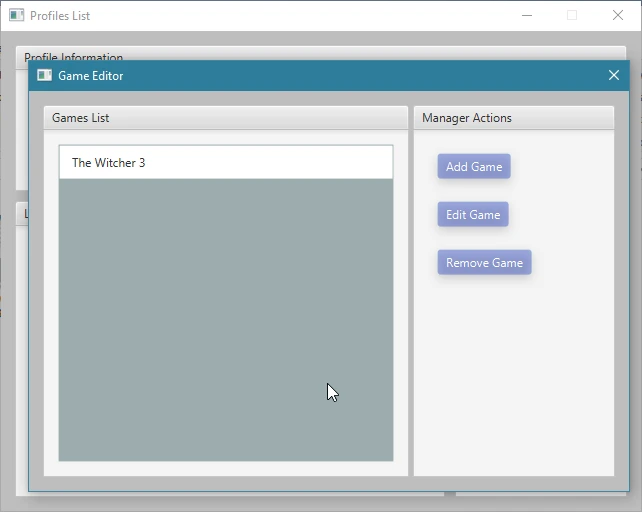
- Manage Games and Add new Game, this time point the application to a directory which contains game save files.
- Select the profile you want to use and click 'Load Profile' then assign a new game to it by clicking Subscribe (This can take some time since existing
files are being moved to profile storage directory)
- Select the subscribed game and load the game / profile combination.
- Application should go into lockdown untill you unlock it.
- Now you can start the game
How it works:
- The idea behind this application is quite simple. After selecting a profile then adding a game to it, the application looks for existing game save files
(or any files inside the specific directory, so in theory you can have separate configuration files for each profile) and moves them to a specified
profile storage directory then creates a symlink, if there are no game save files the application only creates a symlink which points to
profile storage directory. This way you won't lose any data.
How to report issues (Be sure to attach respective log files which can be found under bin/logs):
-ENGINE Exceptions and Suggestions
-CLIENT (Not supported since UI will be rewritten)
- If you want to use your own Python version go to bin/conf/app.json and change pyint to none
- Autoupdater (It'll be released with the new GUI)
- UI Rewrite (Decided to ditch Java in favour of Electron)
- Cloud Storage Support (Dropbox and Google Drive) (I'll be released with the new GUI)
- User Plugins
- User Suggested Features
Disclaimer:
This is an early version of the UI, made within few hours so it might not be the most user friendly. I'm facing some real life issues and I just wanted
to finally release this project because some people pm'ed me about it. I'll be working on it as much as I can but my time is limited.
📊 Mod Details
- Game
- Witcher3 Mods
- Author
- mar3ksoftware
- Version
- 1.10.1-1.10.5
- Downloads
- 349
- Endorsements
- 19
- Category
- Utilities
- Created
- 9/17/2018
- Updated
- 1/7/2019
🔧 How to Install The Witcher 3 Mods
Download from Nexus Mods.
📖 Full step-by-step install guide for The Witcher 3 →
Visit the official mod page for specific installation instructions for this mod.
🎮 Need cheat codes or console commands? Check ur gaming wiki for The Witcher 3 commands, item IDs, and more.
Keep browsing — more The Witcher 3 mods await