HUD Killer
⚪ Last updated 2016Preview
🔍 Analysis
- 👍 3.5% endorsement rate — high engagement, a strong quality signal
- 🏆 #34 of 175 User Interface mods in this game by downloads
📋 About This Mod
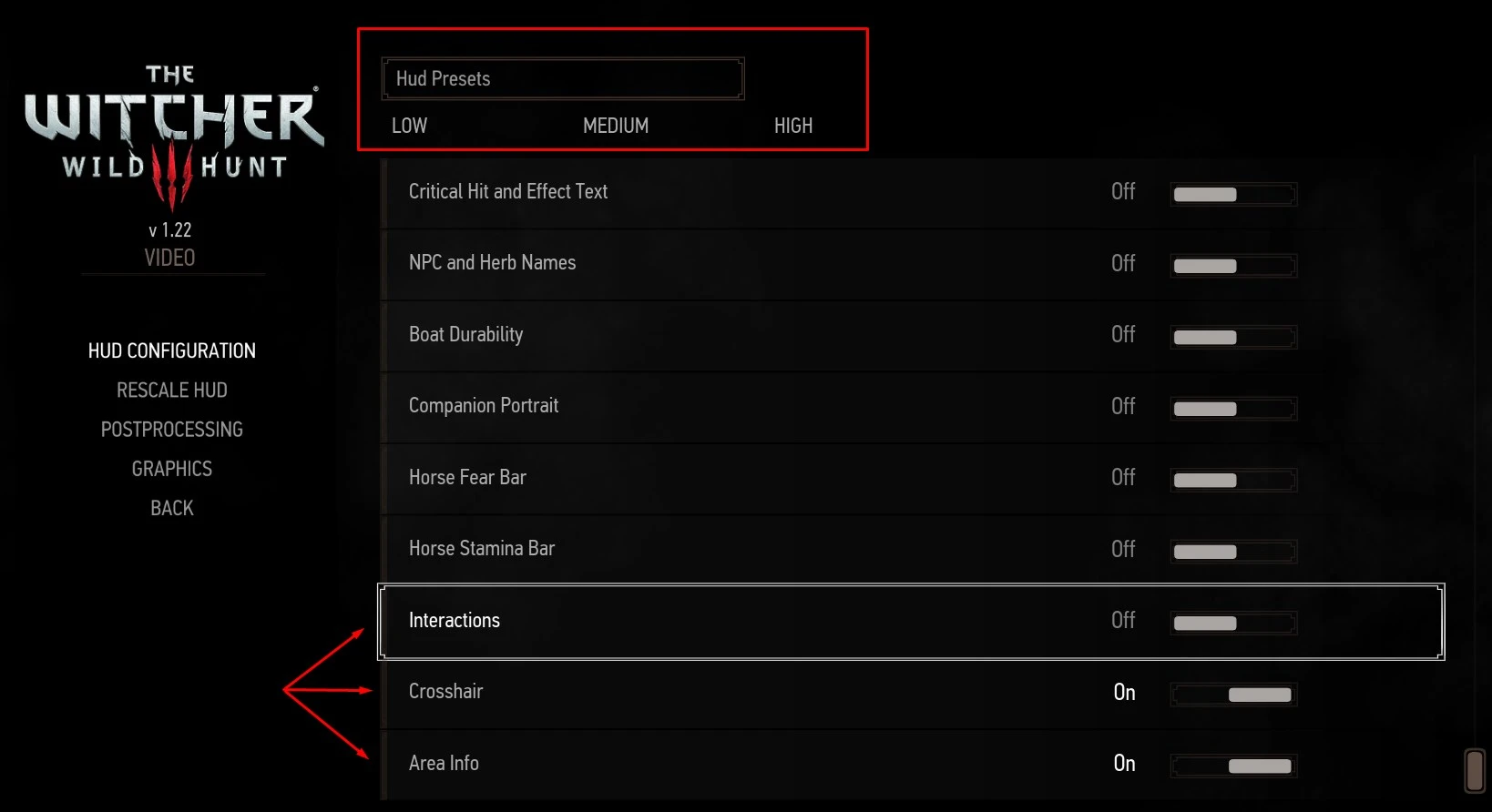
Mod to HIDE HUD, COMPLETELY(Also with Hotkey), partially(for hardcore gameplay) or don't hide anything. It creates preset buttons (Low/Medium/High) for the HUD Options from the Video menu. Also has the capability to disable Interactions and
v1. 6. 1 Just compatibility with patch 1. 3
As requested... 1. 22 compatibility! I also cleaned up how it appears to English language, it will be kinda seamless now :D
Just a compatibility version to patch 1. 21
_________________ Ok updated.
V1. 4. 1 , Patch 1. 12 compatible.
_________________________________________________________
Version 1. 4 compatible with Patch 1. 11.
Again no new functionality, just compatibility.
Read the new install instructions. ___________________________________________________________________________
Version 1. 2. 0!
As Requested. A HUD Toogle hotkey that shows back only the selected enabled modules.
- Since now we have a hotkey this mod also modifies input.xml, input.settings and playerInput.ws
- (However, Merging playerInput.ws should be simple, just 3 lines and you're done.)
- Default key to Toogle Hud is NumPeriod (as the game recognizes...) for me is the the key to right side of the NumPad0 ( , (comma) del).
- (If you don't like this key you can change ingame, in the keyboard options.. no problems)
If you want a module to not be affected by the toogle, you open the file "modHUDKiller\content\scripts\local\game\CAPAHUDKiller.ws"
And edit the SetModulesDisabled() function, commenting with "//" the "if" lines that corresponds to the module you don't want to be hidden by the toogle.
Example: You want to keep minimap true, so iHUD still works even though the toogle was pressed.
Edit the if line of the Minimap2 to be like below:
// if(Minimap2State){Minimap2. SetEnabled(false);}
This way the line will be just a comment and will not be used. Resulting in the module not being affected.
___________________________________________________________________________________
If you're searching a HUD Toogle for taking shots try my other mod:
Photomode 2inOne (almost ALLinOne lol)
It toggles Hud, Pause and Dialog/Subtitles with just one button.
You can also: Change Weather Change Screen Effects Slowdown and FastForward time. ... and more ______________________________________________________________________ What this mod does? It creates preset buttons (Low/Medium/High) for the on the top of the "HUD Settings" in the Options. Mod to Hide Hud, COMPLETELY(also with a custimizable key), partially or don't hide anything.
The Pressets:
📊 Mod Details
- Game
- Witcher3 Mods
- Author
- CAPA
- Version
- 1.6.1
- Downloads
- 3,018
- Endorsements
- 107
- Category
- User Interface
- Created
- 8/15/2015
- Updated
- 9/2/2016
🔧 How to Install The Witcher 3 Mods
Download from Nexus Mods.
📖 Full step-by-step install guide for The Witcher 3 →
Visit the official mod page for specific installation instructions for this mod.
🎮 Need cheat codes or console commands? Check ur gaming wiki for The Witcher 3 commands, item IDs, and more.
Keep browsing — more The Witcher 3 mods await