The Definitive The Witcher 2 Gamepad
🟠 Updated over a year agoPreview
🔍 Analysis
- 👍 1.6% endorsement rate — high engagement, a strong quality signal
- 🏆 #94 of 115 Gameplay mods in this game by downloads
📋 About This Mod
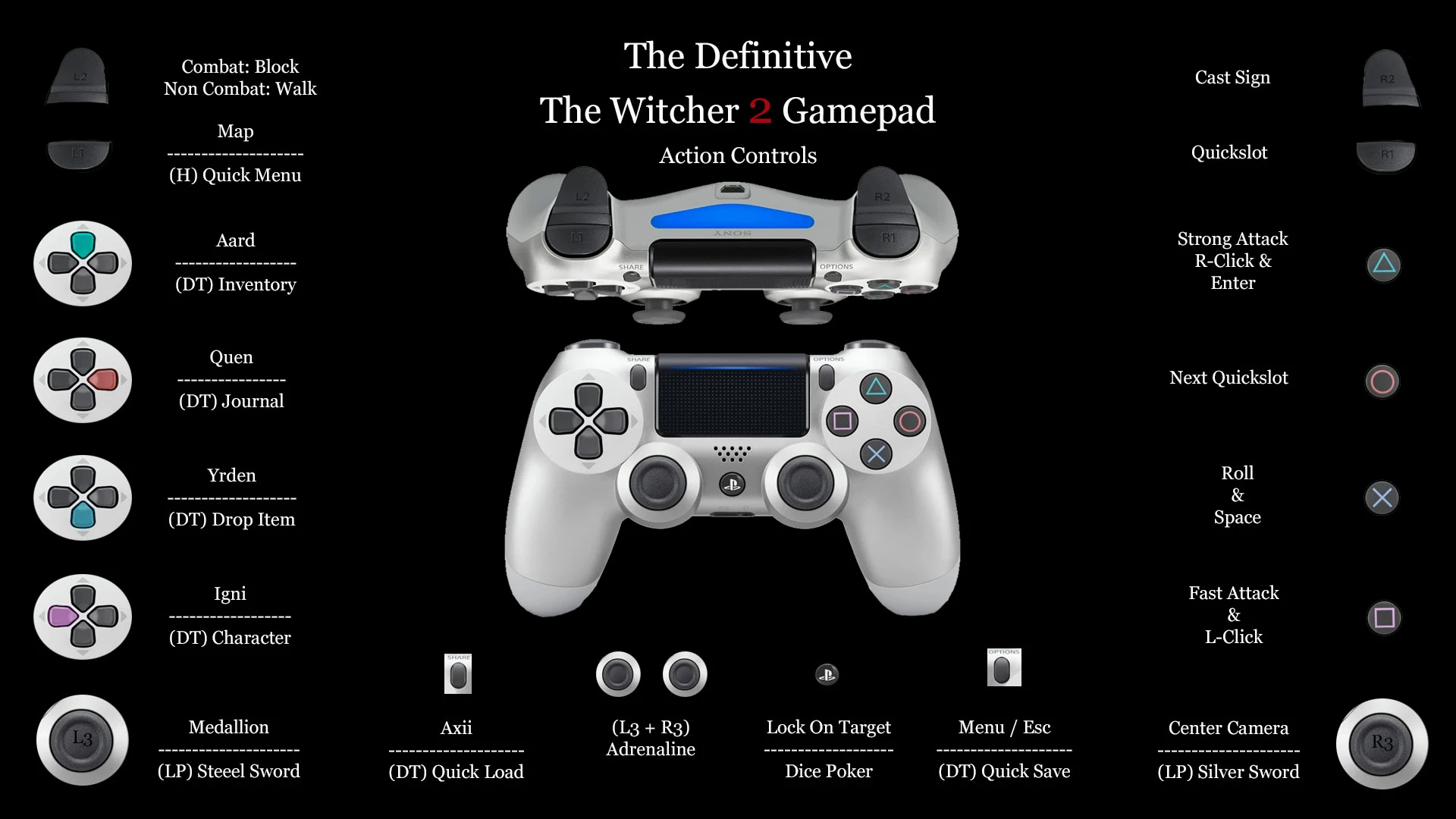
An improved gamepad that utilizes all the features of a keyboard. Simpler Dice Poker mechanics. Both Playstation and XBOX/Generic controllers.
While the game was designed with controller support it didn't support a Playstation controller and it left out some functions that could only be used with a keyboard. I have successfully mapped all the keyboard keys in a comfortable design that functions with all controllers and I included an easier Dice Poker function that points to the dice rather than dragging the mouse all over the screen.
4. 0 Update
Refined control
Eliminated the Secondary Controls
Corrected the Readme
3. 0 Update
Included Enter key
Included manual Walk
Included a Brawl and Arm Wrestling Wager key
Brawlers Edition is now standard
2. 0 Update
Corrected the missing links between Dice Poker and Action Controls
Moved Lock On Target to the PS / XBOX button
Long Press PS / XBOX button to switch to Dice Poker controls
Center Camera added to primary control's R3 button
Created an Optional Brawlers Edition
Table of Contents
00. Setup & Notes
01. Action Controls
02. Menu Windows
03. Dice Poker Controls
04. Dice Poker Explained
4a.) Modded Wagers
4b.) Unmodded Wagers
05. Brawl & Wrestling Wager
06. Keyboard & Corresponding Buttons
-----------------------------------------------------------------------------------------------------------------------------------------
Setup
Requires JoyToKey version 7. 0. 0 or higher
(You may need to set JoyToKey to Run As Administrator)
In STEAM disable controller support for The Witcher 2
Select PlayStation 4 & 5 or XBOX, PS3, and Generic Controllers from this download page
Place the two downloaded profiles in the JoToKey folder located in Documents
The JoyToKey program must remain open while playing the game
In game select Options and then Control Options
Change Controller to Keyboard
Reduce Mouse sensitivity to 1 (one notch below 2) or whatever is comfortable
Once you have control of Geralt, before moving either analog stick, Press R3 (see notes on Dice Poker below)
Enjoy the game
Mouse Sensitivity
Reducing the mouse sensitivity in JoyToKey just seemed to make it choppy while reducing the sensitivity in game made for a smoother camera.
Dice Poker was extremely difficult to program unlike the previous installment. The way the game is designed makes the location where the mouse points dependent on the location
📊 Mod Details
- Game
- Witcher2 Mods
- Author
- MageMaglor
- Version
- 4.0
- Downloads
- 890
- Endorsements
- 14
- Category
- Gameplay
- Created
- 1/8/2025
- Updated
- 1/16/2025
🔧 How to Install Witcher2 Mods
Download from Nexus Mods.
📖 Full step-by-step install guide for Witcher2 →
Visit the official mod page for specific installation instructions for this mod.
🎮 Need cheat codes or console commands? Check ur gaming wiki for Witcher2 commands, item IDs, and more.
Keep browsing — more Witcher2 mods await