Improved controls for gamepad - AntiMicro profile
⚪ Last updated 2017Preview
🔍 Analysis
- 👍 5.8% endorsement rate — high engagement, a strong quality signal
- 🏆 #93 of 115 Gameplay mods in this game by downloads
📋 About This Mod
Changes fast & strong attacks to RB & RT, allows quick use of all signs and menus
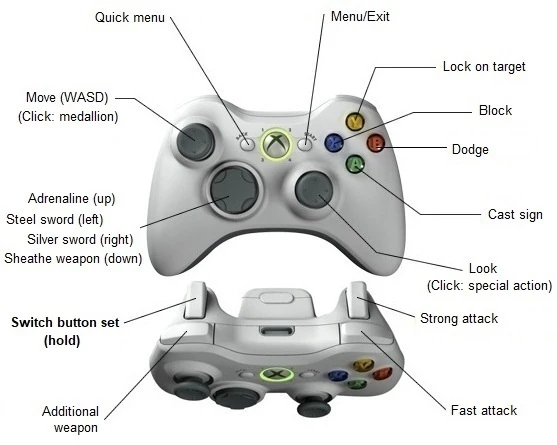
I didn't like the default gamepad layout in TW2 and the options to change the layout are limited, so I made my own AntiMicro profile (obviously requires AntiMicro to work). It makes three key changes: 1. RB and RT are now the fast and strong melee attacks respectively, which I feel makes aiming attacks easier. 2. Holding LT allows the player to use the face buttons to cast all of the signs (similar to MaxBelmont's Quick Signs profile). 3. Holding LT also allows the player to directly access the inventory, attributes, journal and map menus.
I have set the rest of the controls out in a way that worked best for me. See the images for more details on the button layout and how the profile is set up. These should give you enough info to make your own tweaks to the profile if there is anything you don't like.
AntiMicro works well for TW2 during combat and general gameplay. However, there are a few things you need to be aware of: - All on-screen prompts are for KB&M, which is what the game thinks you are using. This just takes a little bit of getting used to. - QTEs use WASD, which is mapped to the left analogue stick, making QTEs extremely difficult to execute with this profile. There are two ways you can get around this. Firstly, you can just use the keyboard for the QTEs, which is what I did. Secondly, you could add another WASD mapping to the D-pad in set 2 of the profile, which should make QTEs easier (although I haven't tested this). - The profile works for dialogue and menu navigation but it's a bit quirky and pretty clunky. I just reverted to the mouse for these aspects of the game.
This profile is designed to work with an Xbox controller but AntiMicro works well with the DS4Windows program if, like me, you prefer to use a DS4 controller. Doing so just adds another layer of complexity if you want to play around with the profile because AntiMicro will display Xbox buttons.
INSTRUCTIONS
1. Go to https://github.com/AntiMicro/antimicro/releases to download and install AntiMicro, if you haven't already done so. 2. Download and extract the profile to the AntiMicro profiles folder (mine is Documents > My Games > antimicro Profiles, yours may vary). 3. Connect your controller and run AntiMicro as an administrator (if you don't run the program as an administrator, the game won't recognise it). 4. Choose your controller from the tabs near the top of the AntiMicro window, then use the 'load' button to load the profile 'Witcher 2 ProbeAway profile' 5. Make sure TW2 is set to use KB&M and the layout is set to default. 6. Play game, have fun!
📊 Mod Details
- Game
- Witcher2 Mods
- Author
- ProbeAway
- Version
- 1.0
- Downloads
- 896
- Endorsements
- 52
- Category
- Gameplay
- Created
- 12/9/2017
- Updated
- 12/9/2017
🔧 How to Install Witcher2 Mods
Download from Nexus Mods.
📖 Full step-by-step install guide for Witcher2 →
Visit the official mod page for specific installation instructions for this mod.
🎮 Need cheat codes or console commands? Check ur gaming wiki for Witcher2 commands, item IDs, and more.
Keep browsing — more Witcher2 mods await