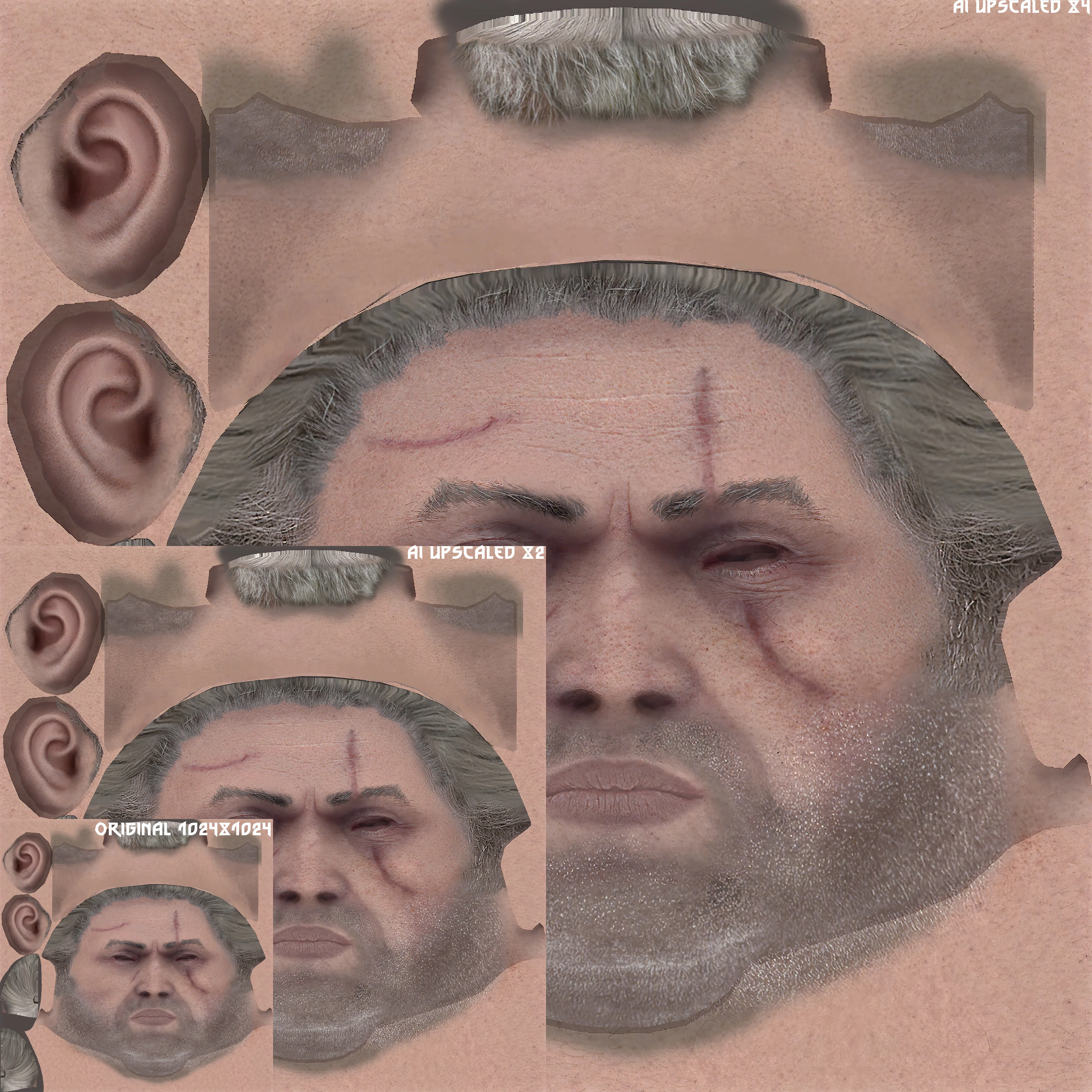
AI Upscale Textures
⚪ Last updated 2020Preview
🔍 Analysis
- 👍 1.4% endorsement rate — high engagement, a strong quality signal
- 🏆 #3 of 147 Models and Textures mods in this game by downloads
📋 About This Mod
I recommend using this mod together with Extreme Vegetation Rendering Distance
Mod can work differently, depending on the hardware, so it is recommended only for high-end PC configurations.
Soon, the version with the substituted textures from The Witcher 3.
Instruction:
Extract folder from zipped file in \The Witcher 2 Enhanced Edition\
CookedPCIf someone has corrupted the user.ini or rendering.ini settings, simply delete the file from the documents and enable the game, the game will then create default settings files and you do not need to reinstall the game.
Recommended settings in ... Documents/The Witcher 2:
If you are editing User.ini and Rendering.ini files, do not use the settings from the game launcher, because values that have changed may return to the default settings.
User.iniAllowSharpen=0 (when it is on textures and shadows look like they have anisotropic filtering turned off)
AtlasTextureDownscale=0
DetailTextureDownscale=0
MaxAtlasTextureSize=4096
MaxTextureSize=4096
TextureMemoryBudget=VRAM size of the graphics card in MB-1024
(The maximum value for card holders over 5 GB VRAM is 4084,
when this value is exceeded, textures have problems with loading)
For RTX and AMD cards, it is recommended to change TextureMemoryBudget value to 1024 (tested on RTX 2080).
TextureDownscale=0
UberSampling=0
and optional settings for high quality shadows:
MaxCubeShadowCount=4
MaxCubeShadowSize=2048
MaxSpotShadowCount=4
MaxSpotShadowSize=2048
MaxTextureSize=4096
ShadowQuality=3
ShadowedLights=4 Rendering.ini
MaxResidentMipMap=11
WorldDiffuse=(Compression=TCM_DXTNoAlpha,MaxSize=4096)
WorldDiffuseWithAlpha=(Compression=TCM_DXTAlpha,MaxSize=4096)
CharacterDiffuse=(Compression=TCM_DXTNoAlpha,MaxSize=4096)
CharacterDiffuseWithAlpha=(Compression=TCM_DXTAlpha,MaxSize=4096)
SpeedTreeDiffuse=(Compression=TCM_DXTNoAlpha,MaxSize=4096)
SpeedTreeDiffuseDetail=(Compression=TCM_DXTAlpha,MaxSize=4096)
SpeedTreeDiffuseWithAlpha=(Compression=TCM_DXTAlpha,MaxSize=4096)
Performance
Test Platform:
Ryzen 5 3600 @4. 2GHz
AI Upscale Textures enhances texture detail using artificial intelligence. With 2,211 endorsements and 161,133 downloads, it's a community-approved visual upgrade for players seeking sharper, more detailed game textures. Last updated June 2020.
✨ Key Features
📊 Pros & Cons
✅ Pros
- Community-approved with 2,211 endorsements.
- Massive download count (161,133) shows widespread use.
- AI upscaling adds more detail without manual retexturing.
⚠️ Cons
- Last updated June 2020 — may be incompatible with current game version.
- AI upscaled textures may increase VRAM usage and cause performance drops on lower-end systems.
For players who want sharper textures without manually editing files. For those with high-end GPUs who can handle increased texture resolution. Skip if you prefer original art style or have limited VRAM.
💡 Beginner Tips
- Use a mod manager to install and easily preview before/after changes.
- If you experience performance issues, try lower texture quality settings in-game or remove some high-res textures.
- Take screenshots before installing so you can compare the visual improvement.
📊 Mod Details
- Game
- Witcher2 Mods
- Author
- hub997 hiuuz Wednesday17 BrutalationX
- Version
- 1.73OPT
- Downloads
- 161,133
- Endorsements
- 2,211
- Category
- Models and Textures
- Created
- 7/14/2019
- Updated
- 6/28/2020
🧩 Commonly Used Together
Users add these mods to the same collections — a real compatibility signal, not an AI guess.
🔧 How to Install Witcher2 Mods
Download from Nexus Mods.
📖 Full step-by-step install guide for Witcher2 →
Visit the official mod page for specific installation instructions for this mod.
🎮 Need cheat codes or console commands? Check ur gaming wiki for Witcher2 commands, item IDs, and more.
Keep browsing — more Witcher2 mods await