Ultimate Spellsword Signcasting - Logitech Gaming Software Profile for G502 Proteus Core
⚪ Last updated 2015⚠️ Install Order · 2 steps
Install in this order, then this mod last — most mods fail to load without their framework and dependencies in place.
Preview
🔍 Analysis
- 👍 4.2% endorsement rate — high engagement, a strong quality signal
- 🏆 #31 of 34 Controller Button Layout mods in this game by downloads
📋 About This Mod
Designed especially for you G502 owners, this profile will make you cast signs like a genuine spellsword!
===== Basic Information =====
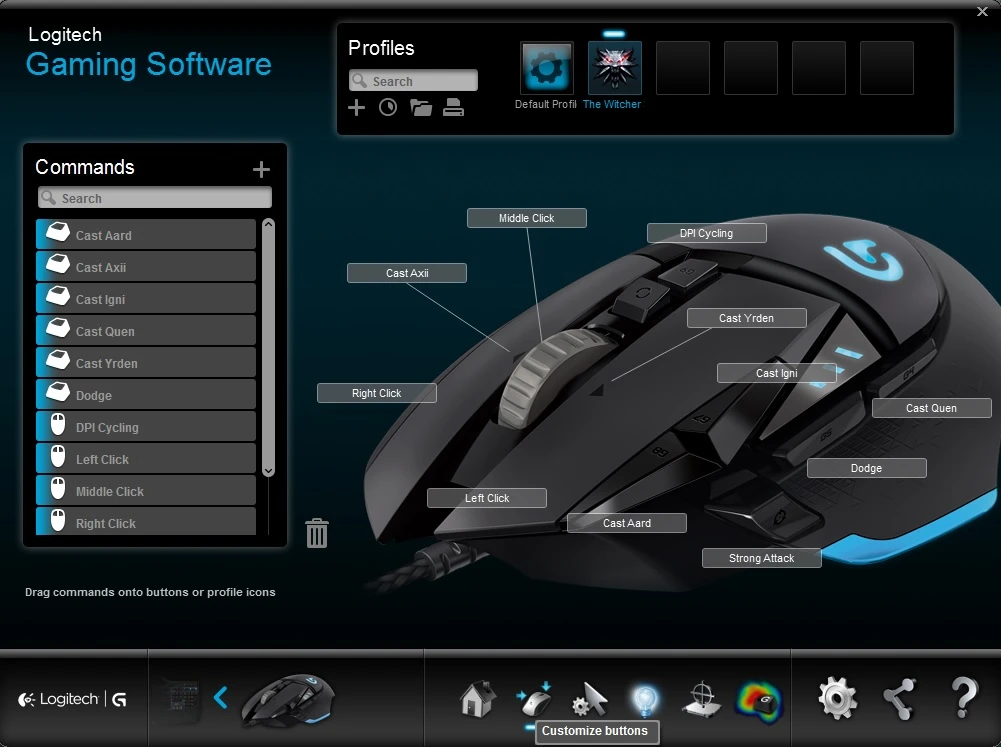
Not really a mod, this is a Logitech Gaming Software profile customised for the G502 Proteus Core Gaming Mouse. This profile is designed for instantaneous casting of all 5 Signs in The Witcher 3 along with their alternate modes.
With this, all control of Signs is in your right hand and in your right hand only. No longer do you need to cast Signs in combat by pressing 2 keyboard buttons! No more stretching your hand around the keyboard! No more inconvenient keymapping! Enjoy the new days of fighting like a genuine spellsword!
The files are as simple as a place-and-play goodness! No customisation needed unless you want it!
NOTE(S): 1. The keybindings included in this file are default except for Direct Strong Attack and Dodge. 2. Direct Strong Attack has been remapped to "P" on the keyboard and assigned to the G-Shift key on the G502. 3. Dodge has been remapped to MB5 on the G502. 4. Look at the image for a more detailed view.
===== Installation =====
Backup your input.settings before proceeding! 1. Extract the archive and copy input.settings into your Documents\The Witcher 3. Overwrite when prompted. 2. Open Logitech Gaming Software, select your G502, and click on Customize Buttons tab. 3. Under the Profiles search bar, click on the Export/Import (folder) icon, choose Import, and select The Witcher 3.xml from the mod. 4. If you need to customise your keybindings, untick the Read Only box from the input.settings properties first. DO NOT customise from the in-game menu. Set the file back to Read Only when done. 5. Enjoy!
===== Uninstallation =====
1. Copy your backup of input.settings to Documents\The Witcher 3. Overwrite when prompted. 2. Delete the mod's profile from your Logitech Gaming Software.
===== Credits =====
xpizdax for creating Instant Sign Casting
📊 Mod Details
- Game
- Witcher 3 Mods
- Author
- thin_o_vintage
- Version
- 1.0
- Downloads
- 809
- Endorsements
- 34
- Category
- Controller Button Layout
- Created
- 8/5/2015
- Updated
- 8/5/2015
🔧 How to Install Witcher 3 Mods
Download from Nexus.
📖 Full step-by-step install guide for Witcher 3 →
Visit the official mod page for specific installation instructions for this mod.
🎮 Need cheat codes or console commands? Check ur gaming wiki for Witcher 3 commands, item IDs, and more.
Keep browsing — more Witcher 3 mods await