TheWhiteOne Atmospheric Reshade
⚪ Last updated 2024⚠️ Install Order · 2 steps
Install in this order, then this mod last — most mods fail to load without their framework and dependencies in place.
Preview
🔍 Analysis
- 👍 2.4% endorsement rate — high engagement, a strong quality signal
- 🏆 #42 of 185 ReShade Preset mods in this game by downloads
📋 About This Mod
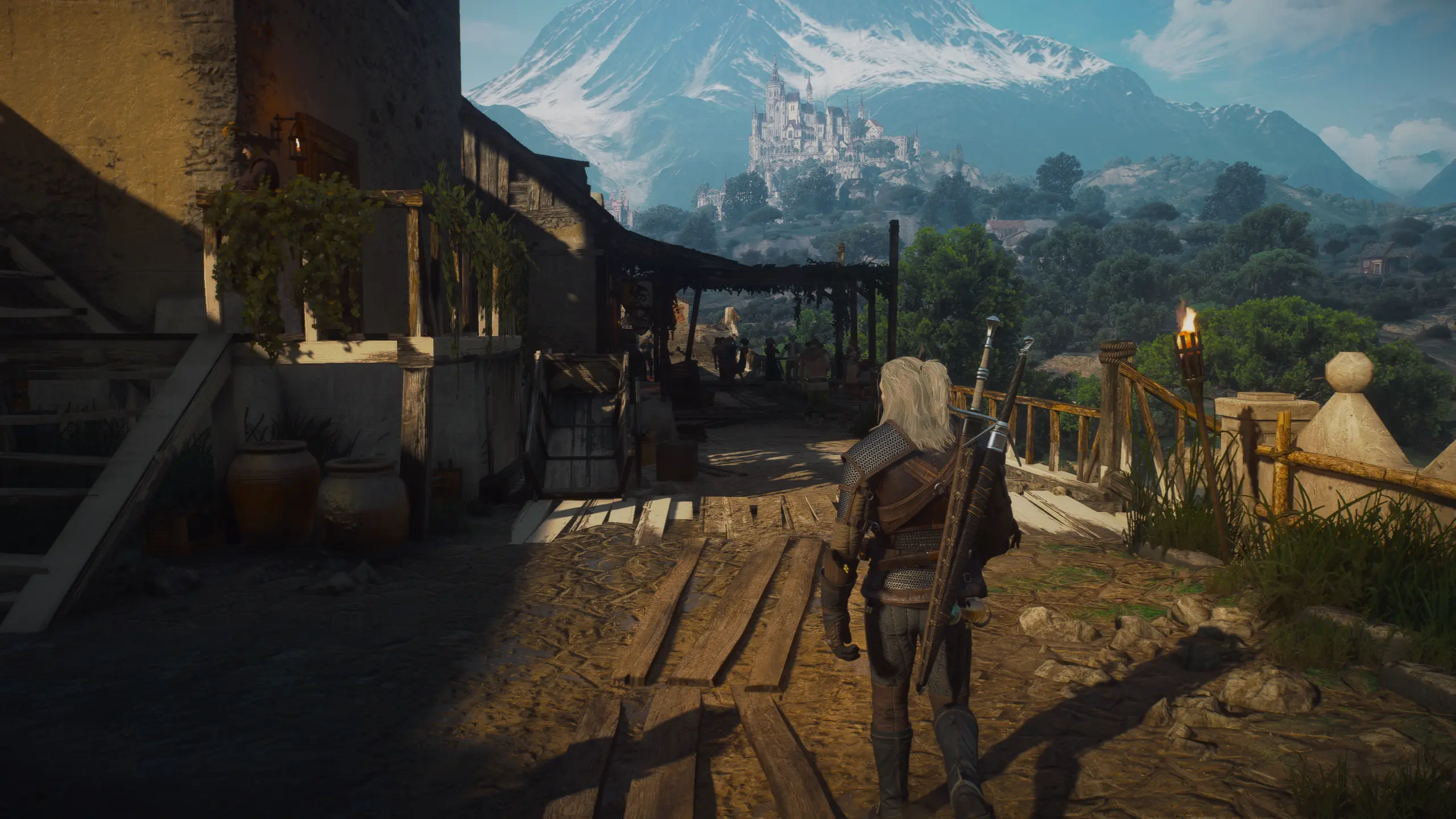
TheWhiteOne Atmospheric Reshade for The Witcher 3 aims to give a mix of realism and fantasy tone.Works on 1.32 Classic Version and Next Gen.
Requeriments For 1. 32 Classic Version Only.
Its required to have ALM 2. 0 version, you can find the link to ALM - Here.
Recommend Mods For 1. 32 Classic Version.
No Artificial Player Light and Disable Fake Lights in All Quest mods.
Filterless Toussaint mod.
Recommend Mods For Next Gen Version.
ALM is only for 1. 32 but you can use Immersive Lighting for Next Gen.
- Installation:
(Very important do not skip this setp)
- Download the the reshade from here - Reshade
- Install the reshade on bin\x64_dx12 or dx11 dependig in what dx you play but mark the "check all effects" box on the reshade program installation, when the reshade is installed drag any of my INIs to the same folder you install the reshade, then on the files that i provide you also will find 2 files named (GSFX_Shaders_Tonemapping) drag both of them to reshade-shaders\Shaders folder.
- Important Step on the reshade make sure that on (Edit global definitions) the third option is 0 instead of 1.
- Included my BlitzFx effects settings in the folder.- This Reshade also works well on Next Gen Version with Immersive Lighting and RT ON, thanks to Stara123 to test out.
- This reshade can be heavy on performace expected to get a few fps lost, Performance will vary depending on mods and hardware you have.
- If your a new to modding the witcher use Script Merger program to resolve conflicts on the mods, the mods No Artificial Player Light and Disable Fake Lights in All Quest need to have higher priority, you can set them to 1 priority.
- Any problems with the reshade can be report it here or on My Discord Server.
Credits to GrooteS for creating the amazing shaders effects.
Check out my Youtube Channel and My Discord Server.Requeriments For 1. 32 Classic Version Only.
Its required to have ALM 2. 0 version, you can find the link to ALM - Here.
Recommend Mods For 1. 32 Classic Version.
No Artificial Player Light and Disable Fake Lights in All Quest mods.
Filterless Toussaint mod.
Recommend Mods For Next Gen Version.
ALM is only for 1. 32 but you can use Immersive Lighting for Next Gen.
- Installation:
(Very important do not skip this setp)
- Download the the reshade from here - Reshade
- Install the reshade on bin\x64_dx12 or dx11 dependig in what dx you play but mark the "check all effects" box on the reshade program instal
📊 Mod Details
- Game
- Witcher 3 Mods
- Author
- The White Wolf
- Version
- 1.0
- Downloads
- 2,315
- Endorsements
- 55
- Category
- ReShade Preset
- Created
- 5/20/2024
- Updated
- 7/30/2024
🔧 How to Install Witcher 3 Mods
Download from Nexus.
📖 Full step-by-step install guide for Witcher 3 →
Visit the official mod page for specific installation instructions for this mod.
🎮 Need cheat codes or console commands? Check ur gaming wiki for Witcher 3 commands, item IDs, and more.
Keep browsing — more Witcher 3 mods await