Potions Please
⚪ Last updated 2016⚠️ Install Order · 2 steps
Install in this order, then this mod last — most mods fail to load without their framework and dependencies in place.
Preview
🔍 Analysis
- 👍 4.1% endorsement rate — high engagement, a strong quality signal
- 🏆 #97 of 223 Gameplay Changes mods in this game by downloads
📋 About This Mod
Potions Please
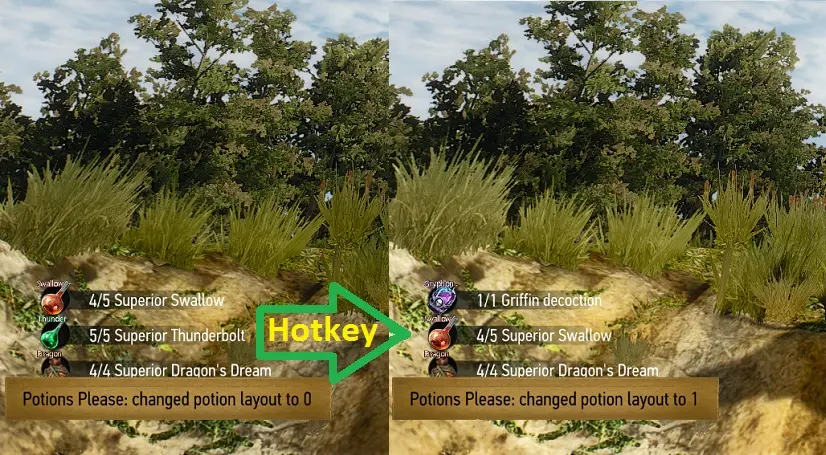
Adds several layouts for consumables slots (equipped Potions). Allows you to toggle consumables slots layouts (items equipped in consumables slots) using a hotkey.
Updated to work with v1. 30 and 1. 31
1. Installation
Make a backup copy of your save game folder before using any mods!
Unpack archive to the <game_installation_dir>\mods folder (steam path example: D:\Steam\SteamApps\common\The Witcher 3\mods). If mods folder doesn't exist, create it.
Check that you don't create second <modXXX> folder when unpacked the file, you should have this folder structure: <game_installation_dir>\mods\modPotionsPlease\content.
This mod needs 2 game configuration files to be modified to allow usage of mod hotkey. You have 3 options to do this (items 1. 1, 1. 2 or 1. 3 in this document, use only one of them):
1. 1. For this purpose you may want to use optional configuration files from Files section of this mod (they are absent in this mod archive).
Make a copy of your original files before replacing them with provided files.
The first file named input_qwerty.ini is located in <game_installation_dir>\bin\config\r4game\legacy\base\input_qwerty.ini
The second file named input.xml is located in <game_installation_dir>\bin\config\r4game\user_config_matrix\pc\input.xml
After replacing both files go to item "1. 4 Setting the hotkey" to finish installation.
1. 2. Or you may change the required files by yourself using notepad as described bellow:
Make a copy of your original files before making any changes.
- The first file named input_qwerty.ini is located in <game_installation_dir>\bin\config\r4game\legacy\base\input_qwerty.ini
IK_T=(Action=TogglePotionSlots)
so you will have (ignore the "QUOTE" word, it is not part of files it's site engine): IK_T=(Action=TogglePotionSlots) IK_K=(Action=PanelChar) IK_I=(Action=PanelInv) IK_M=(A
📊 Mod Details
- Game
- Witcher 3 Mods
- Author
- Zur13
- Version
- 1.6
- Downloads
- 1,933
- Endorsements
- 79
- Category
- Gameplay Changes
- Created
- 9/12/2015
- Updated
- 8/31/2016
🔧 How to Install Witcher 3 Mods
Download from Nexus.
📖 Full step-by-step install guide for Witcher 3 →
Visit the official mod page for specific installation instructions for this mod.
🎮 Need cheat codes or console commands? Check ur gaming wiki for Witcher 3 commands, item IDs, and more.
Keep browsing — more Witcher 3 mods await