Gamepad Controller Preset for 1.31
⚪ Last updated 2016⚠️ Install Order · 2 steps
Install in this order, then this mod last — most mods fail to load without their framework and dependencies in place.
Preview
🔍 Analysis
- 👍 4.7% endorsement rate — high engagement, a strong quality signal
- 🏆 #8 of 34 Controller Button Layout mods in this game by downloads
📋 About This Mod
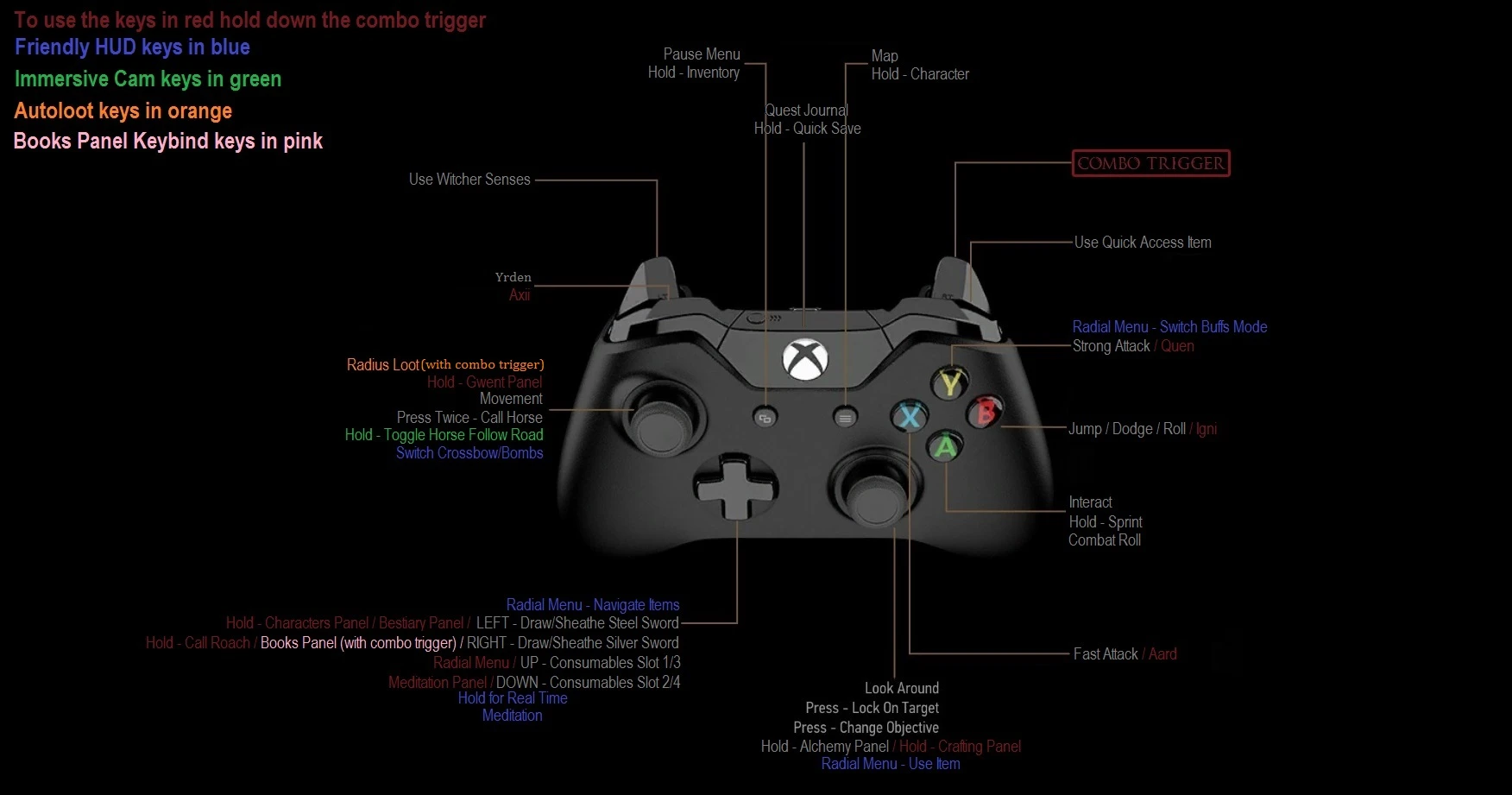
Controller preset inspired by GAMEPAD PLUS update for latest W3 version.
THIS MOD CANNOT BE INSTALLED WITH NMM SO READ THE INSTALLATION INSTRUCTIONS CAREFULLY! Description An Antimicro profile and input.settings file that (IMO) greatly improves the game. I made this from scratch taking inspiration (and most of the layout) from Gamepad Plus by Bandu since his was outdated and had a couple of bugs. This is compatible with the latest version of TW3 (1. 31/1. 30, GOTY or otherwise) and the latest version of Antimicro (2. 22).
This mod is compatible with Friendly HUD, Autoloot, Books Panel Keybind and Immersive Cam (including the Alternate Horse Controls optional file, they can be installed independently from each other BTW). None of those mods are required (at least in theory since I haven't tested it) but I strongly recommend them, at the very least, just FHUD.
Installation 1. Install Antimicro 2. 22. 2. 22 is the latest version as of writing this but I don't know if future versions will work as intended. It shouldn't matter if you get the installation package or the portable version but the installer is more convenient for most. 2. Navigate to 'Documents\The Witcher 3' and replace the 'input.settings' with the one from my mod. I recommend you backup the original file if you have made changes to it. I also recommend you keep 'input.settings as 'read only' to avoid the game making unwanted changes to it. 3. Disable 'Key Repeat' from the General section of Antimicro's settings. 4. Run Antimicro in administrator mode and load 'W3 Zhior Preset.gamecontroller.amgp' 5. Navigate to \bin\config\base, open Hidden.ini and change 'LockControlScheme=0' to LockControlScheme=2.
Keyboard Keys Sincethat gamepads have access to a small number of buttons as compared to KB+M, I had to make some hotkeys only available via the keyboard. All of these are non-essential but are there for you to use if you want.
[]Toggle HUD key (Home) []All of the keys for manipulating the camera from Immersive cam (PageDown, PageUp, Up, Left, Down, Right, End). []Quest Markers toggle (F2), User Markers toggle (F3) and Refill Potions toggle (F4) from Friendly HUD. []Pin Modules key from FHUD (Right Shift). []The Use Items keys (1-0, -, =) from FHUD. Same thing as using the DPad and clicking the right stick from the controller. []The radial menu buff display from FHUD (F1, F2, F3, F4). Use the left trigger or the Y/Triangle button to cycle through them on the gamepad. [/list
📊 Mod Details
- Game
- Witcher 3 Mods
- Author
- Zhior
- Version
- 1.2
- Downloads
- 2,072
- Endorsements
- 98
- Category
- Controller Button Layout
- Created
- 9/25/2016
- Updated
- 11/1/2016
🔧 How to Install Witcher 3 Mods
Download from Nexus.
📖 Full step-by-step install guide for Witcher 3 →
Visit the official mod page for specific installation instructions for this mod.
🎮 Need cheat codes or console commands? Check ur gaming wiki for Witcher 3 commands, item IDs, and more.
Keep browsing — more Witcher 3 mods await