Plant Easily
🟢 Updated this month⚠️ Install Order · 1 step
Install in this order, then this mod last — most mods fail to load without their framework and dependencies in place.
Preview
🔍 Analysis
- 👍 1.8% endorsement rate — high engagement, a strong quality signal
- ✅ Updated 0 day after the latest game patch — actively maintained
- 🏆 #25 of 836 Gameplay mods in this game by downloads
📋 About This Mod
Description:
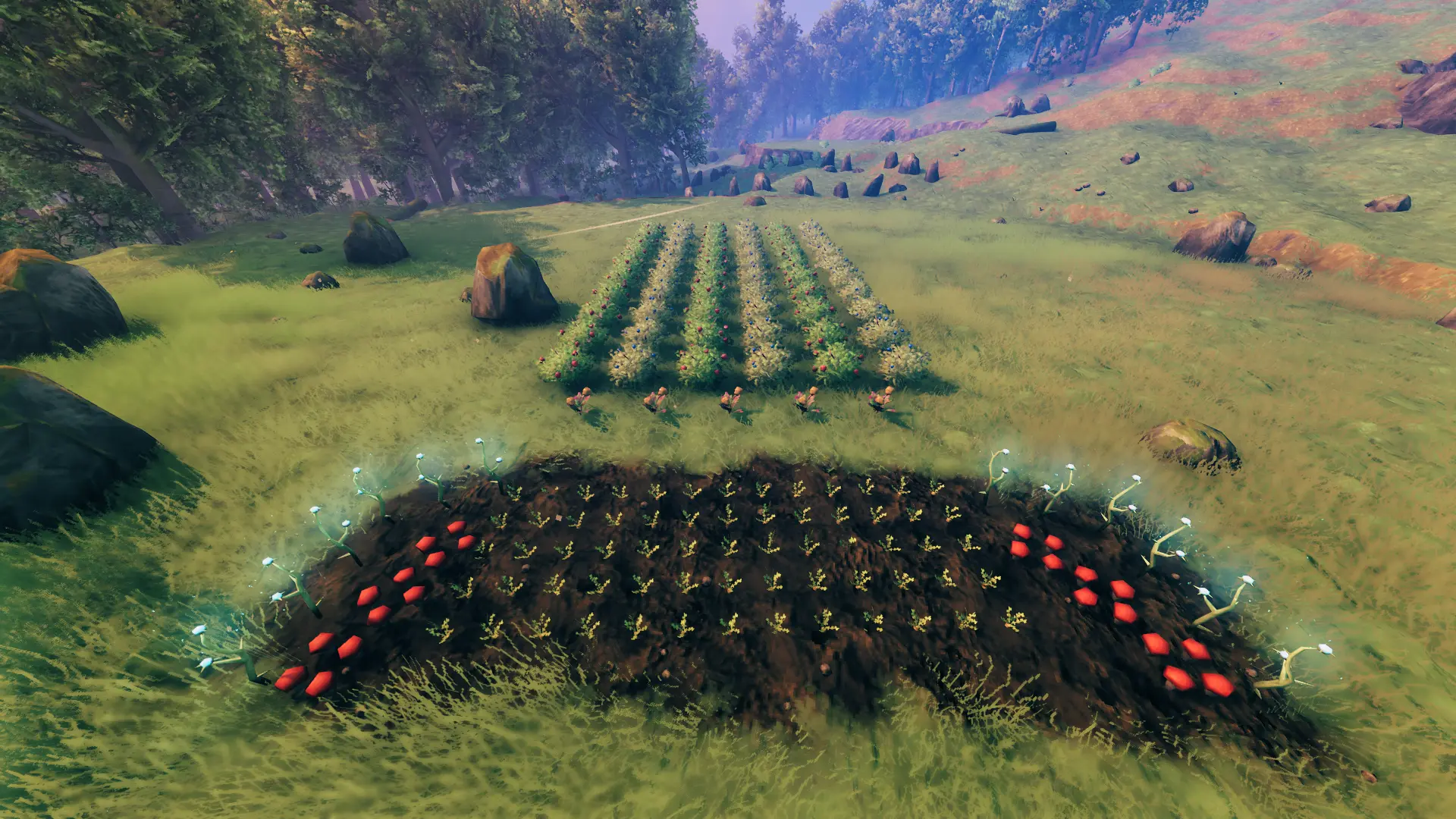
This is a QoL mod that simplifies the planting aspect of farming, and fixes a lot of common frustrations with it. It allows you to quickly and easily plant beautiful and evenly spaced fields of crops without ever worrying about wasting a precious seed. Once those crops mature, you can optionally harvest them in bulk, and/or replant automatically. Its feature-set also supports berry bushes, flowers, and mushrooms from Plant Everything.
Whether you want to plant one crop at a time, or several at once to save time, this mod can do that. You can plant a single crop, a single row, a single column, or any number of rows and columns at once; the size of which can be changed easily in real-time using keybinds (configurable).
In addition to planting in bulk, this mod will optionally allow you to harvest in bulk (configurable). Works for all pickables as well as beehives.
If you don't want your fields to look too uniform, this mod will by default put a random rotation on your crops once placed (configurable). It also supports random positional and rotational scatter.
If you don't want to plant a crop too close to another, worry not. This mod by default will highlight your invalid crops in red before they are placed, and also by default will prevent you from planting anywhere a crop cannot grow (configurable). Causes include wrong biome, uncultivated ground, no space, no sunlight, lack of resources, too hot, too cold, and no attach piece (Ashvines).
Tired of replanting the same fields over and over again? Enable ReplantOnHarvest in the mod's configuration file or via configurable keybind. When enabled, crops will automatically replant themselves upon being picked, provided the player has enough seeds. You can change what is planted in a crop's place by selecting your desired crop in the cultivator build tab before putting your cultivator away and harvesting a plant.
And last but definitely not least, this mod provides grid snapping (configurable). Snap individual crops to a single crop, to an existing grid of crops, or snap a new grid of crops onto either a single crop or an existing grid of crops. Alternative placement options have been added to the cultivator to support free 360 degree rotation when snapping to a single piece (see Default Keybinds).
Note If a piece is not snapping where you'd expect, try rotating the piece.
Support Me!
Thank you to everyone who has used my mods at any time during early access. It was your collective passion, not mine alone, that fueled me these 5 long years.
If you would like to keep supporting the development and maintenance of my mods you can do this through the paypal image link below.
Looking for a Valheim server? I have partnered with SurvivalServers.com. For a limited time you can get 25% off with the code VALHEIM25 ! Order through my affiliate link by clicking on the image below and I will receive a portion of the proceeds.
Default Keybinds:
These keybinds are not checked in a standard update tick, they will only work while the cultivator is equipped and an applicable piece is selected. All keybinds are configurable.
Right CTRL + Arrow Keys increases/decreases rows and columns.
Left Bumper + D-Pad increases/decreases rows and columns.
Left Shift + Use Key to bulk harvest (when enabled).
Left Bumper + Use Key to bulk harvest (when enabled).
Pressing your vanilla alternative placement key allows free 360 rotation when snapping to a single piece:
Hold Left Shift while planting and snapping.
Hold Left Bumper and press Right Stick to toggle.
F6 toggles crop replant on harvest, F8 toggles all mod features, F10 toggles grid snapping features.
The three available toggle keys support keyboard combinations (e.g. Left Ctrl + F8).
Requirements:
Requires BepInEx - Valheim 5. 4. 2202
Installation:
This is a client-side only mod. Do not install it on a dedicated server.
Extract the Advize_PlantEasily.dll file into the BepInEx/plugins folde
Plant Easily is a gameplay mod for Stardew Valley that enables planting crops in evenly spaced grids, with options for single or bulk planting, grid snapping, and invalid placement prevention. It also adds bulk harvesting and auto-replanting. With 1,591 endorsements and 87,165 downloads, it's a popular quality-of-life tool for farmers.
✨ Key Features
📊 Pros & Cons
✅ Pros
- Huge community trust (1,591 endorsements) and 87k downloads — this is a staple for many farmers.
- Saves serious time with bulk planting and harvesting, especially for large farms.
- Auto-replanting keeps your fields productive without constant manual work.
⚠️ Cons
- Last updated April 2026 — if the game patches after that, it might break until the author updates.
- Grid snapping might feel restrictive if you prefer organic, scattered crop layouts.
For Stardew Valley players who min-max their farm layout and want to cut down on repetitive planting and harvesting. Also great for those with massive fields who dread the daily grind. Skip if you enjoy the manual, hands-on farming experience or prefer a more natural look.
💡 Beginner Tips
- Use the grid snapping to align crops perfectly with your sprinkler layout — it'll save you headaches later.
- Test the bulk planting on a small patch first to get a feel for the row/column settings before going big.
- If you use other farm mods, check that they don't conflict with Plant Easily's placement logic.
📊 Mod Details
- Game
- Valheim Mods
- Author
- Advize
- Version
- 2.2.0
- Downloads
- 90,081
- Endorsements
- 1,615
- Category
- Gameplay
- Created
- 4/2/2023
- Updated
- 9/11/2026
🧩 Commonly Used Together
Users add these mods to the same collections — a real compatibility signal, not an AI guess.
🔧 How to Install Valheim Mods
Download from Nexus.
📖 Full step-by-step install guide for Valheim →
Visit the official mod page for specific installation instructions for this mod.
🎮 Need cheat codes or console commands? Check ur gaming wiki for Valheim commands, item IDs, and more.
Keep browsing — more Valheim mods await