Mofo's Player Stats In Range
⚪ Last updated 2021⚠️ Install Order · 1 step
Install in this order, then this mod last — most mods fail to load without their framework and dependencies in place.
Preview
🔍 Analysis
- 🏆 #139 of 177 User Interface mods in this game by downloads
📋 About This Mod
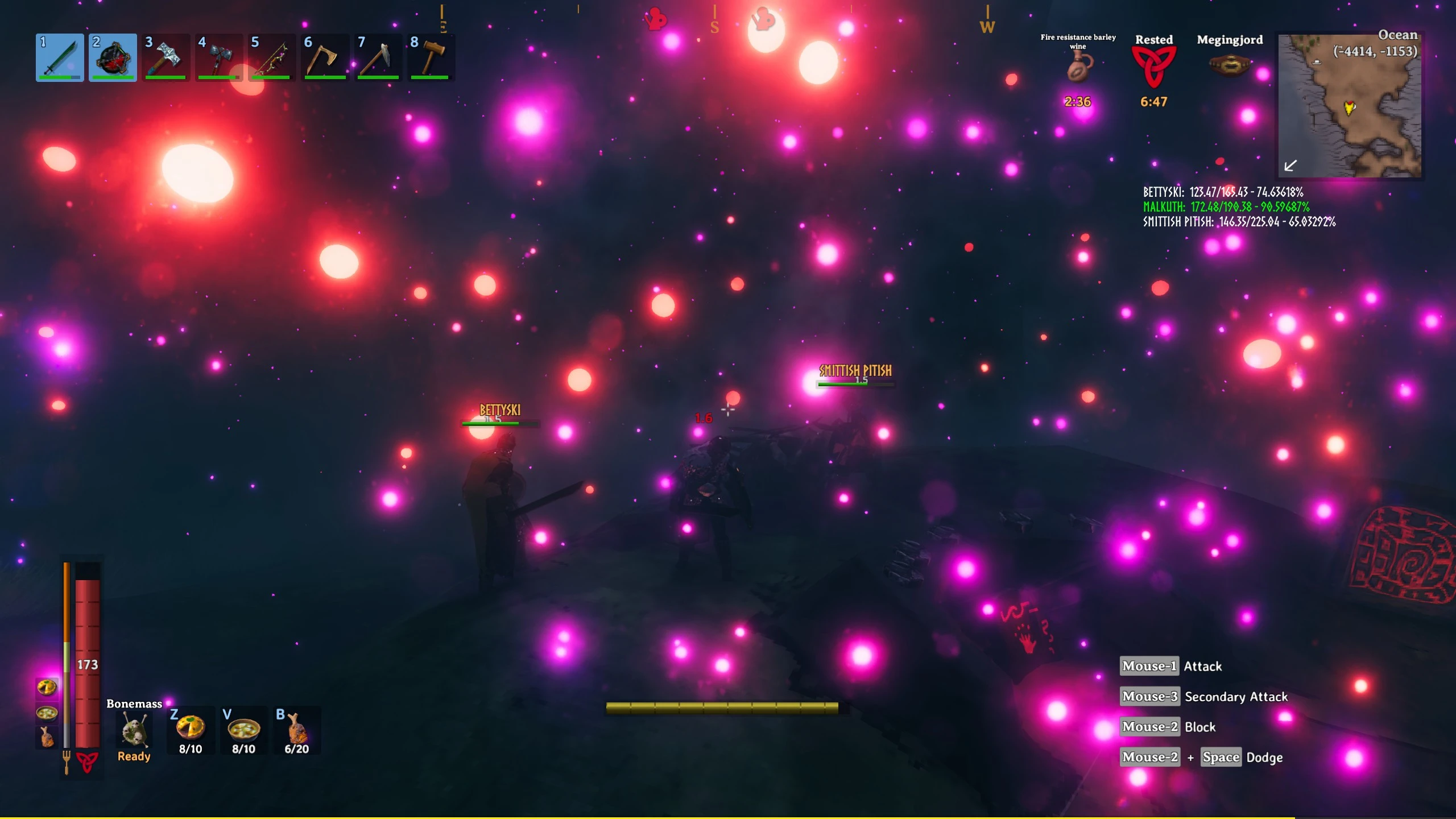
PlayerStats will show health data for all nearby players within a given range of you. It allows you to configure various health and healthpercentage levels with customizable levels of criticality.
As for coloring, the most critical level wins. In other words, if your health is considered critical, but your health percentage is Medium, then stats are colored with critical coloring.
if your health percentage is critical, but your health level indicates it should be normal then the coloring will be critical.
Default color levels are from Normal to Critical:
White
Yellow
Various settings available
ShowPlayerStatsInRange
Disables/Enables the mod
ShowPlayerStatsRadius
Sets the radius for showing players
PlayerStatLocation
Location on the screen to show the player stats (x,y) or (x%,y%).
Once in active session, you can also use the mouse cursor to drag and drop the stats wherever you want.
PlayerStatToggleKey
Define a toggle key to show/hide the stats
PlayerStatHealthPercentageMediumValue
HealthPercentage to be considered medium. Anything higher is normal
PlayerStatHealthPercentageWarningValue
HealthPercentage to be considered warning. Anything higher is medium
PlayerStatHealthPercentageCriticalValue
HealthPercentage to be considered critical. Anything higher is warning
PlayerStatHealthMediumValue
Health value to be considered medium. Anything higher is normal
PlayerStatHealthWarningValue
Health value to be considered warning . Anything higher is medium
PlayerStatHealthCriticalValue
Health value to be considered critical . Anything higher is warning
PlayerStatHealthNormalColor
Sets the color for playerstatus at Normal Level, https://docs.unity3d.com/Packages/com.unity.ugui@1. 0/manual/StyledText.html. Supported color names: aqua,black,blue,brown,cyan,darkblue,fuchsia,green,grey,lightblu,lime,magenta,maroon,navy,olive,orange,purple,red,silver,teal,white,yellow
PlayerStatHealthMediumColor
Sets the color for playerstatus at medium Level, can also use color hex tags, like FFFFFF, FF0000, etc,.
PlayerStatHealthWarningColor
Sets the color for playerstatus at warning Level
PlayerStatHealthCriticalColor
Sets the color for playerstatus at critical Level
PlayerStatUpdateInterval
How often to update. This value represents frames, so if you're getting 30 FPS and the value is 30, you'll update every second. The higher your FPS, the more often this will update. I. E. 90 FPS = 3 updates by default (90/30 = 3). You can reduce overhead by increasing the value, but if your value is 90 an
Mofo's Player Stats In Range is a lightweight UI mod that displays health data for all nearby players within a configurable range. With 13 endorsements and last updated in April 2021, it's a niche tool for players who want quick awareness of teammate or enemy health at a glance.
✨ Key Features
📊 Pros & Cons
✅ Pros
- Simple and focused: does exactly what it says, showing health for nearby players.
- Configurable range lets you tailor the display to your playstyle.
- Lightweight UI mod that won't bog down your game.
⚠️ Cons
- Low adoption (13 endorsements) suggests it's not widely tested or polished.
- Last updated in 2021 — may be outdated or incompatible with current game versions.
- No documentation or screenshots provided, so setup might be trial-and-error.
For players who want a quick glance at nearby player health without cluttering the screen. If you're in a group or PvP and need to track teammates or enemies, this could be handy. Skip if you prefer minimal UI or want more detailed stats.
💡 Beginner Tips
- Check if the mod requires a mod manager or manual placement; if manual, drop files into the correct folder.
- Test the range setting in a safe area to see how it affects your UI.
- Since it's from 2021, verify compatibility with your current game version before relying on it.
📊 Mod Details
- Game
- Valheim Mods
- Author
- MofoMojo
- Version
- 1.0
- Downloads
- 179
- Endorsements
- 13
- Category
- User Interface
- Created
- 4/7/2021
- Updated
- 4/7/2021
🔧 How to Install Valheim Mods
Download from Nexus.
📖 Full step-by-step install guide for Valheim →
Visit the official mod page for specific installation instructions for this mod.
🎮 Need cheat codes or console commands? Check ur gaming wiki for Valheim commands, item IDs, and more.
Keep browsing — more Valheim mods await