Item Stacks - Valheim BepInEx Plugin
⚪ Last updated 2021This mod may not work until the author updates it. Check for an update, or see the rollback guide.
⚠️ Install Order · 2 steps
Install in this order, then this mod last — most mods fail to load without their framework and dependencies in place.
Preview
🔍 Analysis
- 👍 3.1% endorsement rate — high engagement, a strong quality signal
- 🏆 #35 of 836 Gameplay mods in this game by downloads
📋 About This Mod
ItemStacks Plugin for Valheim
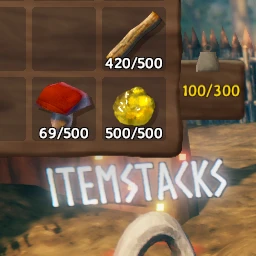
Increases item stack size (10x by default) and item weight (x0. 1 by default).
Loading up a world without the mod installed or reducing item stack size will cause any items in a stack above the new stack size to be lost.
Configuration entries are generated based on the items in the ObjectDB instance.
You must join a world for it to create the individual item config entries.
You may choose to enable/disable the stack size or weight modification by setting the respective enabled flag.
Item weights and stack sizes can be individually set, setting these values above 0 will have it ignore the multiplier and use the given value instead.
Installation
1. Download and install BepInEx Valheim
2. Download this mod and move the `ItemStacks.dll` into `<GameLocation>\BepInEx\plugins`
3. Launching the game and joining a world will generate a config file at `<GameLocation>\BepInEx\config`
Configuration
`<GameLoacation>/BepInEx/config/net.mtnewton.itemstacks.cfg`
## Multiply the original item stack size by this value
## Minimum resulting stack size is 1
## Overwritten by individual item _stack_size values.
# Setting type: Single
# Default value: 10
stack_size_multiplier = 10
## Multiply the original item weight by this value
## Overwritten by individual item _weight values.
# Setting type: Single
# Default value: 0. 1
weight_multiplier = 0. 1
## Should item stack size be modified?
# Setting type: Boolean
# Default value: true
enabled = true
## Set above 0 to use this value instead of the stack size multiplier
## Game default: 20
# Setting type: Int32
# Default value: 0
amber_stack_size = 0
## Set above 0 to use this value instead of the stack size multiplier
## Game default: 50
# Setting type: Int32
# Default value: 0
amberpearl_stack_size = 0
## Should item weight be modified?
# Setting type: Boolean
# Default value: true
enabled = true
## Set above 0 to use this value instead of the weight multiplier
## Game default: 0. 1
# Setting type: Single
# Default value: 0
amber_weight = 0
## Set above 0 to use this value instead of the weight multiplier
## Game default: 0. 1
# Setting type: Single
# Default value: 0
amberpearl_weight = 0
Changelog
- added config option for stack and weight multiplier
- specific item configs now default to 0
Item Stacks is a lightweight Valheim BepInEx plugin that increases item stack sizes and reduces item weight, with configurable settings. It's for players who want to carry more resources without frequent trips back to base. With 2,219 endorsements and 72,311 downloads, it's a popular quality-of-life mod, though it hasn't been updated since March 2021.
✨ Key Features
📊 Pros & Cons
✅ Pros
- Community favorite with 2,219 endorsements and 72k downloads
- Solves the inventory grind—carry more ore and wood per trip
- Configurable, so you can tweak stack sizes and weight to your liking
⚠️ Cons
- Last updated in March 2021—may not work with the latest Valheim patches
- Requires BepInEx, so you'll need to set that up first
- No detailed instructions or documentation provided by the author
For Valheim players who hate backtracking to base just to haul more iron. If you're tired of inventory tetris and want to focus on building and exploring, this is for you. Skip if you prefer the vanilla survival challenge of limited inventory.
💡 Beginner Tips
- Make sure BepInEx is installed correctly before adding this plugin—check that the 'winhttp.dll' is in your Valheim root folder.
- After installing, launch the game once to generate the config file, then edit it to set your preferred stack sizes and weight multipliers.
- If the mod doesn't work after a Valheim update, check the mod page for a patch or consider using a mod manager like Thunderstore to keep it updated.
📊 Mod Details
- Game
- Valheim Mods
- Author
- mtnewton
- Version
- 1.2.0
- Downloads
- 72,311
- Endorsements
- 2,219
- Category
- Gameplay
- Created
- 2/21/2021
- Updated
- 3/8/2021
🔧 How to Install Valheim Mods
Download from Nexus.
📖 Full step-by-step install guide for Valheim →
Visit the official mod page for specific installation instructions for this mod.
🎮 Need cheat codes or console commands? Check ur gaming wiki for Valheim commands, item IDs, and more.
Keep browsing — more Valheim mods await