AutoMapPins with Configuration
⚪ Last updated 2021⚠️ Install Order · 1 step
Install in this order, then this mod last — most mods fail to load without their framework and dependencies in place.
Preview
🔍 Analysis
- 👍 3.5% endorsement rate — high engagement, a strong quality signal
- 🏆 #19 of 173 User Interface mods in this game by downloads
📋 About This Mod
Notice
There is a new mod out that utilizes the base code from my mod, please go ahead and switch over to that mod since I will no longer be maintaining this verions: https://www.nexusmods.com/valheim/mods/2199
After using the AutoMapPins mod by Bdew, I found that I needed a bit of configuration for it (as well as many other people). I reached out and asked if they wouldn't mind if I tried my hand at adding some configuration. With their permission I have added a configuration file for the mod.
Changes from original Mod:
-
[]Added configuration file
[
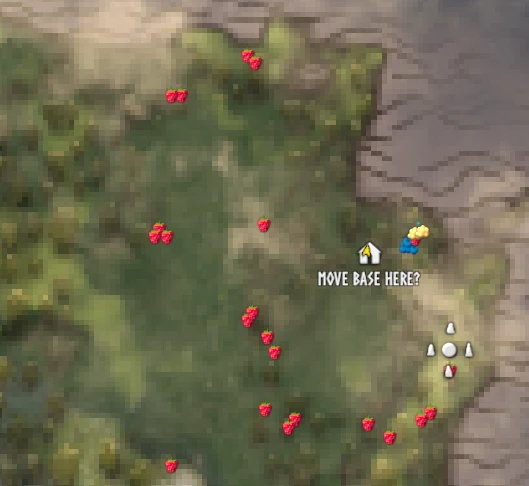
]Added option to use colored pins (the dot) or the sprite for the item. Copper nodes will show Copper Ore, Berry bushes will show Berries.[]Added option to each pin to be able to show it, it's name, and to save it. The save isn't permanent. It is only for that session. They will vanish if you log out. However they will stay if you move away from the area.
[]Added option to disable multiple pins of the same type within a certain radius. Larger number means less pins in an area. (this is useful for berries)
[]Added scaling options for each pin. By default they will be smaller than the other pins on the map, just so everything isn't clustered.
- []Add ability to upload custom images for each pin
- Add other spawn types (crypts, spawners, chitin, etc.) - if there is interest
Version 1. 2. 2
Temporarily disabled commands, was resulting in errors when trying to enter any commands.
Version 1. 2. 0
Updated to correct issue with H&H release
Previous Versions
Version 1. 1. 1
Added nexus Id to config file
Fixed issue with being able to remove death pin - was preventing new death pins from appearing. As of now it cannot be removed.
Fixed issue with pins not reappearing around character after log out and back in
Version 1. 1. 0
Fixed issue with cloudberries not following config options to turn on/off
Fixed issue with being able to remove starting pin showing where the boss mounting racks are
Stopped pins from appearing in dungeons
Version 1. 0. 9
Reduced min range to 5
Added Serpent tracking
Version 1. 0. 8
Fixed issue with pin saving not functioning after adding in the range feature.
Fixed issue with being able to check off pins.
FYI- if you check off a pin and the 'X' appears behind it, you most likely have multiple pins in one location. Remove the check and then right click to remove a pin. Then try to add the check again. You may have to do this a few times to get down to just one pin, or for the X to begin appear on the top pin.
AutoMapPins with Configuration is a deprecated UI mod for adding custom map pins with per-pin configurations. It offers custom pins for each object, but is no longer maintained. Suitable for players who want enhanced map pin customization, though compatibility with current game versions is uncertain.
✨ Key Features
📊 Pros & Cons
✅ Pros
- Decent community traction with 825 endorsements and over 23k downloads
- Offers granular control over map pins, which is handy for organized players
- Custom pins for each object add visual variety to the map
⚠️ Cons
- Deprecated since October 2021 — likely broken with current game versions
For UI tinkerers who want more control over map markers and don't mind an outdated mod. Skip if you're on the latest game version or want a supported, actively maintained mod.
💡 Beginner Tips
- Since the mod is deprecated, check the game version you're running and test in a safe save before relying on it.
- Look for community patches or forks if you're on a newer version — the original may not work.
- Use a mod manager to easily enable/disable the mod if issues arise.
📊 Mod Details
- Game
- Valheim Mods
- Author
- MaterousApps
- Version
- Deprecated
- Downloads
- 23,668
- Endorsements
- 825
- Category
- User Interface
- Created
- 3/26/2021
- Updated
- 10/2/2021
🧩 Commonly Used Together
Users add these mods to the same collections — a real compatibility signal, not an AI guess.
🔧 How to Install Valheim Mods
Download from Nexus.
📖 Full step-by-step install guide for Valheim →
Visit the official mod page for specific installation instructions for this mod.
🎮 Need cheat codes or console commands? Check ur gaming wiki for Valheim commands, item IDs, and more.
Keep browsing — more Valheim mods await