AlweStats
⚪ Last updated 2023⚠️ Install Order · 1 step
Install in this order, then this mod last — most mods fail to load without their framework and dependencies in place.
Preview
🔍 Analysis
- 👍 2.1% endorsement rate — high engagement, a strong quality signal
- 🏆 #47 of 176 User Interface mods in this game by downloads
📋 About This Mod
AlweStats
You may encounter incompatibilities in case there are other mods that modify the UI,
be sure to enable either one or the other equivalent section so they don't conflict in the same function
If you have an idea for something to add or any suggestion regarding the implemented features,
feel free to create an issue on my GitHub repository !
The mod is compatible with "randyknapp's Minimal Status Effects", "randyknapp's Equipment and Quick Slots",
"aedenthorn's Extended Player Inventory" and "marlthon's OdinShip" mods.
> For reasons inherent to the optimal functioning of the mod,
> everything related to the pins and elements in the status effects list (BedStatus, PortalStatus, ShipStatus and TombStatus, except for WeightStatus)
> could cause a lowering of fps if the computer running the game is not very powerful.
> Since the default day length declared in Valheim doesn't match the real one,
> to successfully use the "Days passed" counter in the world selection panel you need to join in a world at least one time,
> The mod will then get the day length in that world and save it in the "AlweStats.json" file (you have to do it for each world).
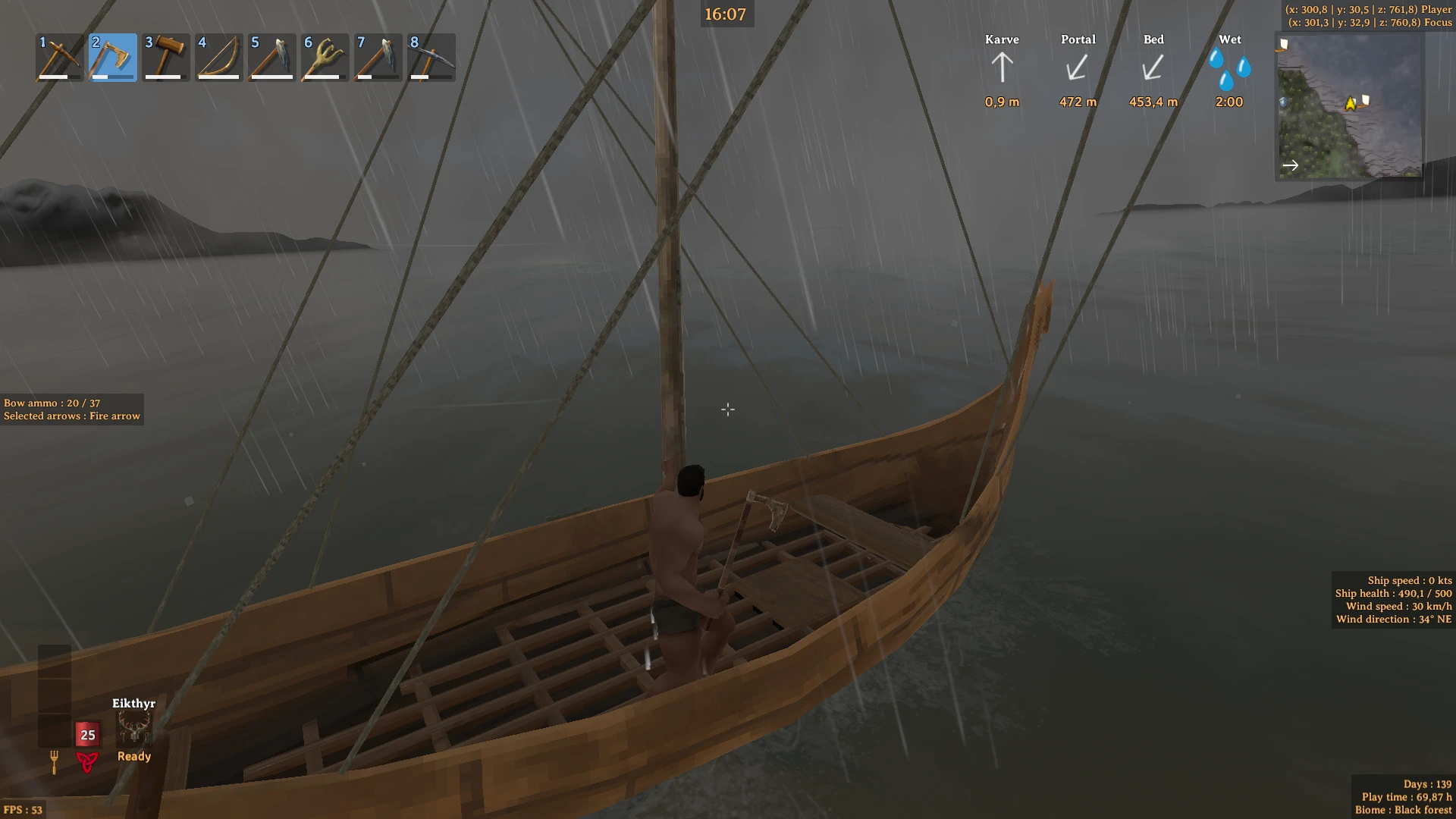
The UI is separated into these blocks :
-
[]GameStats, which contains "FPS"
[
]WorldStats, which contains "Days passed", "Time played", "Current biome", "Weather" and "Seed"[]WorldClock, which contains "Clock" (game clock)
[]SystemClock, which contains "Clock" (real-life clock)
[]ServerStats, which contains "Ping", "Total players" and a list of players in range with their health percentage
[]ShipStats, which contains "Ship health", "Ship speed", "Wind speed", "Wind direction"
[]PlayerStats, which contains "Inventory slots", "Inventory weight", "Selected arrows" and "Bow ammo"
[]MapStats, which contains "Player coordinates" and "Focus coordinates"
For each block, you can enable or disable it and you can also set :
- Text color
- Text size (also for the cursor coordinates and the explored percentage)
- Text alignment (not for WorldClock and SystemClock)
Each block is also movable with your mouse while in-game thanks to the integrated editing mode (default key : F8).
You can reload the configuration file (default key : F9) while in-game to see changes.
There are also "EntityStats" and "EnvStats" which aren't UI blocks but can let you choose different things.
In the config file you can also :
[]Change key for plugin reload and editing mode
[]Change the color of the health bar for entities and tamed creatures
[]Change the height of the health bar for entities
[]Choose the clock format (12h or 24h)
AlweStats is a user interface mod for Valheim that displays detailed statistics about entities, FPS, ping, clock, ship, wind, world, bow, inventory, weight, map, player, and environment, including pins, coordinates, and explored percentage. With 102 endorsements and 4,855 downloads, it's a niche but useful tool for players who want real-time data at a glance.
✨ Key Features
📊 Pros & Cons
✅ Pros
- Packed with info—FPS, ping, coordinates, explored %—all in one UI overlay.
- Decent community trust with 102 endorsements and nearly 5k downloads.
- Covers a wide range of stats, from ship and wind to inventory and weight, so you don't need multiple mods.
⚠️ Cons
- Only 102 endorsements means it's not widely tested; could have hidden bugs.
- Last updated in 2023—might not be compatible with the latest Valheim patches.
For Valheim players who love data and want to track everything from FPS to explored map percentage without alt-tabbing. Also great for streamers or builders who need precise coordinates. Skip if you prefer a clean UI without extra on-screen clutter.
💡 Beginner Tips
- Since it's a UI mod, make sure to enable it in the mod manager (like BepInEx) and check the config for which stats to show.
- If you're using other UI mods, watch for overlapping elements—you can often adjust positions in the config file.
- Check the mod's page for a detailed description link, as the summary hints at more info there.
📊 Mod Details
- Game
- Valheim Mods
- Author
- zAlweNy26
- Version
- 6.0.5
- Downloads
- 4,855
- Endorsements
- 102
- Category
- User Interface
- Created
- 3/26/2022
- Updated
- 8/27/2023
🧩 Commonly Used Together
Users add these mods to the same collections — a real compatibility signal, not an AI guess.
🔧 How to Install Valheim Mods
Download from Nexus.
📖 Full step-by-step install guide for Valheim →
Visit the official mod page for specific installation instructions for this mod.
🎮 Need cheat codes or console commands? Check ur gaming wiki for Valheim commands, item IDs, and more.
Keep browsing — more Valheim mods await