PauseMenuImages
🟡 Updated this yearPreview
🔍 Analysis
- 👍 0.1% endorsement rate
- 🏆 #234 of 414 Mods mods in this game by downloads
📋 About This Mod
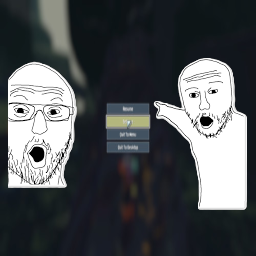
Pause Menu Images Adds customizable PNG images to the left and right sides of the pause menu with configurable positioning, sizing, and smooth animations. Features Display custom PNG images on either side of the pause menu Smooth slide-up animation when pause menu appears (toggleable) Fully customizable position and size via in-game settings Images disappear when entering settings or logbook Non-intrusive - doesn't block menu buttons Works with any screen resolution Installation Install with r2modman or Thunderstore Mod Manager. Configuration All settings can be adjusted in-game via Risk of Options mod settings menu: General Settings Slide up with Pause - Enable/disable the smooth slide-up animation (default: ON) Left Image Settings Position X - Horizontal position (negative = more left, positive = more right) Position Y - Vertical position (negative = more down, positive = more up) Width - Image width in pixels (10-2000) Height - Image height in pixels (10-2000) Right Image Settings Position X - Horizontal position (negative = more left, positive = more right) Position Y - Vertical position (negative = more down, positive = more up) Width - Image width in pixels (10-2000) Height - Image height in pixels (10-2000) How to Use Your Own Images Create or find two PNG images you want to use (one for left, one for right) Recommended base resolution: 800x1080 or similar vertical images Navigate to AppData/Roaming/r2modmanPlus-local/RiskOfRain2/profiles/DesiredProfile/BepInEx/plugins/PauseMenuImages/ Replace left_image.png and right_image.png with your own images Keep the exact filenames: left_image.png and right_image.png Launch the game and adjust position/size in Risk of Options settings to fit your screen perfectly! Tips Transparent backgrounds work great and look professional Vertical images (taller than wide) work best Use the in-game sliders to fine-tune position and size for your screen resolution PNG format is required (use GIMP, Photoshop, or any image editor) The animation is subtle - disable it in settings if you prefer instant appearance Test different width/height values to make images fit your aesthetic Notes Placeholder images are included as examples Images automatically respect your screen's UI scaling Click-through is enabled so transparent areas won't block menu interaction Images only show on the main pause screen, not in submenus Changes to settings take effect the next time you pause Requires Risk of Options mod for in-game configuration Recommended Image Tools GIMP - Free, powerful image editor (what the creator uses!) Photoshop - Professional option Paint.NET - Simple and lightweight
Add your own custom images on both sides of the pause menu! Now with adjustible size and position!
📊 Mod Details
- Game
- Thunderstore Mods
- Author
- Moetus
- Version
- 2.1.5
- Downloads
- 1,401
- Endorsements
- 1
- Category
- Mods
- Created
- 1/28/2026
- Updated
- 1/31/2026
- Tags
- Mods, Client-side
🔧 How to Install Thunderstore Mods
Use r2modman/Thunderstore Mod Manager. Or manual: install BepInEx, drop mods into plugins folder.
📖 Full step-by-step install guide for Thunderstore →
Visit the official mod page for specific installation instructions for this mod.
🎮 Need cheat codes or console commands? Check ur gaming wiki for Thunderstore commands, item IDs, and more.
Keep browsing — more Thunderstore mods await