FalseSonRealLobbySize
🟡 Updated this yearPreview
🔍 Analysis
- 👍 0.0% endorsement rate
- 🏆 #89 of 632 Tweaks mods in this game by downloads
📋 About This Mod
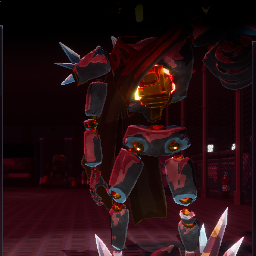
FalseSonRealLobbySize A Risk of Rain 2 mod that adjusts False Son's display size on the character selection screen. Description By default, False Son appears at 0.7x his actual in-game size on the character selection screen. This mod allows you to adjust that multiplier to see his true scale. Based on this project by TheTimeSweeper - all credit goes to him! Configuration After first run, a config file will be generated at BepInEx/config/Encoded404.Encoded404.FalseSonRealLobbySize.cfg Setting Default Description CSS Size Multiplier 1.0 Multiplier for False Son's size on the character selection screen. Vanilla is 0.7x his in-game size. Installation Using a Mod Manager (Recommended) Install using r2modman or Thunderstore Mod Manager Launch the game through the mod manager Manual Installation Install BepInEx Download and extract this mod Place FalseSonRealLobbySize.dll in your BepInEx/plugins folder Changelog v1.0.0 Initial release
Adjusts False Son's display size on the character selection screen to be more accurate
📊 Mod Details
- Game
- Thunderstore Mods
- Author
- Encoded404
- Version
- 0.1.2
- Downloads
- 3,679
- Endorsements
- 0
- Category
- Tweaks
- Created
- 11/28/2025
- Updated
- 11/28/2025
- Tags
- Tweaks, Mods, Client-side
🔧 How to Install Thunderstore Mods
Use r2modman/Thunderstore Mod Manager. Or manual: install BepInEx, drop mods into plugins folder.
📖 Full step-by-step install guide for Thunderstore →
Visit the official mod page for specific installation instructions for this mod.
🎮 Need cheat codes or console commands? Check ur gaming wiki for Thunderstore commands, item IDs, and more.
Keep browsing — more Thunderstore mods await