Pathfinder Scripted Dice Roller v2.0
⚪ Last updated 2016Preview
🔍 Analysis
- 👍 0.0% endorsement rate
📋 About This Mod
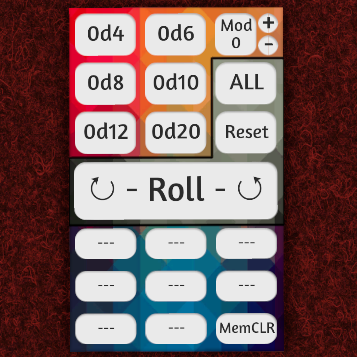
A tool that simulates dice rolls using scripting and prints them to chat, rather than physically rolling dice. This one in particular is designed for tabletop RPGs that use multiple types of dice. Basically, to make life a little easier. Features: Has d4, d8, d10, d12 and d20 buttons, plus a modifier which can add/subtract to/from the total. Roll results are printed to chat, along with the player who rolled. Text is color coded to them too. After each roll, tool automatically clears out the previous roll selections. Reset button clears currently selected roll (but not memory). ALL/GM button lets you select if all players see the roll results or if only the GM (Black seat) can. 8 memory buttons let you save different common roll combination. You get to name those memory slots so you can keep track of them. Font size adjusts to name length. MemCLR button is used to clear a memory slot. Works fully with save/load/undo/redo. Use multiple instances of the tool at once without any issue. Instructions: This is all stuff I imagine you would figure out after playing with it for a few minutes. But just in case: Standard Roll Click on each die's button to add 1 of that type to the roll. Clicking "0d4" will make it "1d4". (optional) Click + or - to add/subtract to/from the Modifier for that roll. (optional) Click ALL/GM button to set who can see this roll. Click Roll to print the roll to chat. Click Reset if you make a mistake. Memory Button Setup Set up the roll as above, but do not hit the Roll button. Instead, right click the tool (not the buttons). Add a name to the "Name" field in the context menu for the tool. Click an empty memory button (---) to save the roll settings for future use. Memory Button Use (optional) Click ALL/GM button to set who can see this roll. Click the button with the saved information. Roll is automatically printed. All other settings will be discarded. Memory Button Clearing Click MemCLR. If you change you mind, the same button now says "Cancel" and
📊 Mod Details
- Game
- Tabletop Simulator Mods
- Author
- 76561197972020303
- Version
- N/A
- Downloads
- 1,787
- Endorsements
- 0
- Category
- Scripting
- Created
- 9/11/2016
- Updated
- 9/11/2016
🔧 How to Install Tabletop Simulator Mods
Subscribe on Steam Workshop. Mods auto-download and install. Launch the game to activate.
📖 Full step-by-step install guide for Tabletop Simulator →
Visit the official mod page for specific installation instructions for this mod.
🎮 Need cheat codes or console commands? Check ur gaming wiki for Tabletop Simulator commands, item IDs, and more.
Keep browsing — more Tabletop Simulator mods await