Advanced Storage
⚪ Last updated 2021Preview
🔍 Analysis
- 👍 3.5% endorsement rate — high engagement, a strong quality signal
- 🏆 #2 of 146 Gameplay Effects and Changes mods in this game by downloads
📋 About This Mod
NOW UPDATED FOR FULL RELEASE VERSION OF THE GAME!
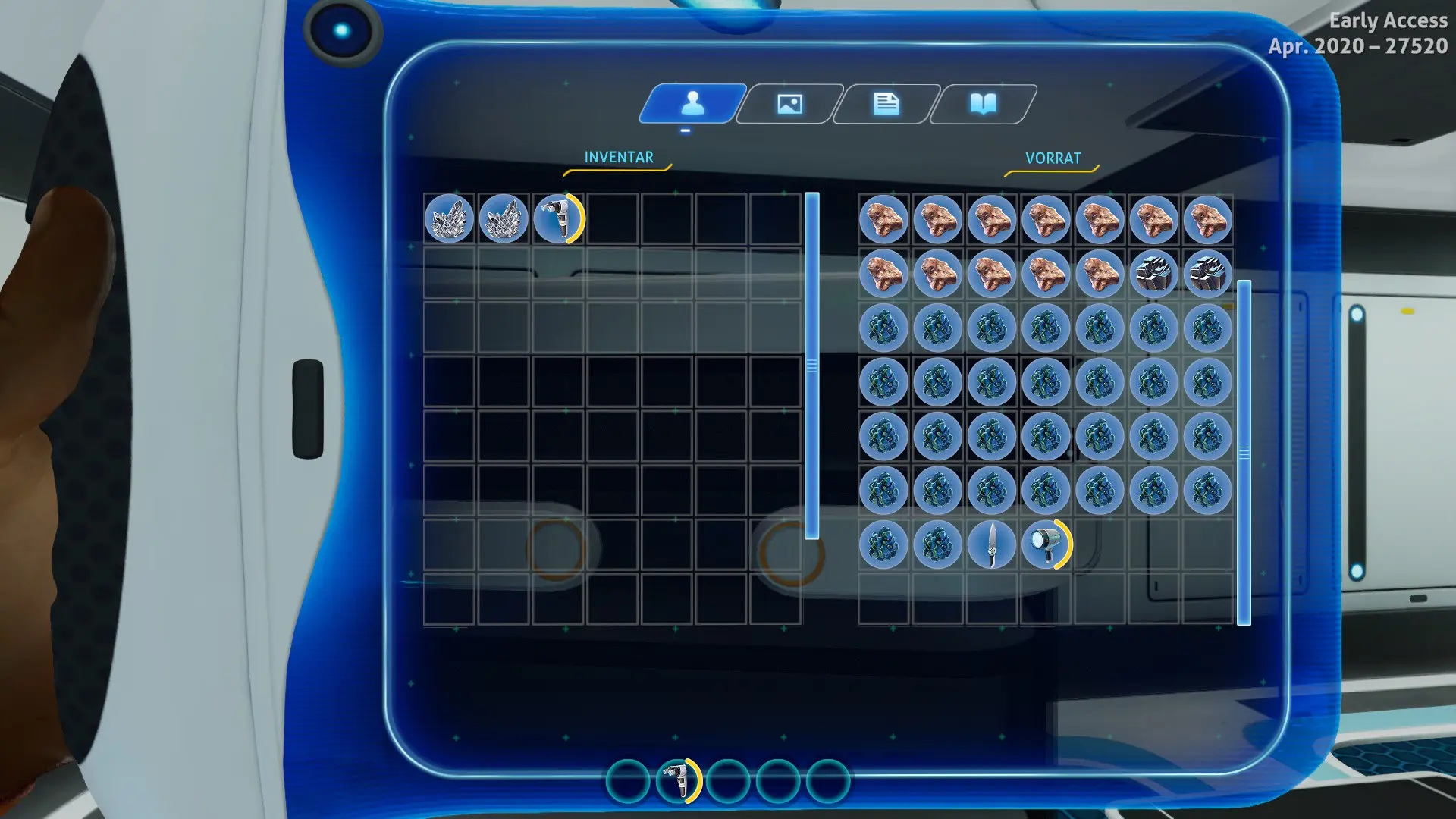
Lets you customize the size (i.e. capacity) of different storage in game. Check below to see supported storage.
You can change the sizes by editing the config.json file in the mod folder.
The default file contains the default sizes of the containers.
First number is the width (= number of columns), second number the height (= number of rows) of the container.
The following storage can be edited:
-
[]Inventory: the player's inventory
[
]SmallLocker: the wall locker[]LargeLocker: freestanding locker
[]LifepodLocker: the storage inside the lifepod
[]WaterproofLocker: the waterproof locker
[]Fridge: the fridge
[]WaterFiltrationMachine: the Water Filtration Machine
[]SeatruckFabricator: the storage inside the seatruck fabricator module
[]SeatruckStorage_GroundLocker: the chest on the ground of the seatruck storage module (right side of movement direction)
[]SeatruckStorage_WallRight: the lockers on the wall above the ground chest in the seatruck storage module (right side of movement direction)
[]SeatruckStorage_WallLeft: the lockers on the wall in the seatruck storage module (left side of movement direction)
Not included in the current version, but planned for the future:
-
[]Nuclear Reactor
[]Bioreactor
[]Quantum Locker
[]Prawn Suit storage
THIS MOD DOES NOT ADD SCROLLING ABILITY!
I therefore strongly recommend using newman55s "Advanced Inventory" Mod:
https://www.nexusmods.com/subnauticabelowzero/mods/84
Following his suggestion, I recommend a maximum size of 7 100.
INSTALLATION
-
[]Make sure QModManager is installed.
[
]Unpack the folder to the QMods folder (SubnauticaZero\QMods). - Change values in config.json to change storage sizes.
-
[]Make sure QModManager is installed.
-
[]Nuclear Reactor
Advanced Storage lets you resize the player inventory and storage containers like lockers and seatruck modules in Subnautica: Below Zero. With 2,292 endorsements and 65,558 downloads, it's a popular quality-of-life mod for hoarders who want more carry capacity without gameplay changes beyond storage.
✨ Key Features
📊 Pros & Cons
✅ Pros
- Huge community backing with 2,292 endorsements — it's a trusted QoL staple.
- 65,558 downloads prove it's been battle-tested by thousands of Subnautica players.
- Updated for full release, so no early-access or beta compatibility issues for launch builds.
⚠️ Cons
- Last updated May 2021 — later game patches may have introduced compatibility problems.
- Only handles inventory and storage size; if you want other gameplay tweaks, this won't scratch that itch.
For Subnautica: Below Zero players who constantly run out of inventory space and hate making multiple trips. Perfect for hoarders and base builders who want to tweak locker and seatruck storage without installing a dozen separate mods. Skip if you're fine with vanilla carry limits or want a mod with in-game settings.
💡 Beginner Tips
- Install with QModManager — drop the mod folder into your SubnauticaZero/QMods directory.
- After installing, open the mod's config file to set your desired inventory and storage sizes.
- If you're on a fresh save, test with a small inventory increase first to avoid overshooting and breaking UI scaling.
📊 Mod Details
- Game
- Subnauticabelowzero Mods
- Author
- MoreDreadd
- Version
- 2.0.0
- Downloads
- 65,558
- Endorsements
- 2,292
- Category
- Gameplay Effects and Changes
- Created
- 6/13/2020
- Updated
- 5/17/2021
🧩 Commonly Used Together
Users add these mods to the same collections — a real compatibility signal, not an AI guess.
🔧 How to Install Subnautica: Below Zero Mods
Download from Nexus Mods.
📖 Full step-by-step install guide for Subnautica: Below Zero →
Visit the official mod page for specific installation instructions for this mod.
🎮 Need cheat codes or console commands? Check ur gaming wiki for Subnautica: Below Zero commands, item IDs, and more.
Keep browsing — more Subnautica: Below Zero mods await