Advanced Inventory
⚪ Last updated 2023Preview
🔍 Analysis
- 👍 2.6% endorsement rate — high engagement, a strong quality signal
- 🏆 #2 of 23 User Interface mods in this game by downloads
📋 About This Mod
Expands inventory options.
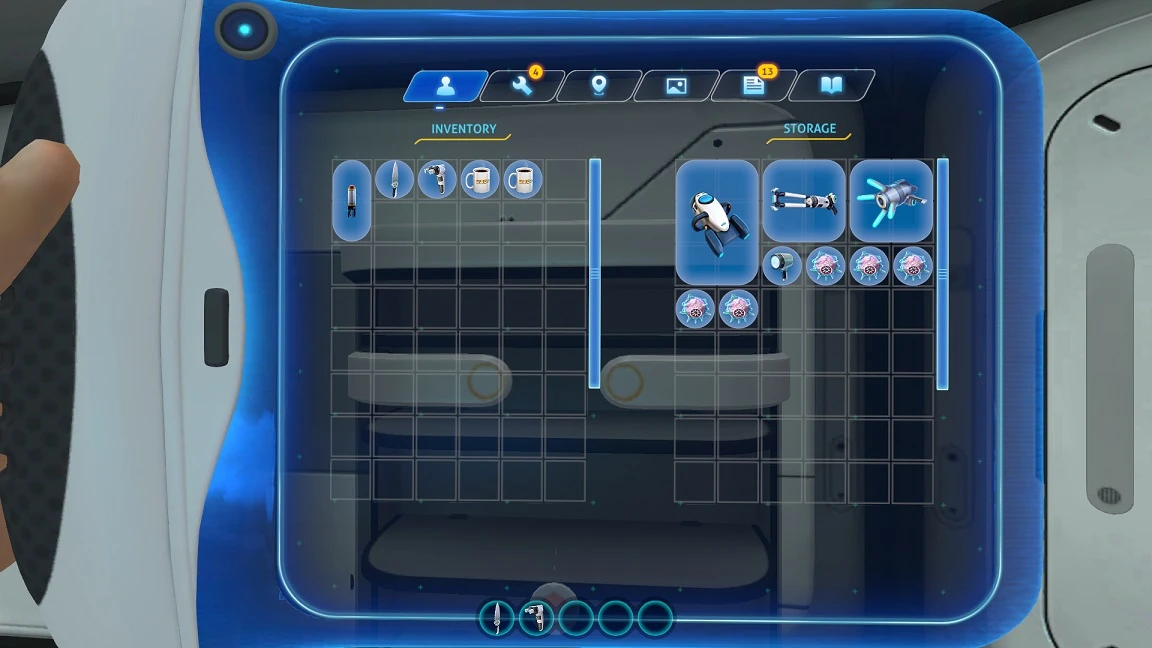
Adds scrolling zone for displaying unlimited inventory. (This mod does not expand your inventory cells)
Adds shift/ctrl + LMB hotkeys to quickly move all items.
Can to change the maxRows (after which the scrollbar will appear) parameter in config (config will appear after game).
The mod is made for stable update branch and may not work with experimental versions.
Installation BepInEx
1. Install BepInEx
2. Extract the archive to folder \Subnautica\BepInEx\plugins\. Should
be \Steam\steamapps\common\Subnautica\BepInEx\plugins\AdvancedInventory_BZ\
Installation QMod
1. Install QModManager.
2. Unpack the archive to folder \SubnauticaZero\QMods\. Should be \Steam\steamapps\common\SubnauticaZero\QMods\AdvancedInventory_BZ\
3. Also need to install other mod that increases inventory.
Note
I recommend not exceeding the width of 7 and the height of 100 for any containers.
Compatibility
Gamepad not support.
Bugs
New items can blink incorrectly.
📊 Mod Details
- Game
- Subnauticabelowzero Mods
- Author
- newman55
- Version
- 1.0.7
- Downloads
- 125,440
- Endorsements
- 3,298
- Category
- User Interface
- Created
- 5/29/2020
- Updated
- 3/16/2023
🧩 Commonly Used Together
Users add these mods to the same collections — a real compatibility signal, not an AI guess.
🔧 How to Install Subnautica: Below Zero Mods
Download from Nexus Mods.
📖 Full step-by-step install guide for Subnautica: Below Zero →
Visit the official mod page for specific installation instructions for this mod.
🎮 Need cheat codes or console commands? Check ur gaming wiki for Subnautica: Below Zero commands, item IDs, and more.
Keep browsing — more Subnautica: Below Zero mods await