ColorTools(bepinex)
🟠 Updated over a year ago⚠️ Install Order · 3 steps
Install in this order, then this mod last — most mods fail to load without their framework and dependencies in place.
Preview
🔍 Analysis
- 👍 3.0% endorsement rate — high engagement, a strong quality signal
- 🏆 #96 of 456 Gameplay mods in this game by downloads
📋 About This Mod
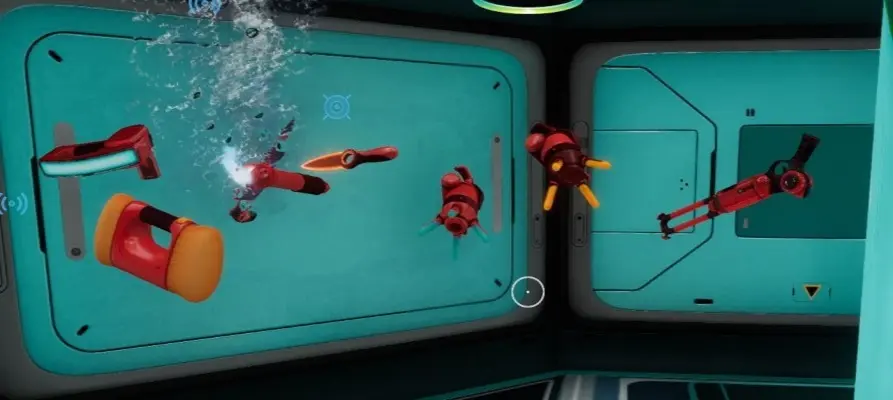
Ever wish your tools were different colors well now you can using the mod options change the Red Blue Green sliders and change the color of the tools
allowed to work with nitrox
Some tools need to be used before they color like the heatblade
others need to be rebuilt to be color changed like the knife
other tools just change as you move the sliders .
color tool slider changes all tools
Modded Tools now can be colored
Its on OnDraw so the new color will show up with equipping another tool and then equipping the modded item .
Tech Pistol
Alien Rifle
TerraBuillder
Colortool is now a Bepinex plugin
1. make sure bepinex is installed
2. make sure Bepinex Configuration Manger is installed this is need to config the colors F1 is the default button !
3. download Colortool.zip
4. Extract to Bepinex\plugins
5. give yourself a pat on the head for installing this mod correctly
ColorTools is a BepInEx mod for Valheim that lets you customize the color of your tools using RGB sliders in the mod options. Some tools, like the heatblade, need to be used once before the color applies, while others require rebuilding. With 400 endorsements and 13,517 downloads, it's a popular cosmetic tweak for players wanting a personalized look.
✨ Key Features
📊 Pros & Cons
✅ Pros
- Community-approved with 400 endorsements and over 13k downloads.
- Simple RGB slider system makes customization easy.
- Adds a fun personal touch to your gear without changing gameplay.
⚠️ Cons
- Some tools need to be used or rebuilt before color shows, which can be confusing.
- Only affects tools, not weapons or armor—limited scope.
For Valheim players who want to stand out with custom-colored tools. If you're into cosmetic tweaks and don't mind fiddling with mod options, this is for you. Skip if you want gameplay changes—this is purely visual.
💡 Beginner Tips
- Make sure BepInEx is installed correctly before adding this mod.
- After changing colors, test each tool—some may need to be used once or rebuilt to see the effect.
- Check the mod's page for any updates or patches if tools don't color as expected.
📊 Mod Details
- Game
- Subnautica Mods
- Author
- Cookie
- Version
- 1.0.1
- Downloads
- 13,517
- Endorsements
- 400
- Category
- Gameplay
- Created
- 3/20/2020
- Updated
- 8/19/2025
🔧 How to Install Subnautica Mods
Download from Nexus.
📖 Full step-by-step install guide for Subnautica →
Visit the official mod page for specific installation instructions for this mod.
🎮 Need cheat codes or console commands? Check ur gaming wiki for Subnautica commands, item IDs, and more.
Keep browsing — more Subnautica mods await