CheatManager (BepInEx - Nautilus)
🟠 Updated over a year agoThis mod may not work until the author updates it. Check for an update, or see the rollback guide.
⚠️ Install Order · 4 steps
Install in this order, then this mod last — most mods fail to load without their framework and dependencies in place.
Preview
🔍 Analysis
- 👍 2.9% endorsement rate — high engagement, a strong quality signal
- 🏆 #7 of 456 Gameplay mods in this game by downloads
📋 About This Mod
IMPORTANT!!
SMLHelper not supported!
Steam Legacy Branch not supported!
(older version remains available in the Files tab)
Features:
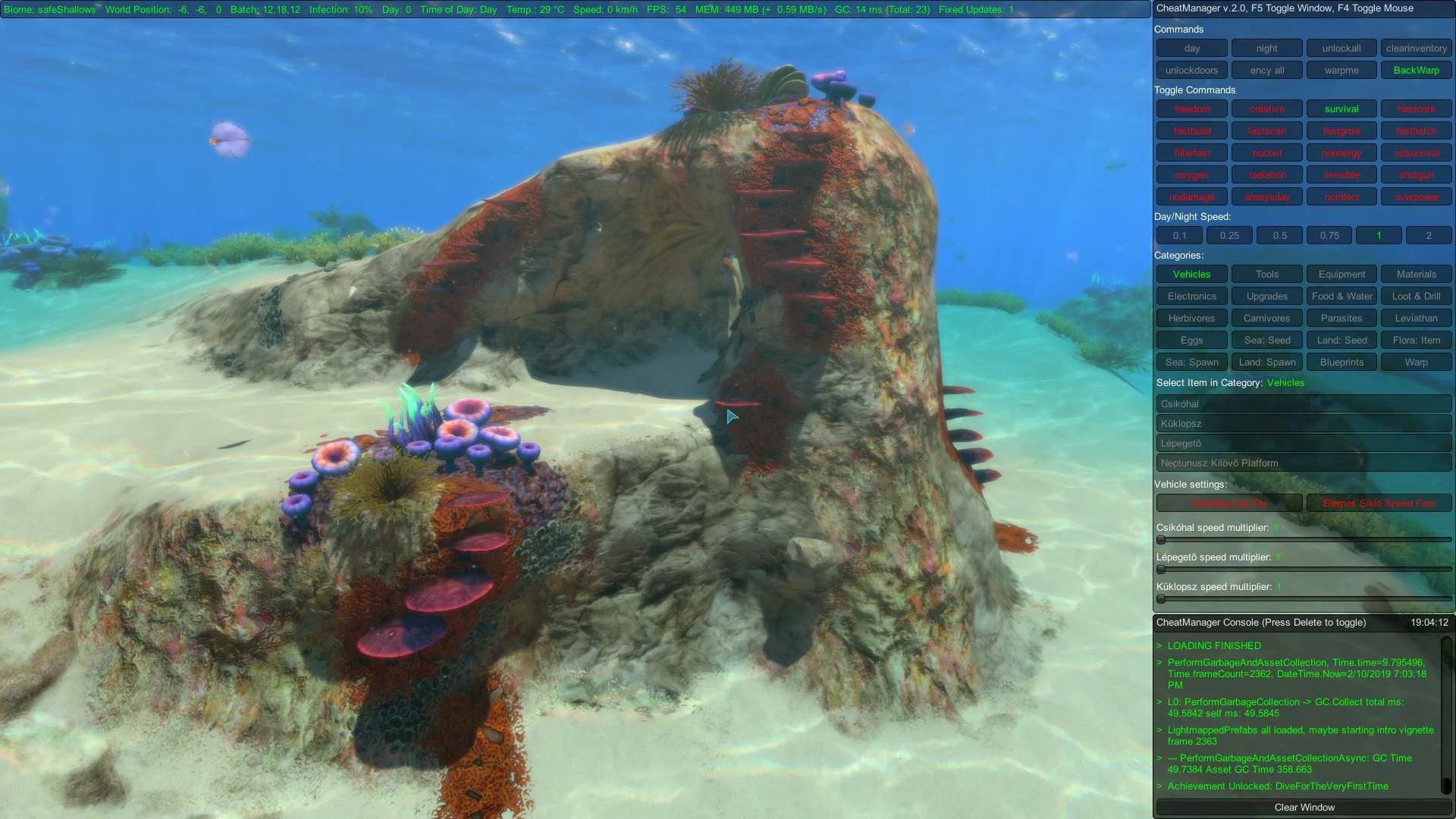
- GUI window opens with the (Default: F5) key, to get mousepointer press (Default: F4) key
- Ingame debug log window (console will catch all game log messages) If enabled in the configuration file press (Default: Delete) to show
- switching all gamemodes (freedom, creative, survival, hardcore)
- overPower toggle button or console command "overpower"
(Default: 2x Health, 2x player Oxygen) Range: 1-10
(hunger / thirst time (Default: 1) Range: 1-10 (Game default: 10))- give all techs (with button 'unlockall')- day/night button
- alwaysday toggle button (no more night) or console command: "alwaysday"
- you can set day/night speed
- noinfect toggle button: bye-bye Warpers ;) or console command: "noinfect"
- unlock doors button (open all precursor doors without key)
- unlock all PDA encyclopedia button (ency all)
- toggle buttons colored: red inactive, green active
- warp/backwarp function with sound effect (can warp within seamoth and exosuit)
- some information (day, position, temperature, speed etc...)
- seaglide: fast speed now available
- vehicle speed control (seamoth, prawn suit, cyclops)
- seamoth now can fly ;)
- shotgun mode available ;)
- you can spawn everything you need, simply select a category and select item from list.
- item names appear in the game's language setting and sort by ABC ascendacy
- Warp point adding: Now You can add a new warp point with the Player current position if its not within 50m to another warp point.
- Warp point removing: Press RMB to select and press remove button. (You can only delete personal warp points.)
- Settings now available in Options->MOD tab.
Requirements:
-
[]BepInEx Subnautica Pack
[
]NautilusInstallation:
-
[]You must have BepInEx Subnautica Pack and Nautilus installed.
[
]Simply extract the CheatManager archive into your BepInEx\plugins\ folder.SAVE your game before using these commands!
Using these commands might impair your Subnautica experience!
These commands can be used for debugging purposes, viewing partially implemented content, or simply for player enjoyment.
-
[]You must have BepInEx Subnautica Pack and Nautilus installed.
CheatManager is a simple GUI window for handling console cheat commands and many more options. It is a popular gameplay mod for BepInEx and Nautilus, with over 3,200 endorsements and 111,000 downloads, last updated in August 2025.
✨ Key Features
📊 Pros & Cons
✅ Pros
- Huge community trust with 3,205 endorsements and 111k downloads.
- Active development — last updated August 2025.
- Streamlines cheat command usage with a GUI, no more typing commands blindly.
⚠️ Cons
- Requires BepInEx and Nautilus setup, which might be overkill for casual players.
- No screenshots or detailed feature list provided, so you're going in somewhat blind.
For players who want a convenient way to use cheat commands without memorizing console syntax. If you're already running BepInEx and Nautilus, this is a no-brainer. Skip if you prefer vanilla gameplay or don't need cheats.
💡 Beginner Tips
- Make sure BepInEx and Nautilus are installed first, then drop CheatManager into the plugins folder.
- Launch the game once to generate config files, then tweak settings in the GUI.
- If the GUI doesn't appear, check that BepInEx is patched correctly and the plugin is in the right folder.
📊 Mod Details
- Game
- Subnautica Mods
- Author
- Senna
- Version
- 3.1
- Downloads
- 111,130
- Endorsements
- 3,205
- Category
- Gameplay
- Created
- 4/12/2018
- Updated
- 8/21/2025
🔧 How to Install Subnautica Mods
Download from Nexus.
📖 Full step-by-step install guide for Subnautica →
Visit the official mod page for specific installation instructions for this mod.
🎮 Need cheat codes or console commands? Check ur gaming wiki for Subnautica commands, item IDs, and more.
Keep browsing — more Subnautica mods await