All The Materials
⚪ Last updated 2023⚠️ Install Order · 2 steps
Install in this order, then this mod last — most mods fail to load without their framework and dependencies in place.
Preview
🔍 Analysis
- 👍 3.0% endorsement rate — high engagement, a strong quality signal
- 🏆 #31 of 136 Miscellaneous mods in this game by downloads
📋 About This Mod
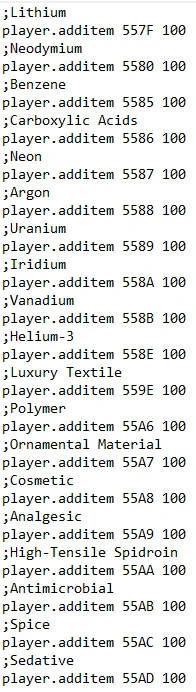
Gives 100 (Alternatively, by popular demand, 10, 50, 200, 500 or 1000) of each of the listed materials
Also now has removeitem capability with the unmats files
Huge thanks to:
Kanarus, PUR3M4YH3M, avrielh, SnikarN, CyoScyme, dalfeinSkyrim, XunAmarox, casuallychallenged
For helping add many, many items to the list!
-------------------------------------------------------
Instructions on how exactly to install
-------------------------------------------------------
1) Download the Zip from the files page
2) Open the zip archive with 7zip or WinRAR, whatever you prefer
3) Go into where your Starfield is installed, (Right-click on Starfield in Steam>Manage>Browse Local Files)
4) Drop the text file in the zip into that folder
5) Open the game, load your save, open the console and type "bat mats" (Or whatever the name of the file you've chosen is, respectively)
6) Want to remove all the materials you just added? Type "bat unmats" to get rid of anything you aren't gonna use or don't wanna keep
All The Materials is a simple text file for 7 Days to Die that adds all crafting materials to your inventory via the console command "bat mats". With 1,582 endorsements and 52,879 downloads, it's a popular quality-of-life tool for players who want to skip resource gathering and focus on building or testing. Last updated in October 2023, it remains a straightforward solution for creative or experimental play.
✨ Key Features
📊 Pros & Cons
✅ Pros
- Community favorite with 1,582 endorsements and over 52k downloads—clearly a go-to for many players.
- Dead simple to use: type one console command and you're set with all materials.
- Perfect for creative mode or testing builds without the grind of gathering resources.
⚠️ Cons
- It's a text file, so it might not work with the latest game updates if the console command syntax changes.
- Adds ALL materials at once, which can clutter your inventory if you only need a few specific items.
For 7 Days to Die players who want to skip the resource grind and jump straight into building or testing. Great for creative mode enthusiasts and modders who need quick access to materials. Skip if you prefer survival gameplay without cheats.
💡 Beginner Tips
- Make sure to enable the console in your game settings (usually by pressing F1) before typing "bat mats".
- If the command doesn't work, check that the text file is placed in the correct folder—typically the game's root directory or a specific mods folder.
- Use this in a creative world or test save to avoid ruining your survival progress with free materials.
📊 Mod Details
- Game
- Starfield Mods
- Author
- v2461
- Version
- V8EngineExceptItHasUnmatsThisTime
- Downloads
- 52,879
- Endorsements
- 1,582
- Category
- Miscellaneous
- Created
- 9/1/2023
- Updated
- 10/13/2023
🔧 How to Install Starfield Mods
Download from Nexus.
📖 Full step-by-step install guide for Starfield →
Visit the official mod page for specific installation instructions for this mod.
🎮 Need cheat codes or console commands? Check ur gaming wiki for Starfield commands, item IDs, and more.
Keep browsing — more Starfield mods await