Split Screen
⚪ Last updated 2018⚠️ Install Order · 2 steps
Install in this order, then this mod last — most mods fail to load without their framework and dependencies in place.
Preview
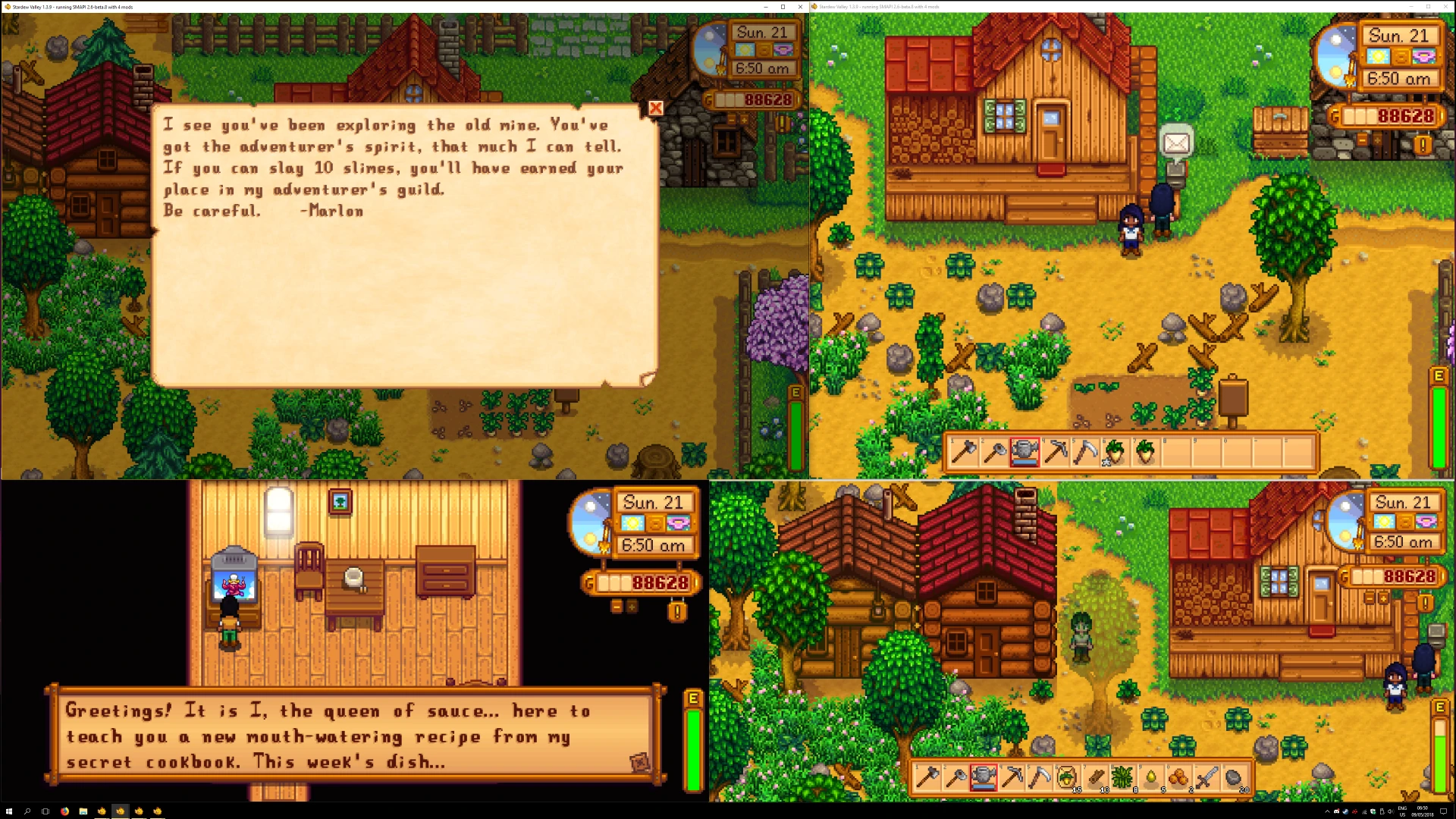
🔍 Analysis
- 👍 2.7% endorsement rate — high engagement, a strong quality signal
- 🏆 #17 of 143 Miscellaneous mods in this game by downloads
📋 About This Mod
(If you want to play split screen with multiple keyboards/mice/controllers on other games, see Universal Split Screen)
About the mod
- Only one copy of the game is needed to play in split screen up to four UNLIMITED players. Can be from Steam or GoG.
- You need a different controller for each instance, but one player can use keyboard
- Only works on Windows
- If you use the x360ce method, any controller will work, e.g. PS1 or even a driving wheel
- You can put each instance on a different monitor if you like
How to install
-
[]Install SMAPI: www.smapi.io
[
]Install SplitScreen mod by downloading the .zip file on this page and unzip it to Stardew Valley/Mods[]Run the SplitScreenShortcutGenerator.exe inside of the mod folder. Create as many keyboard shortcuts as you want: they’re free. All the shortcuts (for running multiple instances of the game) will be created in the Stardew Valley folder
[]By default, Stardew Valley multiplayer looks a lot like ice skating. Use this to fix that: https://www.nexusmods.com/stardewvalley/mods/3021
How to play (multiple gamepads only):
-
[]Launch however many shortcuts you need (e.g. 3 for 3 players)
[
]Make sure each instance is in windowed mode. You can do this by clicking the square button in the top left corner of the title menu[]Resize each window however you like. Make sure there is no overlap
[]On any instance, go to Co-op -> Host -> Host one of your worlds
[]On all the other instances, go to Co-op -> Join LAN -> Leave IP box empty -> Ok -> Click the world
[]You can now control each instance with a different controller. Have fun!
How to play (multiple gamepads, keyboards, or mice):
[*]Instructions can be found here
-
[]Launch however many shortcuts you need (e.g. 3 for 3 players)
Split Screen enables local multiplayer for games that lack native support, allowing multiple players to share one PC using gamepads, keyboards, or mice. It requires only one copy of the game, making it a cost-effective solution for couch co-op. With 558 endorsements and 20,783 downloads, it's a niche but popular utility for PC gamers.
✨ Key Features
📊 Pros & Cons
✅ Pros
- Community-approved with 558 endorsements and over 20k downloads.
- Cost-effective: only one game copy needed for local multiplayer.
- Flexible input support: gamepads, keyboards, and mice.
⚠️ Cons
- Last updated in 2018 – may not work with newer games or game updates.
- No detailed instructions or compatibility list provided by the author.
- Requires manual setup and may need tweaking per game.
For PC gamers who want to play local multiplayer without buying multiple copies. Ideal for couch co-op sessions with friends or family. Skip if you prefer online multiplayer or don't have extra input devices.
💡 Beginner Tips
- Check if your game is compatible by reading community forums before installing.
- Make sure all controllers are plugged in and recognized by Windows before launching the mod.
- Test with a simple game first to understand the setup process.
📊 Mod Details
- Game
- Stardew Valley Mods
- Author
- Ilyaki
- Version
- 4.0.2
- Downloads
- 20,783
- Endorsements
- 558
- Category
- Miscellaneous
- Created
- 5/9/2018
- Updated
- 12/13/2018
🔧 How to Install Stardew Valley Mods
Download from Nexus.
📖 Full step-by-step install guide for Stardew Valley →
Visit the official mod page for specific installation instructions for this mod.
🎮 Need cheat codes or console commands? Check ur gaming wiki for Stardew Valley commands, item IDs, and more.
Keep browsing — more Stardew Valley mods await