Global Thermo Control
🟡 Updated this yearPreview
🔍 Analysis
- 👍 0.0% endorsement rate
📋 About This Mod
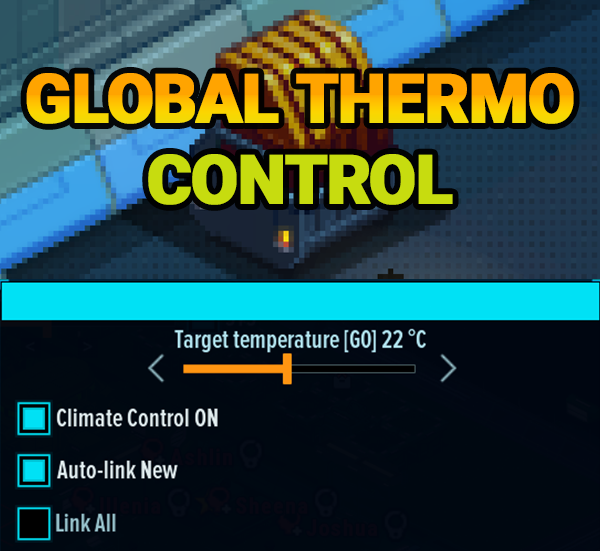
Global Thermo Control Requires: Space Haven Mod Loader 0.12.1+ — subscribe to the loader and launch the game through it (or the official "play with mods" branch). Installation After subscribing, the mod should appear in Mod Loader automatically. The folder must contain info.xml and GlobalThermoControl.jar at the same level (no extra nested subfolder). If the mod is missing, open the mod folder from Workshop, move both files out of any inner subfolder into the mod root, then click Refresh in Mod Loader. What is this mod and why use it In vanilla Space Haven you adjust thermo regulators one by one. On a large ship that means opening many windows or hunting each unit on the map. Global Thermo Control adds a control panel in Temperature view and overlays on every regulator so you can: Set one global target for the whole ship (network G0). Split the ship into up to four optional zones (G1–G4) with their own targets — e.g. crew quarters vs. greenhouse vs. industry. See each regulator's group, current/target temps, and change its group from the map. Optionally auto-link new regulators, link everything to G0 once, and use emergency climate assist when rooms overheat or freeze. The mod does not replace vanilla heater UI — it extends Temperature view and map overlays. Save compatibility: back up your save before first use. Groups (G0–G4) G0 (global) — always active. Every regulator "in G0" uses the G0 target from the top panel slider. This is your ship-wide default network. G1, G2, G3, G4 — optional zones. When a zone is enabled on the panel, you get its own target slider. A regulator assigned to G2 follows G2's target, not G0. Each regulator belongs to one group at a time. Changing group on the map or via reassignment moves it to another network. Control panel (left of the temperature legend) Shown when you open Temperature view. Top to bottom: 1. Target temperature — main slider Label shows Target temperature and the current G0 setpoint (e.g. 22 °C). Drag the bar
Global Thermo Control Requires: Space Haven Mod Loader 0. 12. 1+ — subscribe to the loader and launch the game through it (or the official "play with mods" branch). Installation After subscribing, the mod should appear in Mod Loader automatically. The folder must contain info.xml and GlobalThermoControl.jar at the same level (no extra nested subfolder). If the mod is missing, open the mod folder from Workshop, move both files out of any inner subfolder into the mod root, then click Refresh in Mod Loader. What is this mod and why use it In vanilla Space Haven you adjust thermo regulators one by one. On a large ship that means opening many windows or hunting each unit on the map. Global Thermo Control adds a control panel in Temperature view and overlays on every regulator so you can: Set one global target for the whole ship (network G0). Split the ship into up to four optional zones (G1–G4) with their own targets — e.g. crew quarters vs. greenhouse vs. industry. See each regulator's group, current/target temps, and change its group from the map. Optionally auto-link new regulators, link everything to G0 once, and use emergency climate assist when rooms overheat or freeze. The mod does not replace vanilla heater UI — it extends Temperature view and map overlays. Save compatibility: back up your save before first use. Groups (G0–G4) G0 (global) — always active. Every regulator "in G0" uses the G0 target from the top panel slider. This is your ship-wide default network. G1, G2, G3, G4 — optional zones. When a zone is enabled on the panel, you get its own target slider. A regulator assigned to G2 follows G2's target, not G0. Each regulator belongs to one group at a time. Changing group on the map or via reassignment moves it to another network. Control panel (left of the temperature legend) Shown when you open Temperature view. Top to bottom: 1. Target temperature — main slider Label shows Target temperature and the current G0 setpoint (e.g. 22 °C). Drag the bar
📊 Mod Details
- Game
- Space Haven Mods
- Author
- 76561198053082672
- Version
- N/A
- Downloads
- 784
- Endorsements
- 0
- Category
- Gameplay, UI, Quality of Life, Mod
- Created
- 5/28/2026
- Updated
- 5/30/2026
🔧 How to Install Space Haven Mods
Subscribe on Steam Workshop. Mods auto-download and install. Launch the game to activate.
📖 Full step-by-step install guide for Space Haven →
Visit the official mod page for specific installation instructions for this mod.
🎮 Need cheat codes or console commands? Check ur gaming wiki for Space Haven commands, item IDs, and more.
Keep browsing — more Space Haven mods await