XPMSSE MCM Menu Image Replacer
⚪ Last updated 2021⚠️ Install Order · 6 steps
Install in this order, then this mod last — most mods fail to load without their framework and dependencies in place.
Preview
🔍 Analysis
- 👍 4.7% endorsement rate — high engagement, a strong quality signal
- 🏆 #36 of 99 User Interface mods in this game by downloads
📋 About This Mod
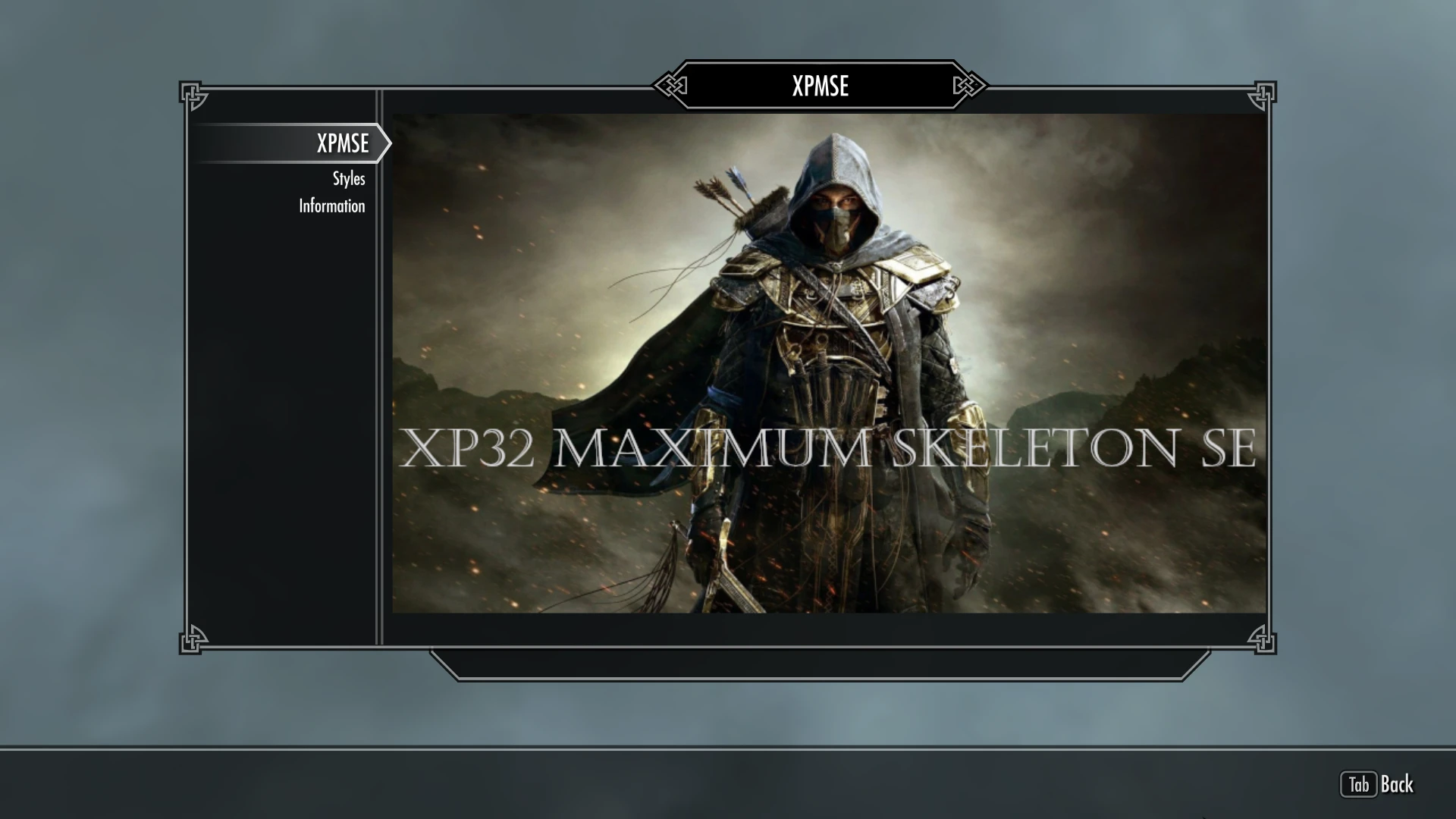
XPMSSE's mod configuration menu (MCM) has a custom image that, in my opinion, doesn't fit well into the aesthetic of Skyrim. It also generally appears pixelated and low quality. This mod replaces the image with a custom, higher quality one. This mod contains no plugin, because it simply overwrites some files included with XPMSSE.
Requirements
-
[]XP32 Maximum Skeleton Special Extended - XPMSSE
[
]SkyUIInstallation
Download the file and install with a mod manager (Mod Organizer 2 or Vortex). Select the option you want in the FOMOD installer. Allow these files to overwrite XPMSSE. To uninstall, simply remove with your desired mod manager. Since this mod changes scripts, it is a good idea to only use it with a new save.
There are five custom images to choose from, as well as an image randomizer option. Three images are "title screens" created using Elder Scrolls Online images of the Breton, High Elf, and Nord heroes; one is a similar graphic made from an image of all three ESO heroes together; and the last is a text only graphic. The image randomizer option allows the MCM to randomly select one of the three "title screen" images of the ESO heroes to display each time the menu is opened.
In the original mod MCM menu script, the image is offset so that it is centred in the menu. To replace the image with a larger one and have it positioned correctly, the script has to be altered slightly. Permissions for the XPMSSE scripts were opened on January 5, 2021, with the mod page permissions stating the following:
Script files:
Do what you want with them.
As such, I edited the original source script (XPMSEMCM.psc) and recompiled it with the Creation Kit. Click below to see the lines changed in the code:
Original Code:
; Load custom logo in DDS format
if (a_page == "")
; Image size 256x256
; X offset = 376 - (height / 2) = 258
; Y offset = 223 - (width / 2) = 95
LoadCustomContent("xpmse/res/mcm_logo.dds", 258, 95)
UnloadCustomContent()
Modified Code for Single Image Replacement Options:
; Load custom logo in DDS format
if (a_page =
This mod replaces the default MCM menu image for XPMSSE with a custom, higher-quality one that better matches Skyrim's aesthetic. It's a simple cosmetic tweak for players who find the original image jarring. With 343 endorsements, it's a niche but appreciated UI polish.
✨ Key Features
📊 Pros & Cons
✅ Pros
- Clean, focused fix for a common aesthetic gripe (343 endorsements).
- Zero impact on gameplay—pure visual polish.
- Easy to install and forget about.
⚠️ Cons
- Only affects the MCM image—no other UI changes.
- Requires XPMSSE to be installed to see the effect.
- Potential conflict with other mods that alter the same MCM menu image.
For Skyrim players who use XPMSSE and care about UI consistency. If the default MCM image bugs you, this is a quick fix. Skip if you don't use XPMSSE or don't notice MCM images.
💡 Beginner Tips
- Make sure XPMSSE is installed before adding this replacer, or the image won't show.
- Use a mod manager to avoid overwriting other MCM tweaks.
- If you see the old image, check your load order—this mod should load after XPMSSE.
📊 Mod Details
- Game
- Skyrim Mods
- Author
- sync67
- Version
- 1.1.0
- Downloads
- 7,228
- Endorsements
- 343
- Category
- User Interface
- Created
- 2/4/2021
- Updated
- 2/7/2021
🔧 How to Install Skyrim Mods
Download from Nexus.
📖 Full step-by-step install guide for Skyrim →
Visit the official mod page for specific installation instructions for this mod.
🎮 Need cheat codes or console commands? Check ur gaming wiki for Skyrim commands, item IDs, and more.
Keep browsing — more Skyrim mods await