Simple No-Spoiler Quest Alert For Map Markers
⚪ Last updated 2021⚠️ Install Order · 5 steps
Install in this order, then this mod last — most mods fail to load without their framework and dependencies in place.
Preview
🔍 Analysis
- 👍 6.2% endorsement rate — high engagement, a strong quality signal
- 🏆 #39 of 99 User Interface mods in this game by downloads
📋 About This Mod
What does it do:
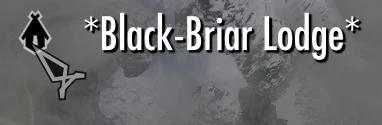
Adds a to each end of the map marker outside every dungeon that is involved in a non-radiant quest. (EX: Black-Briar Lodge). This only applies to dungeons where the quest begins away from the actual dungeon. Dungeons that include quests started inside itself or immediately outside of itself have been left alone. No other information is given nor other changes made except for the on the map marker.
Why does this exist:
I like to mix questing with random exploration, but I hate clearing the same dungeon twice in one playthrough and quests often bug if their location was cleared in advance. Since I do not remember off the top of my head which dungeons are involved in quests, I wanted a mod that tells me. I tried dungeon quest awareness redux, but it gave me too much information. I just wanted a simple icon to tell me to come back later. Thus, I made this mod.
Who is it for:
People like me who want to explore randomly or do radiant quests but don't want to clear a location a second time. If you arrive at a location and see you know to come back later. (EX: Black-Briar Lodge) If you have a save before starting a radiant quest, you can check the map marker for the location of the radiant quest and see if it has a at both ends. (EX: Black-Briar Lodge*). If it does, you can reload and try again for a new radiant quest location.
Who is it not for:
If you want more information, such as where to get the quest involved or whether the dungeon contains world walls and the like, i recommend. Dungeon Quest Awareness Redux Special Edition with Atlas Map Markers at Skyrim Special Edition Nexus - Mods and Community .
Compatibility:
Should be compatible with everything.
Users of the mod MISSIVES: Please note that, unlike skyrim itself, MISSIVES does not actually activate map markers when you accept the radiant quests, it simply gives you a quest marker. As such, you will be unable to see if the location of a missive quest is used for a regular quest until you arrive there. This is part of how MISSIVES works and there is nothing i can do. Creating a save and using the console command TMM 1 0 0 will make all map markers visible and allow you to check the location if desired. Then simply load the save.
Installation: Put it in your data folder or use a mod manager.
Should be fine to add or remove mid-game.
Note to moderators: I made this mod entirely from scratch. I am publishing this mod in good faith with the belief that it is unique and does not violate any terms of this website. If I am mistaken in any regard, please note that I am willing to correct any issues myself as soon as i am notified and ask for the right to correct any honest mistake.
Simple No-Spoiler Quest Alert For Map Markers adds a * to map markers for dungeons tied to non-radiant quests, letting you avoid spoilers until you're on the right quest. A lightweight UI tweak with 444 endorsements, last updated in November 2021.
✨ Key Features
📊 Pros & Cons
✅ Pros
- Community-approved with 444 endorsements and over 7k downloads.
- Does exactly what it says—no bloat, just a simple marker.
- Perfect for players who hate accidental spoilers from exploring too early.
⚠️ Cons
- Last updated in 2021, so it might not be compatible with the latest game patches or DLC.
- Only marks non-radiant quest dungeons—radiant quests are ignored, which could be a letdown for some.
- If you use other map marker mods, there's a chance of conflicts or visual overlap.
For Skyrim players who want to avoid dungeon spoilers on their first playthrough or when following a quest guide. Also great for completionists who like to explore without ruining quest surprises. Skip if you don't care about spoilers or if you use heavy UI overhauls that might conflict.
💡 Beginner Tips
- Make sure to place the mod in your load order after any UI mods that alter map markers.
- If you're using a mod manager, let it handle the file placement to avoid overwriting issues.
- Test the mod on a save with a known quest dungeon to see the asterisk appear.
📊 Mod Details
- Game
- Skyrim Mods
- Author
- Tryvon
- Version
- 1.02
- Downloads
- 7,175
- Endorsements
- 444
- Category
- User Interface
- Created
- 1/13/2021
- Updated
- 11/29/2021
🔧 How to Install Skyrim Mods
Download from Nexus.
📖 Full step-by-step install guide for Skyrim →
Visit the official mod page for specific installation instructions for this mod.
🎮 Need cheat codes or console commands? Check ur gaming wiki for Skyrim commands, item IDs, and more.
Keep browsing — more Skyrim mods await