Vibrant Map Markers
⚪ Last updated 2023⚠️ Install Order · 5 steps
Install in this order, then this mod last — most mods fail to load without their framework and dependencies in place.
Preview
🔍 Analysis
- 👍 0.7% endorsement rate
- 🏆 #140 of 154 User Interface mods in this game by downloads
📋 About This Mod
Features:
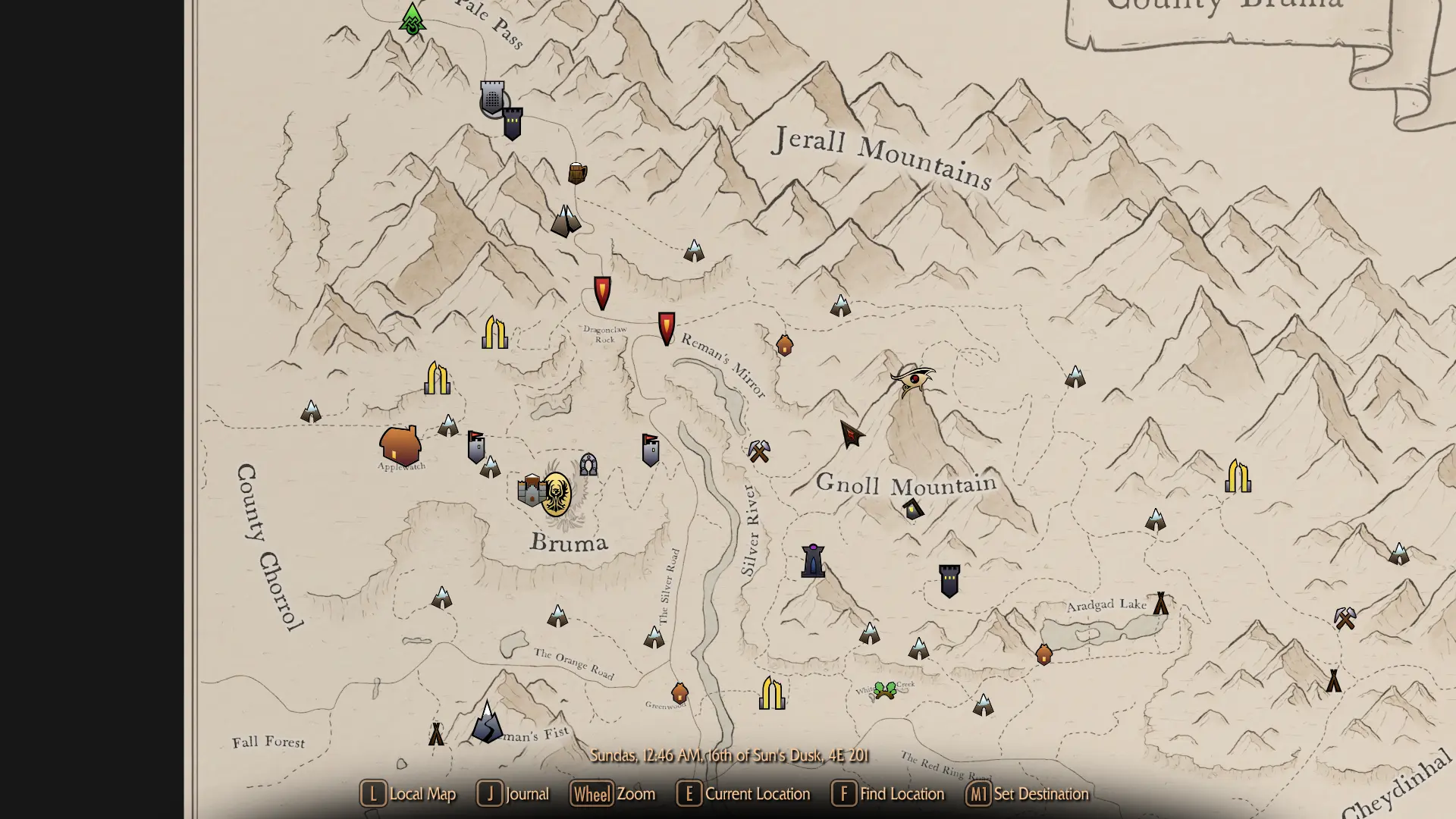
- all markers with gradiant in .svg format so no jagged edges of the markers and reduced file size
- fixed vanilla paths of the markers where necessary
- tweaked some of the markers from the original Colorful Map Markers Mod where I thought it was an improvement
- added CoMAP markers (Bruma, CoMAP, CotN, Holds, LotD, Maslea, Wt --> all covered)
- Compass compatability for vanilla, SkyHUD and Compass Navigation Overhaul as of version 1. 1. There is an optional file if using Dear Diary Dark Mode and Compass Navigation Overhaul for the updated Compass (if DDDM gets updated this will no longer be necessary).
Planned Features:
- Compass compatability. Will be added as soon as the compatability of the Compass Navigation Overhaul and CoMAP is released. For SkyHUD and other HUD mods this could already be provided, but I want to finish the Compass setup all in one.
Installation:
Just install it with your mod manager and use the FOMOD for the CoMAP and Compass options according to your setup. Then let my mod overwrite the other mods.
Feedback:
Please leave your feedback in the Comments section. I will not react to DMs and unfortunately I can provide only very superficial technical support since I am a beginner. So any missing markers, weird colors etc. is very likely out of my abilities to help you with.
-
[]Your lights and windows in the markers are not quite like the ones from Wildgoat007, why is that?
Well, the original markers have been made not as .svg but imported .png files which allowed the original creator to use more sophistaced effects such as blur or glow effects. While I tried to recreate these effects with decent succes in Inkscape using a blur method and radial gradiant effects the reimporting of the files in the FFDec (JPEXS) did not support these features. Hence there are only gradiant effects in the windows/lights, but no blur sadly. This might very well be possible by changing the DefineShapeTag but I do not know enough about these things as a beginner.
- [
Yeah maybe, just let me know in the Comments section.
- Why did you change some of the original colors?
For some markers I made these changes because I consider them an improvement in color variety or just being closer to vanilla (Riften, Morthal i.e.) If you disagree with these changes feel free to change them or just use the markers from the other mods.}
Credits
iTitoMix (original Mod author of Pastel Map Markers)
Wildgoat07 (original Author and artist, please endorse his original work of the Colorful Map Markers Mod)
Fuzzles (helped me a lot to make this mod)
uranreactor (le
Vibrant Map Markers replaces vanilla and CoMAP map markers with vibrant versions inspired by Wildgoat07's Colorful Map Markers. A popular UI mod with over 1,000 endorsements, last updated in February 2023.
✨ Key Features
📊 Pros & Cons
✅ Pros
- Community favorite with 1,051 endorsements and 154k downloads
- Works with both vanilla and CoMAP markers, so you get a consistent look
- Simple visual upgrade that makes the map pop without changing gameplay
⚠️ Cons
- Last updated in early 2023, so it might not be compatible with the latest game patches
- Only affects map markers – if you want other UI changes, this won't help
- Potential conflicts with other UI overhaul mods that touch map markers
For players who want a more colorful and vibrant map without overhauling the whole UI. If you use CoMAP, this is a must-have to keep markers consistent. Skip if you're happy with vanilla markers or want more comprehensive UI changes.
💡 Beginner Tips
- If you use CoMAP, install this after CoMAP so it overwrites the marker textures.
- Check your mod manager's preview to see the new markers before loading in.
- Since it's a texture replacer, it should work with most load orders – just place it after other UI mods.
📊 Mod Details
- Game
- Skyrim Mods
- Author
- AptenodytE
- Version
- 1.1
- Downloads
- 154,315
- Endorsements
- 1,051
- Category
- User Interface
- Created
- 1/26/2023
- Updated
- 2/27/2023
🧩 Commonly Used Together
Users add these mods to the same collections — a real compatibility signal, not an AI guess.
🔧 How to Install Skyrim Mods
Download from Nexus.
📖 Full step-by-step install guide for Skyrim →
Visit the official mod page for specific installation instructions for this mod.
🎮 Need cheat codes or console commands? Check ur gaming wiki for Skyrim commands, item IDs, and more.
Keep browsing — more Skyrim mods await