TrueHUD - HUD Additions
⚪ Last updated 2023This mod may not work until the author updates it. Check for an update, or see the rollback guide.
⚠️ Install Order · 6 steps
Install in this order, then this mod last — most mods fail to load without their framework and dependencies in place.
Preview
🔍 Analysis
- 👍 0.7% endorsement rate
- 🏆 #5 of 141 User Interface mods in this game by downloads
📋 About This Mod
The mod started its existence when I wasn't able anymore to rationalize adding more unrelated HUD elements to True Directional Movement. I've made the decision to move all the HUD components to a separate mod, while also reworking and improving them. The plugin will also serve as a sort of hub for my (or someone else's) other SKSE plugins that want to add and control HUD widgets.
Please excuse the cheesy name but I just couldn't resist the name connection with True Directional Movement.
-
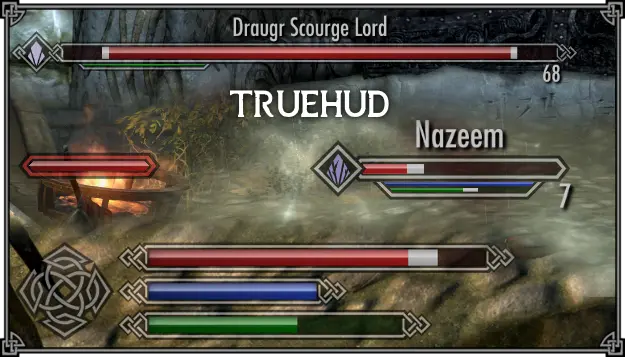
[]Floating info bars for any amount of actors - enemies or teammates.
[
]Boss health bars[]Moveable/scalable player health/magicka/stamina bars, a shout cooldown indicator and a combined enchantment charge meter
[]Recent loot log
[]An API for other plugins to use
[]Special bars that can be utilized by other plugins to represent a value like stun progress or current poise
[]Everything is done through SKSE, can be installed/uninstalled anytime
[]Modular and flexible - all features can be disabled and configured through MCM
An info bar is a small animated widget that shows the enemy health, and, optionally, other things that might be of interest. All the features can be toggled per actor type (current target, enemies, teammates, and others).
-
[]The name
[
]An indicator on the left side which can contain either a soul icon (by Mern) representing the required soul gem level, a minimalistic square colored by the relative difficulty, or simply the character's level as a number[]Resource bars (magicka/stamina) - they can be configured to show up only when the resource has changed from default
[]Recent damage counter
- Special bar - described in a section below
The default settings are set up in such a way that your current target (the one that would show up below the compass on the vanilla target bar, or the current target of True Directional Movement's target lock) has a wider health bar, with the name and soul indicator enabled, while other enemies have smaller, minimalistic bars.
Certain enemies you encounter will automatically get detected as bosses and the mod will display their health in a form of a big, static bar on your screen.
The boss bar shares a lot of the features with the floating info bars, however they can be configured independently. The screen position can be freely changed through the MCM, and there's an option to either displace the subtitles upwards or disable the compass while a boss bar is visible so the bar can find a good place on your HUD.
There are two settings presets available to load for your convenience, one sets up the boss bar as a replacement for th
-
[]The name
TrueHUD is a modular HUD overhaul for Skyrim, extracting and enhancing features from True Directional Movement. It adds customizable actor info bars, boss bars, a player widget, and a recent loot log, plus an API for other mods. With 60,522 endorsements and 8.4M downloads, it's a highly popular UI enhancement.
✨ Key Features
📊 Pros & Cons
✅ Pros
- Massive community trust with 60,522 endorsements and 8.4M downloads.
- Reworked and improved from True Directional Movement's HUD parts.
- Highly customizable and modular—tweak every element to your liking.
⚠️ Cons
- Last updated December 2023—may need updates for newer Skyrim versions.
- Configuration can be overwhelming for new users due to many options.
For Skyrim players who want a cleaner, more informative HUD without overhauling the entire UI. Perfect for modders who want to build on its API. Skip if you prefer vanilla HUD or minimal UI changes.
💡 Beginner Tips
- Use a mod manager like MO2 or Vortex for easy installation and updates.
- Check the mod's MCM menu to enable/disable individual HUD elements.
- Ensure you have the latest SKSE64 for your Skyrim version to avoid crashes.
📊 Mod Details
- Game
- Skyrim Mods
- Author
- Ersh
- Version
- 1.1.9
- Downloads
- 8,427,415
- Endorsements
- 60,522
- Category
- User Interface
- Created
- 2/2/2022
- Updated
- 12/24/2023
🔧 How to Install Skyrim Mods
Download from Nexus.
📖 Full step-by-step install guide for Skyrim →
Visit the official mod page for specific installation instructions for this mod.
🎮 Need cheat codes or console commands? Check ur gaming wiki for Skyrim commands, item IDs, and more.
Keep browsing — more Skyrim mods await