Subtitles
🟠 Updated over a year ago⚠️ Install Order · 5 steps
Install in this order, then this mod last — most mods fail to load without their framework and dependencies in place.
Preview
🔍 Analysis
- 👍 0.4% endorsement rate
- 🏆 #94 of 141 User Interface mods in this game by downloads
📋 About This Mod
Subtitles
as in more than one
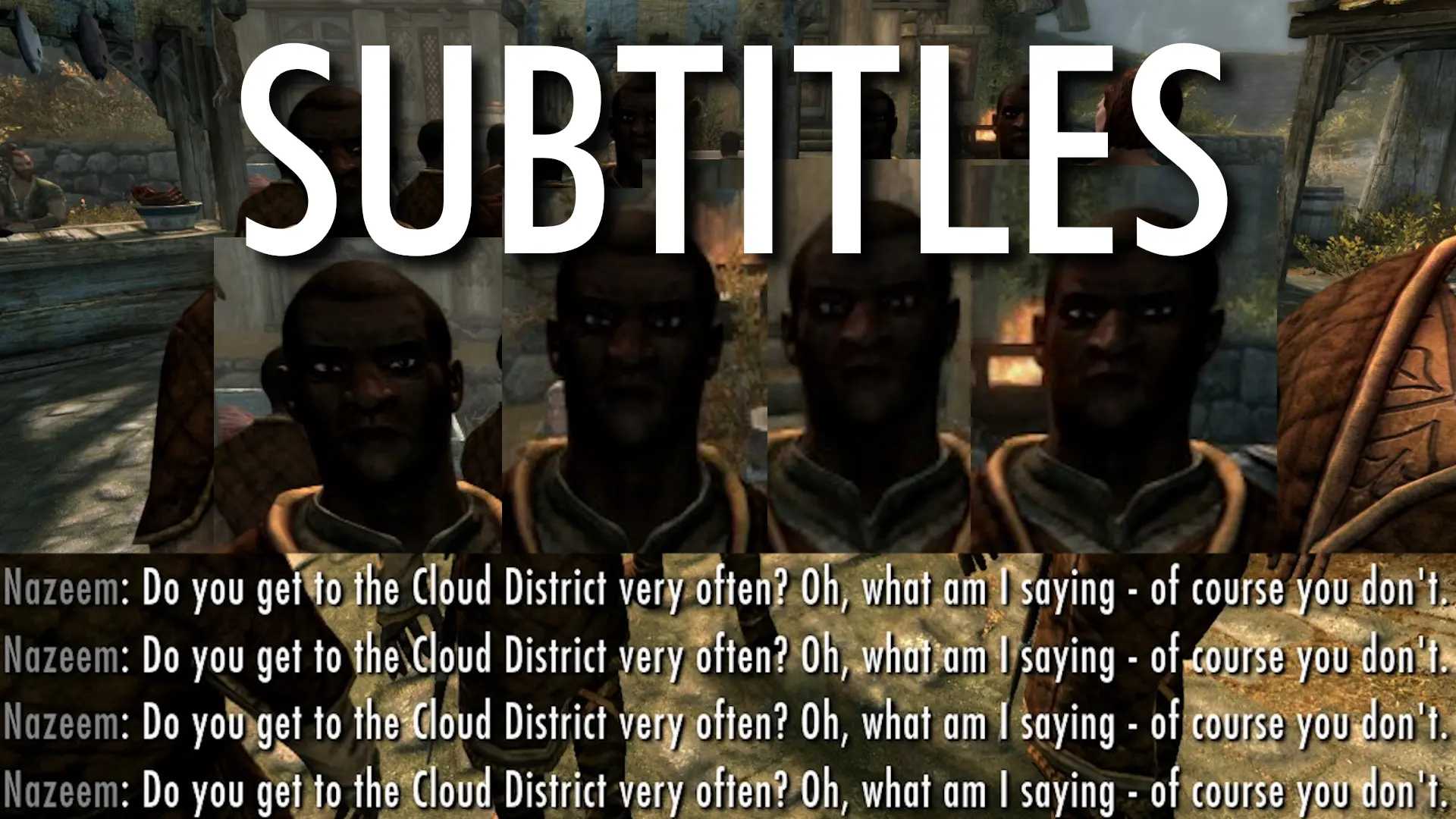
Show up to four (by default) subtitles at the same time.
This is an SKSE plugin built against CommonLibSSE-NG, so it's compatible with all the major versions.
Requirements
Address Library
(Optional) NPC Names Distributor
For VR support: Subtitles VR by FlayaN
Configuration
-
numDisplayedSubtitles ; controls the maximum number of subtitles to be displayed at once. Default: 4
dimBackgroundSubtitles ; when enabled, the closest subtitle is colored differently from others. Default: false
; the following two settings have no effect if dimBackgroundSubtitles is set to false
foregroundSubtitleColor ; 6-digit hex string. Color of the foreground subtitle. Default: FFFFFF
backgroundSubtitleColor ; 6-digit hex string. Color of background subtitles. Default: 999999
Future plans
-
[](Optionally) multicoloured NPC names
[
]make each subtitle's position "sticky," so the order won't change as speakers get closer or farther[](Distant future) Better Third-Person Selection-style floating subtitles under each NPC's face
[]Make "background" subtitles darker/dimmer, however "background" should be defined Added in 0. 5. 0
Known Incompatibility
- Less Intrusive HUD II SE can cause subtitles beyond the first to flicker. Apparently this can be resolved by changing subtitle line spacing in that mod's in-game configuration.
Source
-
[](Optionally) multicoloured NPC names
Subtitles is an SKSE plugin for Skyrim that adds support for multiple subtitles on screen at once. With over 5,600 endorsements and 1.5 million downloads, it's a highly popular UI improvement for players who want to read all dialogue lines without missing context. Last updated January 2025, it remains actively maintained.
✨ Key Features
📊 Pros & Cons
✅ Pros
- Huge community trust: 5,632 endorsements and 1.5M downloads show it's a must-have for many
- Solves a real annoyance: no more missing dialogue because a new line overwrites the old one
- Actively maintained: last updated January 2025, so it's likely compatible with current Skyrim versions
⚠️ Cons
- Requires SKSE, so you'll need to install that first if you haven't already
- No detailed description provided, so you'll have to rely on community guides for setup specifics
- May not work with other UI mods that alter subtitle behavior—test for conflicts
For Skyrim players who hate missing dialogue because subtitles get cut off. If you're a lore enthusiast or just want to catch every line during busy scenes, this is a no-brainer. Skip if you play without subtitles or don't use SKSE.
💡 Beginner Tips
- Make sure you have the correct version of SKSE for your Skyrim build (SE or AE) before installing.
- Use a mod manager like Vortex or Mod Organizer 2 to handle the plugin files and avoid manual errors.
- If you use other UI mods, check their compatibility pages or test in-game to ensure subtitles work together.
📊 Mod Details
- Game
- Skyrim Mods
- Author
- kpvw aka Water Face
- Version
- 0.6.2
- Downloads
- 1,470,094
- Endorsements
- 5,632
- Category
- User Interface
- Created
- 3/6/2024
- Updated
- 1/20/2025
🧩 Commonly Used Together
Users add these mods to the same collections — a real compatibility signal, not an AI guess.
🔧 How to Install Skyrim Mods
Download from Nexus.
📖 Full step-by-step install guide for Skyrim →
Visit the official mod page for specific installation instructions for this mod.
🎮 Need cheat codes or console commands? Check ur gaming wiki for Skyrim commands, item IDs, and more.
Keep browsing — more Skyrim mods await