Skyrim Upscaler VR - DLSS FSR2 XeSS
🟠 Updated over a year ago⚠️ Install Order · 5 steps
Install in this order, then this mod last — most mods fail to load without their framework and dependencies in place.
🖼️ Gallery (2 images)
🔍 Analysis
- 👍 0.3% endorsement rate
- 🏆 #64 of 72 Visuals and Graphics mods in this game by downloads
📋 About This Mod
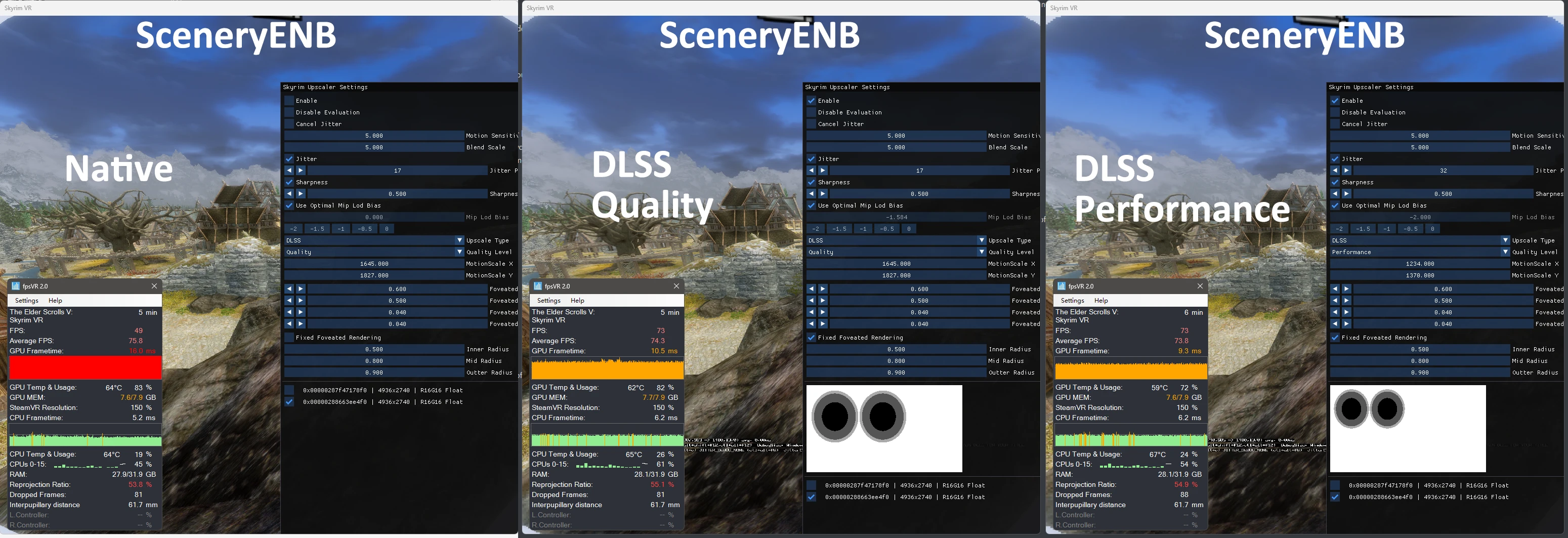
SKSE Plugin to use DLSS/FSR2/XeSS in SkyrimVR.
OVERVIEW
SKSE Plugin to use DLSS/FSR2/XeSS in SkyrimVR, also supports DLAA.
Featuring fixed foveated DLSS and fixed foveated rendering specifically for VR.
REQUIREMENTS
VR Address Library for SKSEVR
Upscaler Base Plugin
INSTALLATION
-
[]Install all the dependencies using vortex or MO2, for Upscaler Base Plugin you just simply install it to data folder, I mean drag the whole UpscalerBasePlugin folder into Data, or install in MO2, the Data stucture should be like Data\UpscalerBasePlugin.
[
]Extra step for UpscalerBasePlugin, cuz I can't include dlls from Nvidia/AMD/Intel, you need to check its description and download the dll for the upscaler you want to use.[]Since VR ENB supports dynamic resolution from the beginning, it's compatible, but remember to turn off Edge AA.
[]Keep TAA on, only toggle the Use TAA For Periphery option in the menu. The TAA option didn't really matter since Use TAA For Periphery overwrites it, if you check Use TAA For Periphery TAA is forced on, if you uncheck it TAA is forced off. But keeping it on as default might solve some weird issue.
[]Do not play in fullscreen mode, turn it off in SkyrimPrefs.ini, set bFull Screen=0
[]Press END in the game to open the menu for upscalers.
[]Adjust Fixed Foveated DLSS rect and Fixed Foveated Rendering circles in the menu to your liking. Blue rectangle represents the DLSS area, don't make it too large or it will consume a lot of frametime.
Notes
-
[]I should mention that I only tested DLSS/DLAA, FSR2 can potentially work, but XeSS isn't good in VR so just don't use it.
[]Only RTX cards can use DLSS/DLAA.
[]FFR is implemented using Variable Rate Shading which only works for NVIDIA RTX / GTX 16xx cards
- Added FSR2 Native DX11 Implementation! This should boost performance and fix many compatibility when using FSR2. Check the UpscalerBasePlugin page!
COMPATIBILITY
It should be compatible with most mods that work in VR.
But I haven't tested every mod so if you find a conflict you can tell me so I can add it to the list or make compatibility.
Don't use VRPerfkit with this mod, SkyrimUpscaler replaces it.
But the exception is CAS, you can still use VRPerfkit's CAS sharpener, just don't use FSR or FFR in vrperfkit.
I also just found out that OpenComposite doesn't work well wit
-
[]I should mention that I only tested DLSS/DLAA, FSR2 can potentially work, but XeSS isn't good in VR so just don't use it.
📊 Mod Details
- Game
- Skyrim Mods
- Author
- PureDark
- Version
- 1.2.1
- Downloads
- 265,933
- Endorsements
- 752
- Category
- Visuals and Graphics
- Created
- 1/6/2023
- Updated
- 12/21/2024
🔧 How to Install Skyrim Mods
Download from Nexus.
📖 Full step-by-step install guide for Skyrim →
Visit the official mod page for specific installation instructions for this mod.
🎮 Need cheat codes or console commands? Check ur gaming wiki for Skyrim commands, item IDs, and more.
Keep browsing — more Skyrim mods await