Skyrim Upscaler - DLSS FSR2 XeSS
⚪ Last updated 2024⚠️ Install Order · 6 steps
Install in this order, then this mod last — most mods fail to load without their framework and dependencies in place.
🖼️ Gallery (2 images)
🔍 Analysis
- 👍 0.8% endorsement rate
- 🏆 #24 of 86 Visuals and Graphics mods in this game by downloads
📋 About This Mod
OVERVIEW
SKSE Plugin to use DLSS/FSR2/XeSS in Skyrim, also supports DLAA.
REQUIREMENTS
Address Library for SKSE Plugins
Upscaler Base Plugin
INSTALLATION
-
[]Install all the dependencies using vortex or MO2, for Upscaler Base Plugin you just simply install it to data folder, I mean drag the whole UpscalerBasePlugin folder into Data, or install in MO2, the Data stucture should be like Data\UpscalerBasePlugin.
[
]Extra step for UpscalerBasePlugin, cuz I can't include dlls from Nvidia/AMD/Intel, you need to check its description and download the dll for the upscaler you want to use.[]Turn off TAA and DOF, anything that will blur the input for upscalers must be turned off.
[]If you use ENB with DLAA, also turn off Edge AA and DOF in ENB. I forgot DLAA involves no upscaling, so if you use DLAA you can keep DOF on.
[]Press END in the game to open the menu for upscalers.
[](Optional) Install Reshade for DOF and other effects, since it applies its effects after the upscaling.
Notes
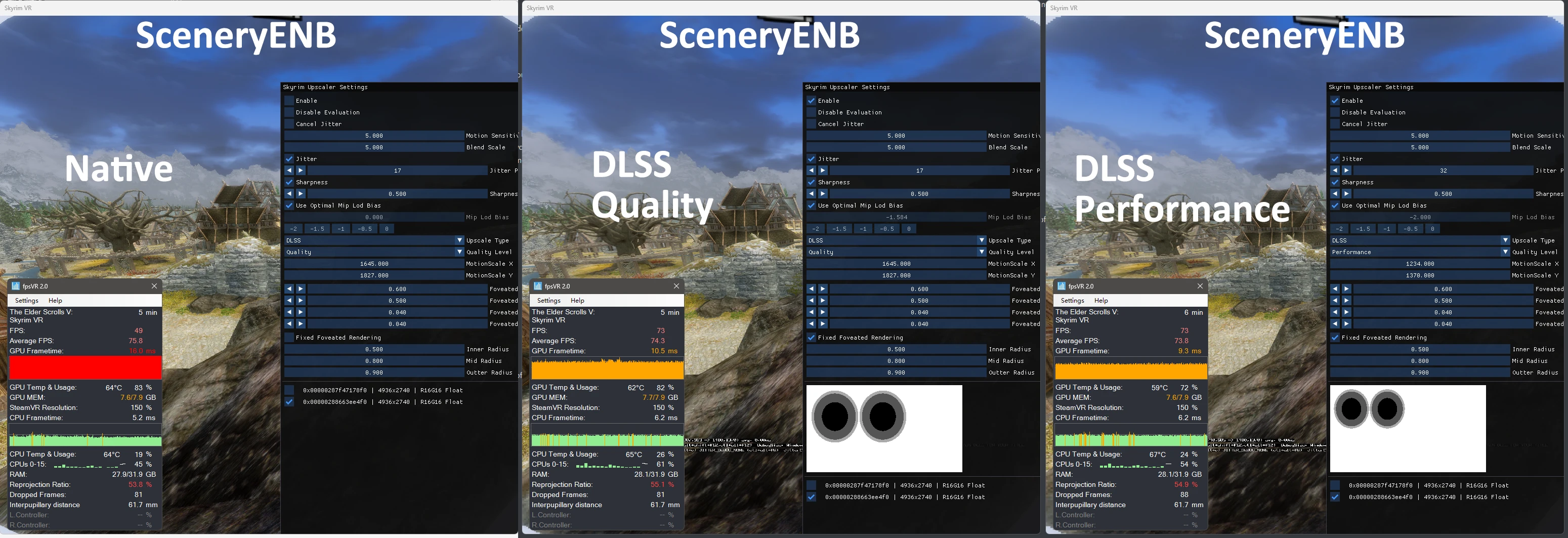
[]DLSS/FSR2/XeSS don't work with ENB, but you can still use DLAA with ENB since there's no upscaling.
[]A workaround version with ENB compatiblity is in development, and Boris also said he would do compatiblity from his side, when he does this version will be compatible with ENB.
[]NOTE That they are two different things, ENB got issue with DRS, that's why it doesn't work with this mod, I made a workaround on my own using a completely different method that's hacky but works. When Boris decides to made compatibility for DRS, this mod will just work without needing any change.
[]Non-RTX card doesn't support DLSS/DLAA, but you can use FSR2 and XeSS with it.
[]But since both FSR2 and XeSS has no official DX11 implementation released, I was forced to make a DX11/DX12 hybrid solution, so your card must at least support DX12 to use FSR2 and XeSS
[]Added FSR2 Native DX11 Implementation! This should boost performance and fix many compatibility when using FSR2. Check the UpscalerBasePlugin page!
[]VR version is officially released! Check Skyrim Upscaler VR - DLSS FSR2 XeSS
[]Performance gain depends on how much you are GPU limited, if you don't see any gains it's very normal, you are most likely CPU limited.
[*]Even if you can't get more FPS in a CPU limited case, you are however getting the superior AA from the DLSS pipeline, it's much better than TAA, or you can just use DLAA (with performance cost).
Skyrim Upscaler is an SKSE plugin that integrates DLSS, FSR2, XeSS, and DLAA into Skyrim, offering modern upscaling for improved performance and visual quality. Ideal for players with compatible GPUs seeking higher framerates or sharper images.
✨ Key Features
📊 Pros & Cons
✅ Pros
- Huge community trust (6,138 endorsements) — this is the go-to upscaler for Skyrim.
- Supports all major upscaling techs (DLSS, FSR2, XeSS) plus DLAA, so you're covered regardless of GPU brand.
- Massive download count (770k+) proves it works for a ton of players.
⚠️ Cons
- Requires SKSE and a compatible GPU — not a plug-and-play for everyone.
- No detailed setup instructions in the description; you'll need to know your way around SKSE plugins.
- Last updated in September 2024 — may need updates for future Skyrim patches.
For Skyrim players with RTX or AMD/Intel GPUs who want better performance or image quality without sacrificing visuals. Skip if you're on an older GPU that doesn't support these upscalers or if you prefer vanilla rendering.
💡 Beginner Tips
- Make sure you have the latest SKSE64 installed and that your game version matches the SKSE version.
- In-game, open the ENB or mod settings to select your preferred upscaler (DLSS for Nvidia, FSR2 for AMD/Intel).
- If you're using a mod manager, install the plugin via MO2 or Vortex to keep your Data folder clean.
📊 Mod Details
- Game
- Skyrim Mods
- Author
- PureDark
- Version
- 1.2.1
- Downloads
- 770,491
- Endorsements
- 6,138
- Category
- Visuals and Graphics
- Created
- 12/9/2022
- Updated
- 9/16/2024
🔧 How to Install Skyrim Mods
Download from Nexus.
📖 Full step-by-step install guide for Skyrim →
Visit the official mod page for specific installation instructions for this mod.
🎮 Need cheat codes or console commands? Check ur gaming wiki for Skyrim commands, item IDs, and more.
Keep browsing — more Skyrim mods await