Skyrim Performance - More FPS
⚪ Last updated 2017⚠️ Install Order · 5 steps
Install in this order, then this mod last — most mods fail to load without their framework and dependencies in place.
Preview
🔍 Analysis
- 👍 5.4% endorsement rate — high engagement, a strong quality signal
- 🏆 #34 of 54 Visuals and Graphics mods in this game by downloads
📋 About This Mod
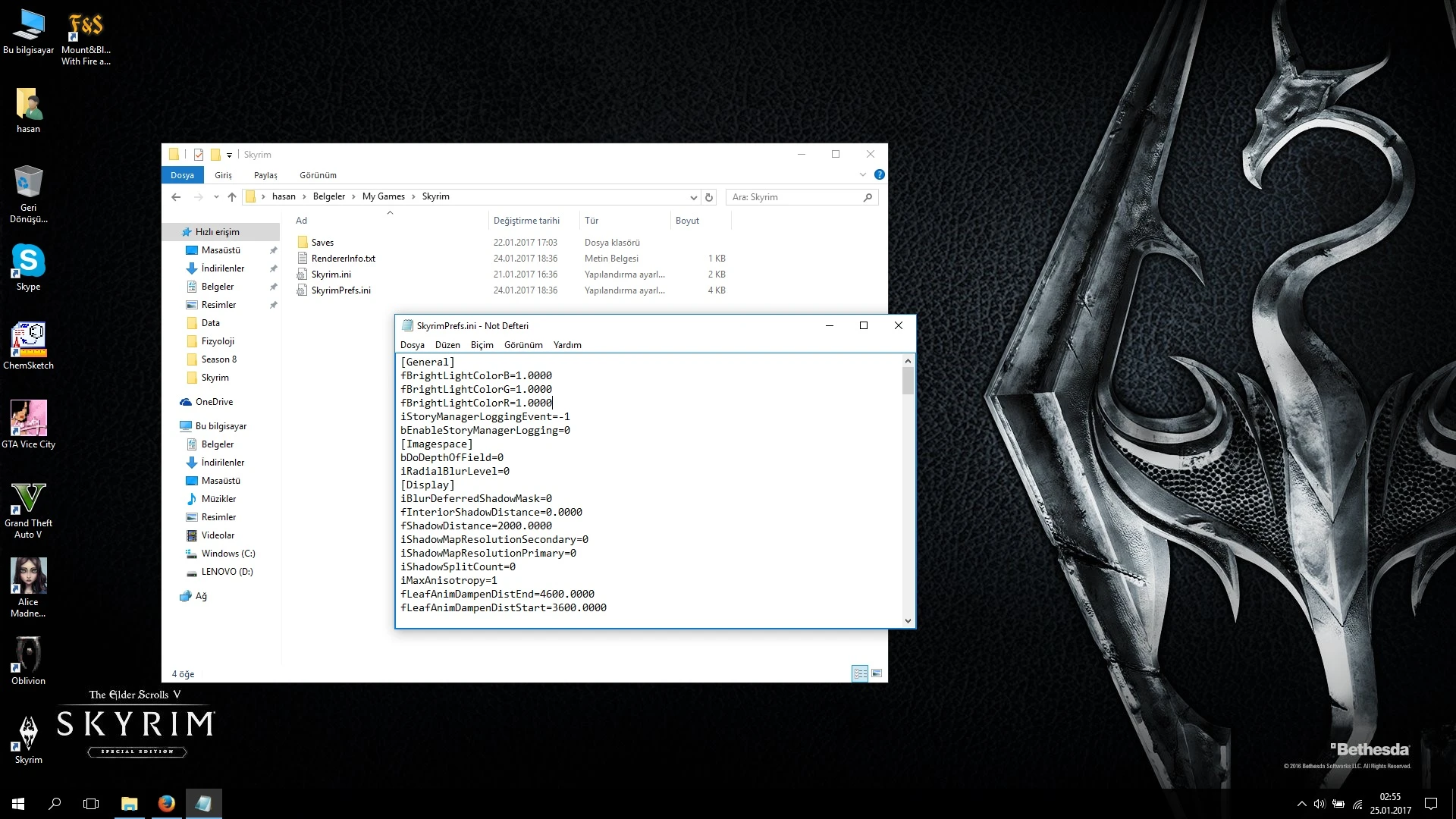
This mod makes a huge FPS and performance boost on your Skyrim! You can get 15+ FPS with this .ini tweak! It's the best Skyrim SkyrimPrefs.ini tweak that you can find in all of the internet! Beware of fakes!
What does this mod do?
This mod make you increase your performance, but how? In this tweak, I found and removed the things that makes lag in game but not necessary, and some details that no one cares or even not realizes. So, why we need them? Along with these, i reduced shadows too, but if you want shadows, you can check the read me page to see how to optimize it for you.
I understand what is this mod for, but what I have to do?
Download the file as manual download, and extract it to your "My Documents > My Games > Skyrim" directory. Backup your original SkyrimPrefs.ini file somewhere, and open my tweak. Find these lines: bFull Screen=0 iSize H=600 iSize W=800 and change them to your own specifications. Find this line: sD3DDevice="NVIDIA Geforce 8800 GS" and change this with your original .ini file's same line.
If you have screenshots, find this line: iScreenShotIndex=0 and change the number to + 1. Now your SkyrimPrefs.ini file is read to play!
I have played enough and I think there are so less quality shadows. What I have to do?
For more shadows, find this lines: iShadowMapResolutionSecondary=0 iShadowMapResolutionPrimary=0 and you can change the 0 to 1024, 2048 and 4096 both. Bigger number means better shadows. If you have more questions about shadows, you can check comments. If you didn't find what you want, you can write a new comment to me, I'll try to answer and find a solution for you.
I want more/less light effect!
You can find this line: iMaxDesired=750 and you can change the number with bigger or smaller numbers, 750 is Skyrim's default, but you can boost it, for example 950, or you can reduce it. 0 is the lowest.
It looks dark for me, what I have to do?
Colorful Lights - No Shadows mod can be a sol
A simple SkyrimPrefs.ini tweak that adjusts graphics settings to boost FPS. With 2,293 endorsements and 42,292 downloads, it's a popular performance mod for players with weaker systems. Last updated in 2017, it remains a straightforward drop-in solution for improving frame rates.
✨ Key Features
📊 Pros & Cons
✅ Pros
- Community-approved (2,293 endorsements) and widely downloaded (42,292)
- Easy to install – just replace your SkyrimPrefs.ini
- Great for low-end PCs looking for a quick FPS boost
⚠️ Cons
- Last updated in 2017, so it may not be optimized for the latest Skyrim versions or mods
- Overwrites your current settings, so you'll lose any custom tweaks
- Compatibility risk with other mods that modify SkyrimPrefs.ini
For players with older or weaker PCs who want a quick FPS boost without fiddling with many settings. Also for those who prefer a simple, no-frills performance tweak. Skip if you're using an ENB or other graphics mods that require specific ini settings.
💡 Beginner Tips
- Back up your original SkyrimPrefs.ini before replacing it so you can revert if needed.
- After installing, launch the game and adjust any settings you care about (like resolution) in the launcher, as the mod may set them to low.
- If you use mods that change ini files (like ENB), install this first and then re-apply those mods' settings.
📊 Mod Details
- Game
- Skyrim Mods
- Author
- hasanalicik
- Version
- SE
- Downloads
- 42,292
- Endorsements
- 2,293
- Category
- Visuals and Graphics
- Created
- 1/25/2017
- Updated
- 1/25/2017
🔧 How to Install Skyrim Mods
Download from Nexus.
📖 Full step-by-step install guide for Skyrim →
Visit the official mod page for specific installation instructions for this mod.
🎮 Need cheat codes or console commands? Check ur gaming wiki for Skyrim commands, item IDs, and more.
Keep browsing — more Skyrim mods await