Universal Fog Remover (Interiors and Exteriors) SKSE64 Plugin
⚪ Last updated 2022⚠️ Install Order · 6 steps
Install in this order, then this mod last — most mods fail to load without their framework and dependencies in place.
Preview
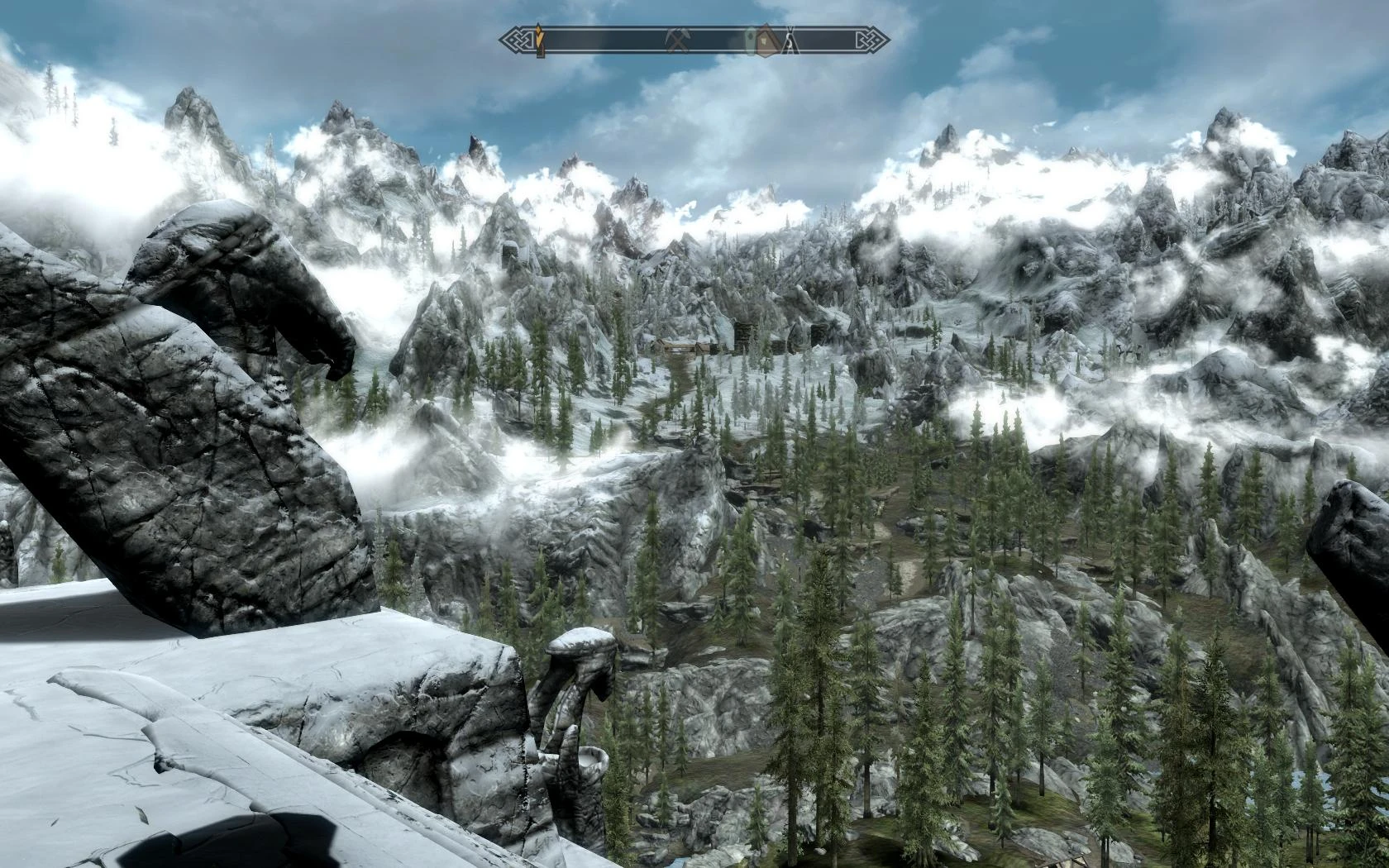
🔍 Analysis
- 👍 4.0% endorsement rate — high engagement, a strong quality signal
- 🏆 #13 of 54 Visuals and Graphics mods in this game by downloads
📋 About This Mod
This SKSE64 plugin can automatically set a global fog settings for new or loaded game, the exact same way you can manually do it with the SetFog console command.
By default any interior or exterior fog will be made to only render at a far distance. This can look weird in the distance for exteriors if you don't use LOD enhancer mods such as:
- HD LODs Textures SE
- Terrain LOD redone
However the settings can be tweaked to your liking. For example, try various settings ingame using the console command:
SetFog <StartDepth>, <EndDepth>
Then modify the settings to match what you like inside SKSE64_Elys_UFR.ini file.
For example If you want to have clearer interiors but still some fog for exteriors you can try such setting in the Data\SKSE\Plugins\SKSE64_Elys_UFR.ini file.
bEnabled = 1
iStartDepth = 5000
iEndDepth = 500000
================================
Skyrim SE -Elys- Universal Fog Remover
================================
1. Description
2. Requirements
3. Installing
4. Optional Settings
5. Uninstalling
7. Disclaimer
===============
1. DESCRIPTION
===============
This plugin Automatically can set Fog settings on new or saved game. (exactly similar to using the SetFog console command).
================
2. REQUIREMENTS
================
Skyrim Anniversary version is required.
Skyrim SE Script Extender. ( http://skse.silverlock.org/ )
==============
3. INSTALLING
==============
Use a mod manager.
Extract the content of this archive into your Skyrim folder.
If correctly extracted you should find SKSE64_Elys_UFR.dll inside your "<Skyrim installation folder>\DATA\SKSE\Plugins\"
==========================
4. OPTIONAL SETTINGS
==========================
You can tweak or disable UFR by modifying values inside SKSE64_Elys_UFR.ini
================
5. UNINSTALLING
================
Use a mod manager
Delete SKSE64_Elys_UFR.dll and SKSE64_Elys_UFR.ini from your "<Skyrim installation folder>\DATA\SKSE\Plugins\"
And then delete this SKSE64_Elys_UFR_README.txt.
===============
===============
As a surviving golden rule, always backup all your save games before trying a new mod. Better safe than sorry. It applies to this mod as well.
===========================
7. DISCLAIMER
===========================
This software is provided 'as-is', without any express or implied
Universal Fog Remover is a SKSE64 plugin for Skyrim Special Edition that automatically applies fog settings on game load, mimicking the SetFog console command. It removes fog in both interiors and exteriors for a clearer view. With 1,936 endorsements and 48,880 downloads, it's a well-received utility for players who want to eliminate fog without manual console input.
✨ Key Features
📊 Pros & Cons
✅ Pros
- Community favorite with 1,936 endorsements and nearly 49k downloads
- Saves time by auto-applying fog removal instead of typing console commands every session
- Simple, focused tool that does one job well
⚠️ Cons
- Requires SKSE64, so you're locked into that dependency
- Removing fog can break immersion for players who like atmospheric effects
- Potential conflicts with weather or lighting mods that alter fog
For Skyrim SE players who find fog annoying and want a clear view without fiddling with console commands every time. Also great for modders who want consistent visuals for screenshots. Skip if you enjoy atmospheric fog or use mods that rely on it for mood.
💡 Beginner Tips
- Make sure SKSE64 is installed and you launch the game through skse64_loader.exe, not the default launcher.
- If you use a mod manager like Vortex or MO2, install the plugin there and enable it in your load order.
- Test in a foggy area like a dungeon or marsh to confirm the effect works before relying on it.
📊 Mod Details
- Game
- Skyrim Mods
- Author
- Elys
- Version
- 1.0.7.0
- Downloads
- 48,880
- Endorsements
- 1,936
- Category
- Visuals and Graphics
- Created
- 9/13/2018
- Updated
- 1/10/2022
🔧 How to Install Skyrim Mods
Download from Nexus.
📖 Full step-by-step install guide for Skyrim →
Visit the official mod page for specific installation instructions for this mod.
🎮 Need cheat codes or console commands? Check ur gaming wiki for Skyrim commands, item IDs, and more.
Keep browsing — more Skyrim mods await