Serio's Spells and Shouts Hotkeys
⚪ Last updated 2017⚠️ Install Order · 5 steps
Install in this order, then this mod last — most mods fail to load without their framework and dependencies in place.
Preview
🔍 Analysis
- 👍 4.3% endorsement rate — high engagement, a strong quality signal
- 🏆 #23 of 135 User Interface mods in this game by downloads
📋 About This Mod
Serio's Spells and Shouts Hotkeys
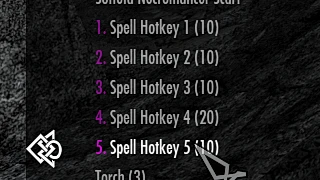
Cycle through 5 different Spell Sets using only 1 button. Up to 25 storable spell sets.
Mod Summary:
- []This mod adds 5 Hotkey Potions to the player. []Store up to 5 spell sets per potion. []Favorite the potions and set them to any vanilla hotkey. []Use the hotkeys to cycle through and equip your spell sets. []New: Weapons and shields can now be added (see section below). Turn on with Options menu.
- []Select a potion from the inventory or favorites menu to configure your sets. []Select the "Cycle" that you wish to set. []The Cycle menu will prompt to store the spells equipped in your right hand, left hand, and voice/power slot to the specified Cycle. []You can choose yes, no, or empty hand (for hand slots). []Empty hand will empty the hand when that set is equipped. []You must have a spell/shout equipped in order for the menu to prompt to store. []Choose "no" for every option in the cycle menu to reset it. []You can store a maximum of 5 sets per potion. []Favorite the potion and set it to a quick menu hotkey. []Use the potion outside of the menus to cycle through the spell sets. []Potions are spam friendly.
[]A potion will initially display the option for "Cycle 1" only by default. []Fill the first Cycle to unlock the option to set the next Cycle, and so on. [*]Resetting a
Serio's Spells and Shouts Hotkeys is a Skyrim UI mod that assigns hotkeys for spells and shouts, eliminating the need to open the favorites menu. It supports weapons and shields, and does not require SKSE. With 267 endorsements and over 6,000 downloads, it remains a niche but functional tool for players seeking quicker access to their abilities.
✨ Key Features
📊 Pros & Cons
✅ Pros
- No SKSE requirement means it works on vanilla Skyrim setups.
- Decent track record with 267 endorsements and over 6,000 downloads.
- Adds hotkey support for weapons and shields, expanding its utility beyond just spells.
⚠️ Cons
- Last updated in 2017, so it may not be compatible with the latest Skyrim versions or mods.
- Potential conflicts with other hotkey or UI mods that modify the same input systems.
- Limited to hotkey functionality; does not offer additional UI enhancements.
For Skyrim players who want to cast spells and use shouts without pausing to open the favorites menu. This is ideal for mage or hybrid builds that rely on quick ability switching. Skip if you're looking for a comprehensive UI overhaul or if you're on a newer Skyrim version that might have compatibility issues.
💡 Beginner Tips
- Since SKSE isn't required, you can install this mod manually by dropping the files into your Data folder, but using a mod manager like Vortex or Mod Organizer 2 is still recommended for easy uninstallation.
- Check your Skyrim version and ensure no other mods are overwriting the same hotkey bindings to avoid conflicts.
- After installing, configure your hotkeys in the mod's MCM menu (if available) or via the in-game settings to match your playstyle.
📊 Mod Details
- Game
- Skyrim Mods
- Author
- Serio
- Version
- 1.05
- Downloads
- 6,204
- Endorsements
- 267
- Category
- User Interface
- Created
- 5/31/2017
- Updated
- 10/1/2017
🔧 How to Install Skyrim Mods
Download from Nexus.
📖 Full step-by-step install guide for Skyrim →
Visit the official mod page for specific installation instructions for this mod.
🎮 Need cheat codes or console commands? Check ur gaming wiki for Skyrim commands, item IDs, and more.
Keep browsing — more Skyrim mods await