Makeup Remover for Bijin Warmaidens SE
⚪ Last updated 2021⚠️ Install Order · 6 steps
Install in this order, then this mod last — most mods fail to load without their framework and dependencies in place.
Preview
🔍 Analysis
- 👍 6.5% endorsement rate — high engagement, a strong quality signal
- 🏆 #171 of 207 Body, Face, and Hair mods in this game by downloads
📋 About This Mod
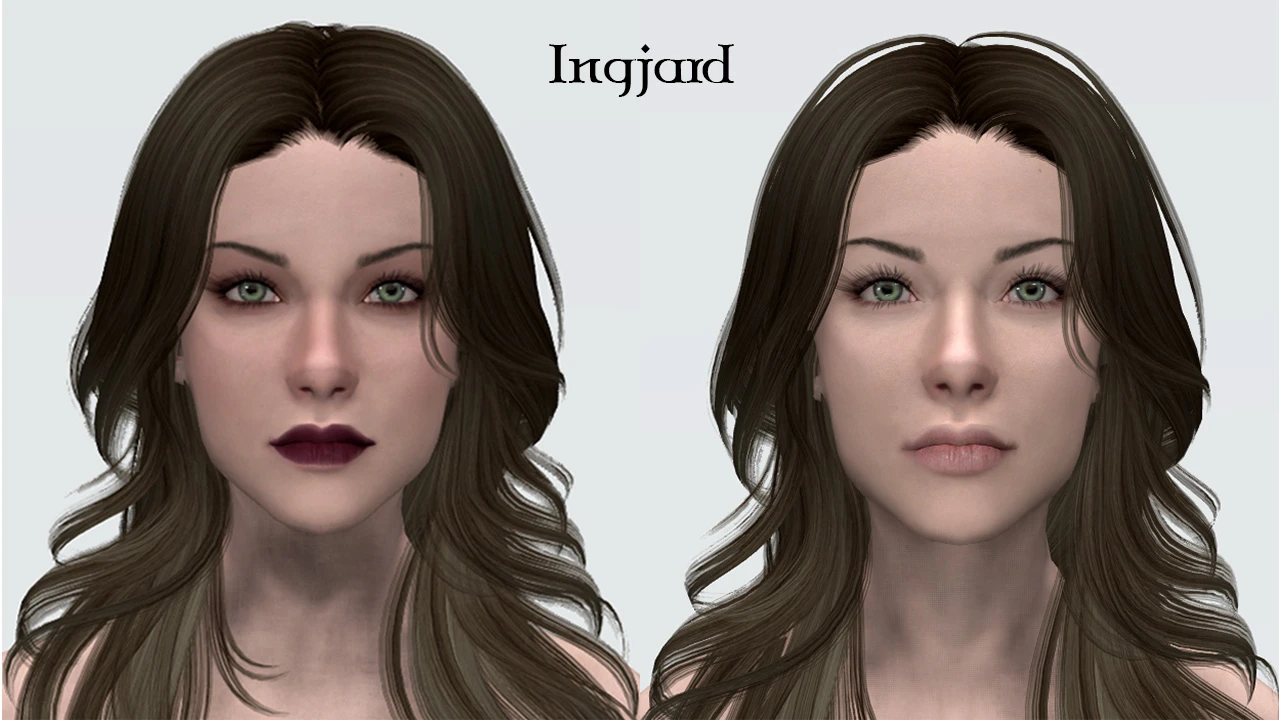
This mod replaces the makeup facetint textures in Bijin Warmaidens SE with blank skintone versions. If you like this mod, there is also one for Wives and NPCs.
Description:
This mod removes makeup and warpaint from NPCs in the mod Bijin Warmaidens SE by rxkx22.
You can choose which character keeps or removes their makeup during installation.
Update 2. 1 removes make-up, but keeps warpaint on Aela, Aranea, Brelyna, Borgakh, Eola, Jenassa, Mjoll, Njada, Rayya and Ria thanks to Shiva182.
Instructions:
All options are chosen during installation. Afterwards, just play the game and enjoy.
Installation:
Use a mod manager like Vortex.
Acquire the mod by clicking the Files tab and clicking on the latest version. Don’t forget to install and enable the mod in your mod software.
Your mod manager might report a conflict. For example, Vortex will provide a pop-up saying “There are unresolved file conflicts”.
Don’t panic, you just need to tell your mod manager to load this mod after Bijin Warmaidens SE and overwrite some files. In Vortex, you can do this directly through the pop-up warning by clicking on “More” and then “Show”. Where it says Makeup Remover for Bijin Warmaidens SE, select the “???” drop down box and choose “after”.
A: According to user insomniamuffin and thesteve812 this mod does work in the original version of Skyrim.
Q: Can I remove the makeup but keep warpaint or vice versa?
A: Yes, thanks to Shiva182, this option is now available on certain characters (see above description for details).
Q: What did you do? It looks like you changed the model’s face!
A: That’s just the magic of cosmetics! The core of the Bijin mods are rxkx22’s hard work on the facial structure and I’d never disrespect that and modify it. Heck, I don’t even know how. All I did was replace texture files.
Q: I have a neck seam problem, how I get rid of it?
A: Some time back, HHaley solved all neck seam issues with the Fair Skin Complexion mod. Specifically by editing the Blankdetailmap.dds texture file. If you use Bijin Skin for Bijin Family SE by Shiva182, then the same texture fix is also included. Choose either. If I recall, the installers will allow you to select only blankdetailmap.dds if you don’t want anything else in the mod.
This mod removes makeup and warpaint from NPCs in Bijin Warmaidens SE, replacing makeup textures with blank skintone versions. It offers installation choices for which characters keep or lose makeup, and an update preserves warpaint on certain characters. Requires a mod manager and must load after the base mod.
✨ Key Features
📊 Pros & Cons
✅ Pros
- Community-approved with 535 endorsements and over 8k downloads
- Gives you control over which NPCs keep their makeup, so you can tailor the look
- Simple install via mod manager, just set load order after Bijin Warmaidens
⚠️ Cons
- Requires Bijin Warmaidens SE as a base mod, so it's useless without it
- Potential file conflicts with the base mod if load order isn't set correctly
- Only affects NPCs from Bijin Warmaidens, not other mods or vanilla faces
For Skyrim players who use Bijin Warmaidens SE but find the heavy makeup unrealistic or too much. If you want a more natural look for those NPCs, this is a quick fix. Skip if you don't use Bijin Warmaidens or prefer the original makeup style.
💡 Beginner Tips
- In Vortex, when the conflict pop-up appears, click 'More' then 'Show' and set Makeup Remover to load 'after' Bijin Warmaidens SE
- If you're using MO2, place Makeup Remover after Bijin Warmaidens in the left pane and let it overwrite
- Test in-game by visiting a character like Aela to see if the makeup is gone; if not, double-check your load order
📊 Mod Details
- Game
- Skyrim Mods
- Author
- vampiredirt
- Version
- 2.1
- Downloads
- 8,189
- Endorsements
- 535
- Category
- Body, Face, and Hair
- Created
- 3/26/2020
- Updated
- 7/18/2021
🔧 How to Install Skyrim Mods
Download from Nexus.
📖 Full step-by-step install guide for Skyrim →
Visit the official mod page for specific installation instructions for this mod.
🎮 Need cheat codes or console commands? Check ur gaming wiki for Skyrim commands, item IDs, and more.
Keep browsing — more Skyrim mods await