Luca's Cellshading ReShade Preset
⚪ Last updated 2020⚠️ Install Order · 7 steps
Install in this order, then this mod last — most mods fail to load without their framework and dependencies in place.
Preview
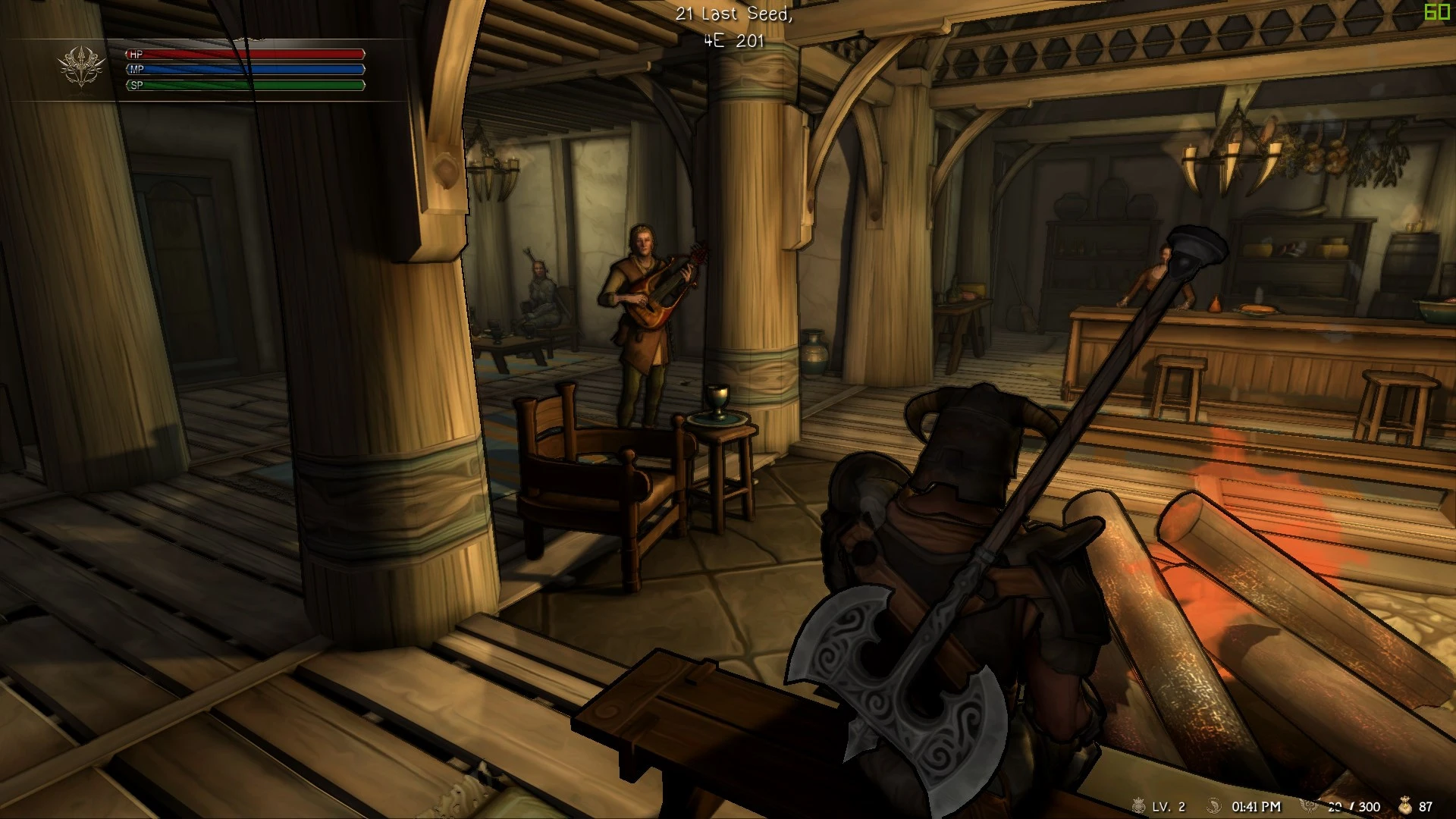
🔍 Analysis
- 👍 1.3% endorsement rate — high engagement, a strong quality signal
- 🏆 #27 of 45 Visuals and Graphics mods in this game by downloads
📋 About This Mod
Recommendation:
I highly recommend you check out Hel's Cel Shading since I like it more than my preset.
Feel free to try them all.
Installation:
1. Download the latest ReShade Version and launch the installer.
2. Select Skyrim or whatever game you want to use this preset with.
3. Select the Render Engine of the Game (DX 10/11/12 for Skyrim SE).
4. Tick the SweetFX by CeeJay.dk and Shaders by Daodan.
5. Install everything.
6. Click "Edit ReShade settings" and select my preset.
7. Hit ok and close the installer.
To get the exact same Visuals as in the Screenshots you need the Customizable UI Replacer
and ASO - Artistic Skyrim Overhaul with my fixes.
Hall of Fame - List of Supporters
Luca's Cellshading ReShade Preset is a visual enhancement for Skyrim that applies a Borderlands-style cellshaded look, designed to work with The Artistic Skyrim Overhaul Mod. It aims to deliver this aesthetic on lower-end PCs with acceptable framerates. With 71 endorsements and over 5,500 downloads, it's a niche but popular choice for stylized visuals.
✨ Key Features
📊 Pros & Cons
✅ Pros
- Gives Skyrim a unique Borderlands vibe that stands out from typical fantasy visuals
- Performance-friendly for lower-end rigs, so you don't need a beast to get that comic look
- Solid community traction with 71 endorsements and over 5.5k downloads
⚠️ Cons
- Requires ReShade and The Artistic Skyrim Overhaul to work as intended, so it's not a standalone fix
- Last updated in 2020, so it might not be fully compatible with the latest Skyrim versions or ReShade updates
- Cellshading isn't for everyone—it can make the game look flat and may clash with other texture mods
For Skyrim players who want a stylized, comic-book look without sacrificing performance, especially those on lower-end PCs. If you're into Borderlands' aesthetic and already use or plan to use The Artistic Skyrim Overhaul, this preset is a must-try. Skip it if you prefer realistic graphics or don't want to mess with ReShade.
💡 Beginner Tips
- Make sure you have ReShade installed and set up before applying this preset, and place the preset file in the ReShade folder.
- Pair it with The Artistic Skyrim Overhaul as intended, but be ready to tweak the preset's intensity settings to match your taste.
- If you're on Special Edition, check for compatibility patches or use the mod manager to ensure the preset loads correctly.
📊 Mod Details
- Game
- Skyrim Mods
- Author
- Luca - EzioTheDeadPoet
- Version
- 1.2
- Downloads
- 5,574
- Endorsements
- 71
- Category
- Visuals and Graphics
- Created
- 9/17/2020
- Updated
- 11/22/2020
🔧 How to Install Skyrim Mods
Download from Nexus.
📖 Full step-by-step install guide for Skyrim →
Visit the official mod page for specific installation instructions for this mod.
🎮 Need cheat codes or console commands? Check ur gaming wiki for Skyrim commands, item IDs, and more.
Keep browsing — more Skyrim mods await