Glass Armor Male Mesh Fix
⚪ Last updated 2022⚠️ Install Order · 5 steps
Install in this order, then this mod last — most mods fail to load without their framework and dependencies in place.
Preview
🔍 Analysis
- 👍 3.6% endorsement rate — high engagement, a strong quality signal
- 🏆 #52 of 54 Bug Fixes mods in this game by downloads
📋 About This Mod
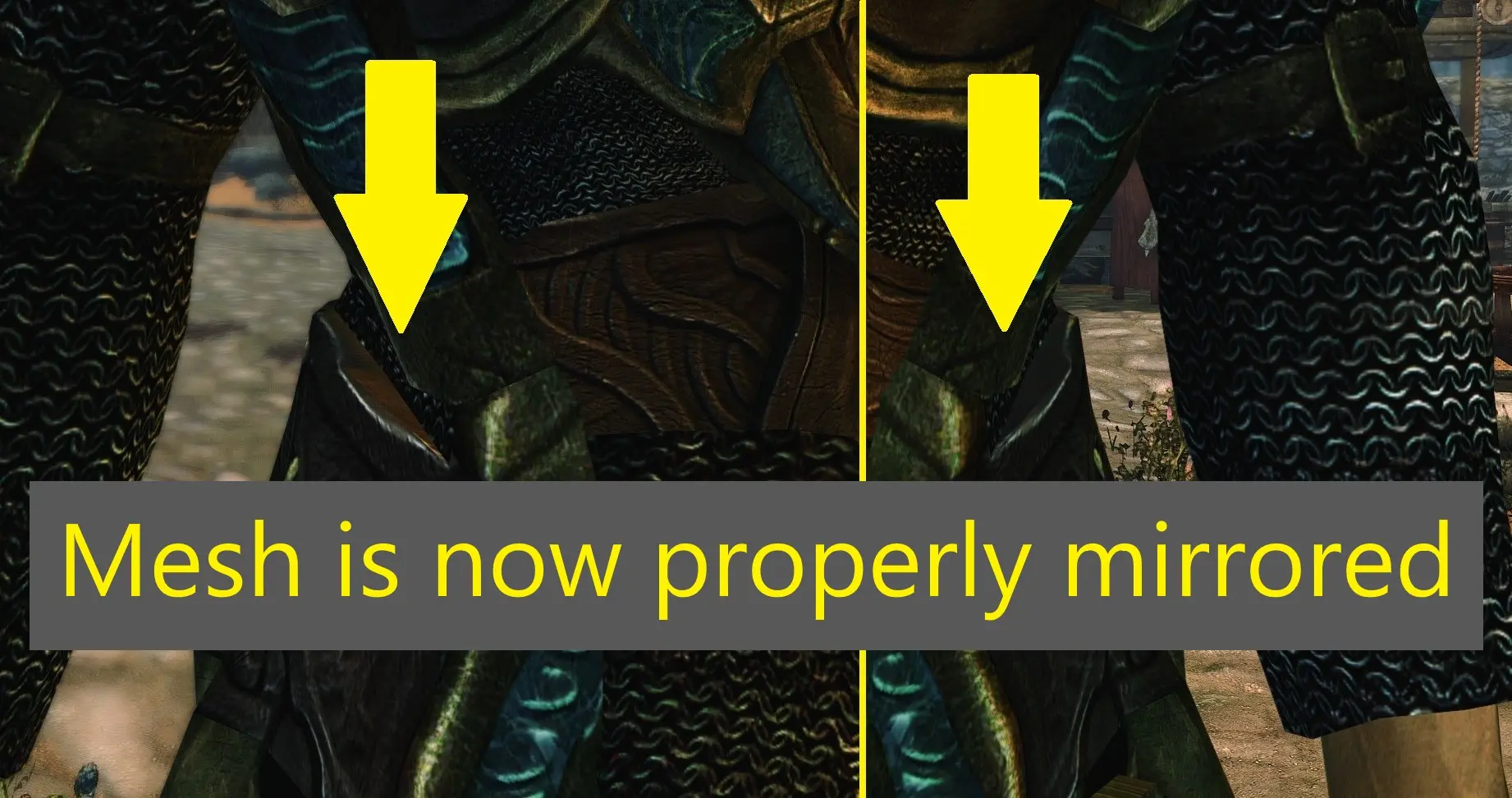
The vanilla male Glass cuirass has a UV texture mapping issue where vertices are "connected" that should not be, which causes an odd texture stretch effect. There is also an issue where the vanilla mesh is not symmetrical as the points where the vertices connect on the midsection within this area are not mirrored from the left to right side.
The Unofficial Skyrim Patch provides one sort of fix by addressing the texture mapping, but the geometry remains as it was in the vanilla mesh.
I have gone the extra step by completely chopping off the right side of the armor and mirroring the left side to make for matched geometry and texture mapping for both sides.
Breakdown of what I did, in case anyone else wants to try it for themselves:
1. Import the cuirass_1.nif into the latest Outfit Studio(5. 6. 0 as of this writing). It will show up as two separate pieces of geometry, GlassCuirass:0(the glass pieces), and GlassCuirass:1(the metal armor pieces and legs)
2. "Symmetrize" the vertices; right click on each model and click "symmetrize vertices." Don't symmetrize bones, it caused me problems before.
3. With the model now symmetrized, on the "GlassCuirass:1" nif, separate the vertices of anything that is not the chest piece, that includes the legs and the shoulder pieces.
4. When you have only the main torso piece and arms remaining, mask the vertices of the right side and separate.
5. Delete the right side of the cuirass
6. Duplicate the left side of the cuirass and name it anything.
7. Mirror the X axis of the duplicate mesh so it will now fill in for the right side.
8. If you properly symmetrized the vertices, there should be no gaps down the middle from one side to the other.
9. Merge the geometry of the now flipped duplicate to the original left half.
10. The merged geometry only has bones associated with the left half, so you need to import an original copy of the cuirass:1 nif and set it as a reference.
11. With the original GlassCuirass:1 set as reference, copy the bone weights of the original mesh to the newly fixed cuirass.
12. The newly fixed cuirass should have proper bones and weights for the left and right sides.
13. Export the new cuirass as a .nif or .obj for use as slider data.
14. Export the legs and shoulder armor that came from cuirass:1 for slider data.
15. Export the GlassCuirass:0 of the cuirass_1 for slider data.
16. Delete the models or start a new project
17. Import the original cuirass_0.nif into Outfit studio.
18. Separate the vertices of the shoulder armor and legs of the GlassCuirass:1 nif
19. Make a new slider for the weight.
20. Import slider data of GlassCuirass:0 that came from cuirass_1 to set the slider data for GlassCuirass1 to
A small bug fix mod for Skyrim that corrects the UV mapping issue on the male Glass cuirass and symmetrizes its vertices. With 191 endorsements and over 5,000 downloads, it's a community-approved fix for a specific visual glitch. Ideal for players who want a polished armor appearance without extra features.
✨ Key Features
📊 Pros & Cons
✅ Pros
- Community-approved fix with 191 endorsements
- Over 5,300 downloads show it's widely used
- Targets a specific visual bug without adding unnecessary changes
⚠️ Cons
- Only addresses the male Glass cuirass, not other armor pieces
- Last updated in 2022, so may not be compatible with the latest Skyrim version
- Potential conflicts with other mods that alter the Glass armor mesh
For Skyrim players who notice the UV mapping glitch on the male Glass cuirass and want a clean fix. If you're a completionist who cares about visual polish, this is a must-have. Skip if you don't use Glass armor or prefer overhaul mods that change the entire armor set.
💡 Beginner Tips
- Use a mod manager like Vortex or Mod Organizer 2 to install and manage this fix easily.
- Place this mod after any other mods that modify the Glass armor in your load order to ensure the fix applies.
- Check the mod's file structure to confirm it overwrites the correct mesh files.
📊 Mod Details
- Game
- Skyrim Mods
- Author
- LogicRock
- Version
- 1
- Downloads
- 5,305
- Endorsements
- 191
- Category
- Bug Fixes
- Created
- 9/11/2022
- Updated
- 9/11/2022
🔧 How to Install Skyrim Mods
Download from Nexus.
📖 Full step-by-step install guide for Skyrim →
Visit the official mod page for specific installation instructions for this mod.
🎮 Need cheat codes or console commands? Check ur gaming wiki for Skyrim commands, item IDs, and more.
Keep browsing — more Skyrim mods await