Dynamic Impact Slash VFX PC Only - MIF
⚪ Last updated 2023⚠️ Install Order · 5 steps
Install in this order, then this mod last — most mods fail to load without their framework and dependencies in place.
Preview
🔍 Analysis
- 👍 3.5% endorsement rate — high engagement, a strong quality signal
- 🏆 #18 of 136 Gameplay mods in this game by downloads
📋 About This Mod
ZScvMO3SPog
Description
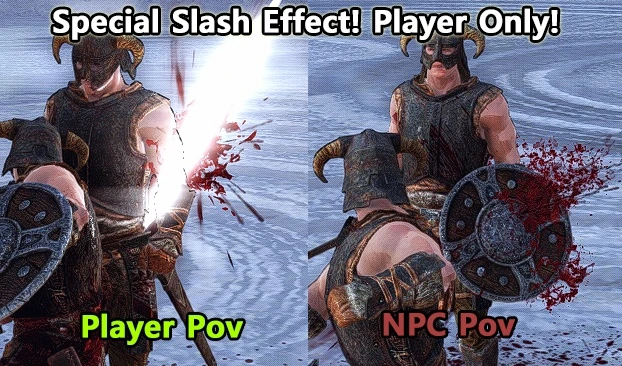
This mod makes the Dynamic Impact's special effects for weapons work only on the player character.
Separate the features in Dynamic Impact. Cut, Blunt, Fist, Arrow, and ENBLight so that they only occur when the Player Character attacks.
The target must not be dead, or unable to block the strike.
The PC must not be in a killmoves, but bows are excluded from the killmoves condition.
This feature is compatible with any mods that use hit(blood) effects, hit sound effects, etc.
Requirements
MIF - Mu Impact Framework
Load order
If you have the original Dynamic Impact installed, make sure to load the MIF version later than the original version.
Compatibility
It works completely separately and is compatible with all mods.
Q. There are three different Mods, Dynamic Impact, DI - MIF, and Separated Slash Effects, what is the difference between them and is there a guide to using them?
A.
You might consider a combination of the following
1. use only . This ensures that all Actors have better splatter and special effect. Depending on your FOMOD installation options, not everyone may have special effect.
2. Use a combination of and . This ensures that only the player has the special effect and better splatter.
3. Use with [Separated Slash Effects]. Only the player will have a more intense special effect, with either better splatter or better splatter and special effect, depending on the FOMOD installation option you choose.
Q. Do I need the original Dynamic Impact for DI-MIF to work?
A. No, the only mod you need to get in advance is MIF - MuImpactFramework.
Q. I like all actors to have special effects. Do I need to install this mod?
A. No, you don't. You only need to download and use the original Dynamic Impact.
Special thanks / Credits
Thanks to Acro748 for working on their framework to support this feature.
Nifskope https://github.com/niftools/nifskope/releases
Tes5Edit https://www.nexusmods.com/skyrimspecialedition/mods/164
Permissions
Give credit to the original author.
Do not offer this mod for a fee when re-uploading or using or included.
Fixes and compatibility patches do not require permission.
Dynamic Impact Slash VFX PC Only - MIF applies Dynamic Impact's cut, blunt, fist, and arrow special effects to player character attacks only, excluding blood and dust effects. A niche cosmetic enhancement for players wanting visual feedback on hits without extra gore.
✨ Key Features
📊 Pros & Cons
✅ Pros
- Lightweight visual upgrade that adds satisfying hit feedback without extra gore
- Focused on player attacks only, keeping NPC effects untouched
- Solid community trust with 219 endorsements and 6,294 downloads
⚠️ Cons
- PC only, so console players are out of luck
- No blood or dust effects, so it feels less visceral than the full Dynamic Impact
- Last updated in December 2023, so it may not be compatible with the latest game patches
For players who want extra visual flair on their attacks without the mess of blood and dust. If you're a purist who prefers the original Dynamic Impact's full effect set, this isn't for you. Skip if you're on console or want gameplay changes—this is purely cosmetic.
💡 Beginner Tips
- Since this mod is PC only, make sure your game version matches the mod's last update (December 2023) to avoid issues.
- If you're using a mod manager, let it handle the file placement to keep your game folder clean.
- Test the effects on a dummy or low-level enemy to see if the visual feedback suits your playstyle.
📊 Mod Details
- Game
- Skyrim Mods
- Author
- ap05
- Version
- 1.02b
- Downloads
- 6,294
- Endorsements
- 219
- Category
- Gameplay
- Created
- 11/30/2023
- Updated
- 12/1/2023
🔧 How to Install Skyrim Mods
Download from Nexus.
📖 Full step-by-step install guide for Skyrim →
Visit the official mod page for specific installation instructions for this mod.
🎮 Need cheat codes or console commands? Check ur gaming wiki for Skyrim commands, item IDs, and more.
Keep browsing — more Skyrim mods await