Dynamic Autosorting System
⚪ Last updated 2018⚠️ Install Order · 7 steps
Install in this order, then this mod last — most mods fail to load without their framework and dependencies in place.
Preview
🔍 Analysis
- 👍 5.7% endorsement rate — high engagement, a strong quality signal
- 🏆 #8 of 119 Gameplay mods in this game by downloads
📋 About This Mod
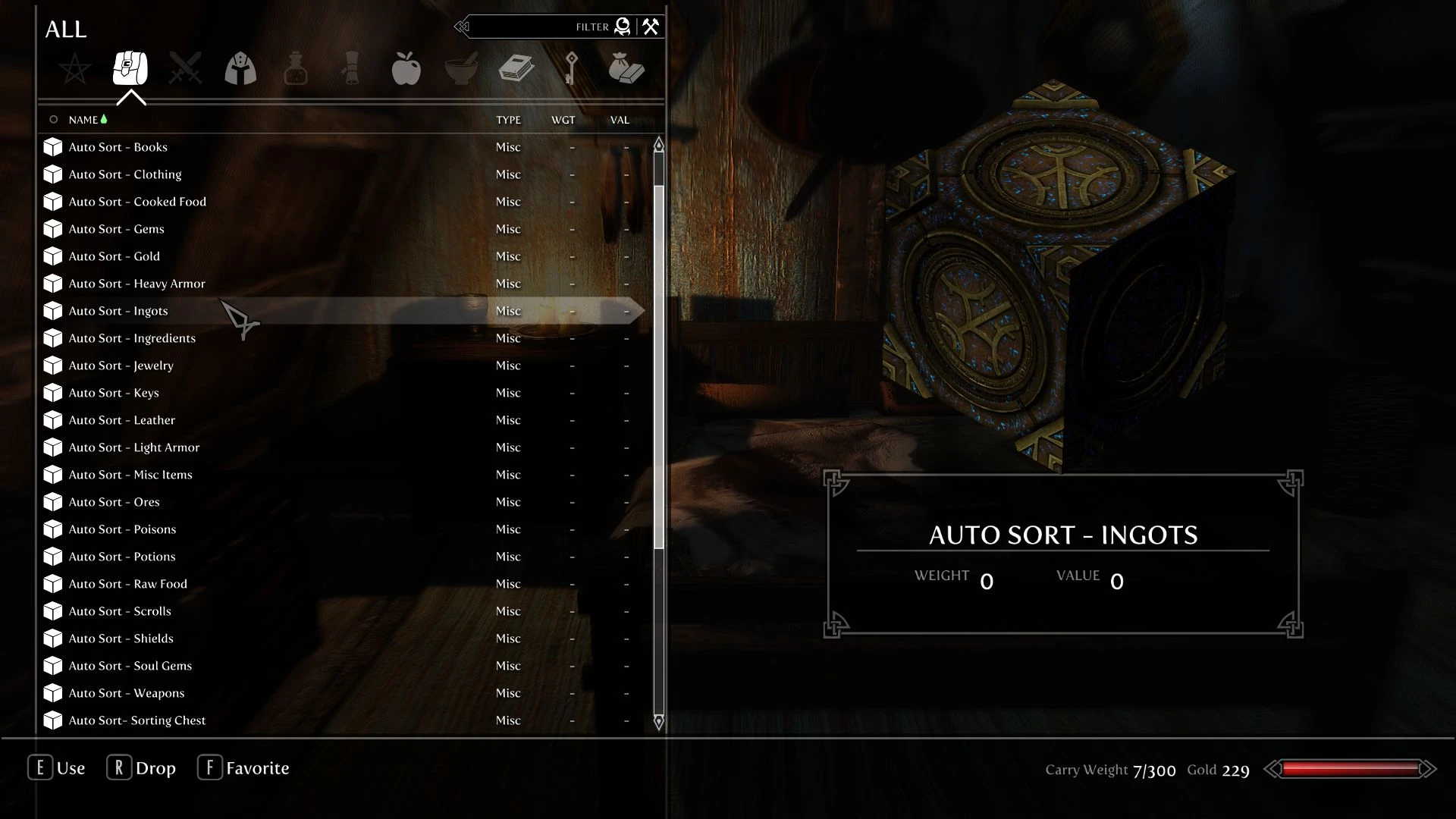
If you, like me, enjoy looting everything you are probably also familiar with how annoying and time consuming it is to sort all those items when you come home to drop it off. Installing this mod will solve that problem for you.
YLRoCIQCS2c
========================================
Requirements:
========================================
What is Auto Sorting?
You place all your loot in one container and it magically sorts them into designated containers.
What is crafting Auto Retrieve:
When you activate a crafting station assigned to the system, you automatically loot its coresponding chest. For example, activating an Enchanting Table adds all soul gems to your inventory.
========================================
How to setup the Auto Sorting System:
Open up the MCM Menu and select the Add Sorting Tokens Option. Several items will be added to you inventory, each representing a sorting category. Whatever chest you place one of these items in will be used by the sorting system. Adding a token to a chest also renames it so that it clearly states what items are stored within. You need to place every token and you should not add more than one token to a container.
Once the system is setup, dropping items into the sorting chest will automatically send out items into the containers you setup. The Sorting Chest also features a quickstash option, which allows you to quickly store Ingredients, books, potions/poisons/food, soul gems and ores/ingots.
How to setup crafting auto retrieve:
Make sure you've setup the Auto Sorting system. Open up the MCM Menu and select the "Add crafting station selection spell". Cast it at a crafting station and it will link it to the Sorting System. Deselecting the option in the MCM menu removes the spell.
========================================
Other MCM options:
- Unchecking the "Add Sorting Tokens" option will remove all tokens from their chests, while keeping the setup intact.
- Allow Global Auto Sort:
By default, every chest sorts away items it's not supposed to contain. For example you can never store ingots in the arrows chest. Unselecting this allows you to place any item inside any chest.
- Allow Crafting Auto Retrive
Deselecting this will prevent items from getting added to your inventory when you activate a crafting station linked to the Sorting System.
========================================
FAQ:
Q: Can I add more than one token to a chest?
A: Yes and no. Any token linked to the auto retrieval system should be placed in its own separ
Dynamic Autosorting System is a Skyrim gameplay mod that automatically sorts loot into designated containers and retrieves crafting materials at linked stations. It requires SkyUI and SKSE, and is configured via MCM with sorting tokens and a selection spell. With 440 endorsements and 7,744 downloads, it's a well-established utility for hoarders.
✨ Key Features
📊 Pros & Cons
✅ Pros
- Community-approved with 440 endorsements and over 7,700 downloads—clearly a mod people trust.
- Solves a real pain point: sorting loot after a dungeon run is tedious, and this automates it.
- Crafting auto-retrieve is a clever touch that streamlines enchanting and smithing workflows.
⚠️ Cons
- Requires both SkyUI and SKSE, so it's not for purists who avoid script extenders.
- Last updated in 2018—might have compatibility issues with newer Skyrim versions or mods.
- Setup requires placing tokens in every container, which can be tedious for large player homes.
For Skyrim players who loot everything and hate spending time sorting their haul. If you use mods like SkyUI and SKSE already, this is a no-brainer. Skip if you prefer manual inventory management or play without script extenders.
💡 Beginner Tips
- Make sure you have SKSE installed and launch the game through the SKSE loader, not the default launcher.
- Use the MCM menu to add all sorting tokens at once, then place them in chests—don't put more than one token per container.
- Link crafting stations with the selection spell after setting up the sorting system to get the auto-retrieve benefit.
📊 Mod Details
- Game
- Skyrim Mods
- Author
- Sjogga
- Version
- 1.2
- Downloads
- 7,744
- Endorsements
- 440
- Category
- Gameplay
- Created
- 6/22/2018
- Updated
- 6/22/2018
🔧 How to Install Skyrim Mods
Download from Nexus.
📖 Full step-by-step install guide for Skyrim →
Visit the official mod page for specific installation instructions for this mod.
🎮 Need cheat codes or console commands? Check ur gaming wiki for Skyrim commands, item IDs, and more.
Keep browsing — more Skyrim mods await