Dawnbreaker Requiem
⚪ Last updated 2020⚠️ Install Order · 5 steps
Install in this order, then this mod last — most mods fail to load without their framework and dependencies in place.
Preview
🔍 Analysis
- 👍 3.9% endorsement rate — high engagement, a strong quality signal
- 🏆 #77 of 114 Weapons mods in this game by downloads
📋 About This Mod
"Take the mighty Dawnbreaker and with it purge corruption from the dark corners of the world."
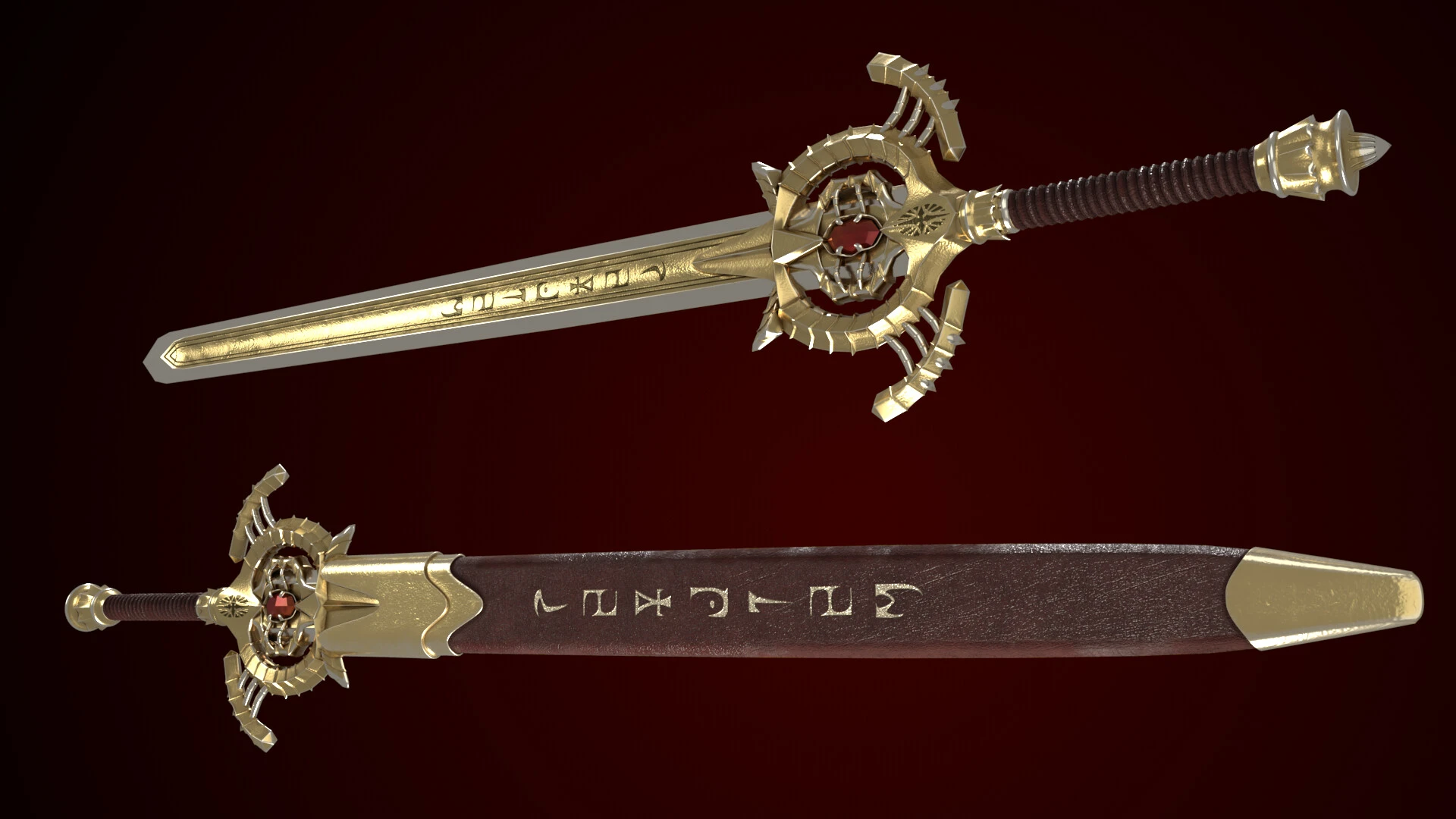
This sword isn't so much a replica as a re-imagining. I was initially going to have the center glow as the sword did in game, but I became quite fond of the red jewel instead. I added a curved guard instead of the straight pipe you sometimes see Dawnbreaker have in photos, kinda gives me Master Sword vibes. I added a wrapped leather grip instead of the "flat" grip it had before. And I made the blade two-toned and added Daedric script. All the while equipping the sword with a simplistic new scabbard.
Hopefully you like my re-imagining of Dawnbreaker.
If you wanna check out the original renders you can see more at https://www.artstation.com/griffenmascioli
Read the DBR_READ_ME.txt in the MOD_FOLDER for instructions on how to download, or just read it here in the description,
For the manual installation:
- open the downloaded name_MOD_FOLDER
- copy both the Textures folder and the meshes folder
- locate and open up you Skyrim Special Edition folder in File Explorer (wherever that location might be)
- open the Data folder that is located in the Skyrim Special Edition folder
- paste the Textures folder and the meshes folder into the Data folder
note this should auto merge the folders and take care of it. If not, then... (starting at open name_MOD_FOLDER)
- open up the Textures folder in the name_MOD_FOLDER
- open the weapons folder
- copy the DBR folder that is inside
- locate your Skyrim Special Edition folder in File Explorer
- open the Data folder in the Skyrim Special Edition folder
- open the Textures folder
- open the weapons folder
- paste the previously copied DBR folder from the name_MOD_FOLDER->Textures->weapons folder into the Skyrim Special Edition->Data->Textures->weapons folder
- now, go back back to the name_MOD_FOLDER
- open the meshes folder in the name_MOD_FOLDER
- open the weapons folder
- copy the DBR folder that is inside
- go back to your Skyrim Special Edition folder
- open the Data folder in the Skyrim Special Edition folder
- open the meshes folder
- open the weapons folder
- paste the previously copied DBR folder from the name_MOD_FOLDER->meshes->weapons folder into the Skyrim Special Edition->Data->meshes->weapons folder
- now go back and open the name_MOD_FOLDER again
- copy the Dawnbreaker_Requiem_DBR.esp file
- open your Skyrim Special Edition folder
- open the Data folder in the Skyrim Special Edition folder
- paste the Dawnbreaker_Requiem_DBR.esp file into the Data folder
- open your Mod Manager of choice (I recommend NMM or -> Vortex <-)
- go to wherever your Mod Manager has your plug-ins at
- activate/check/enable/shoot the Da
Dawnbreaker Requiem is a re-imagined version of Skyrim's Dawnbreaker sword, featuring a red jewel, curved guard, wrapped leather grip, two-toned blade with Daedric script, and a new scabbard. It's a cosmetic mesh and texture replacer for Skyrim Special Edition, with 440 endorsements and last updated in March 2020.
✨ Key Features
📊 Pros & Cons
✅ Pros
- Community-approved with 440 endorsements and over 11k downloads
- Unique artistic take on a classic weapon, not just a simple replica
- Includes a new scabbard, adding to the visual overhaul
⚠️ Cons
- Last updated in 2020, so it may not be compatible with the latest Skyrim SE patches or mods
- Manual installation required, which can be error-prone for less experienced modders
- Cosmetic only, so no gameplay changes or balance tweaks
For Skyrim Special Edition players who want a fresh, artistic look for Dawnbreaker without altering gameplay. If you're a fan of the original sword but crave a more unique aesthetic, this is for you. Skip if you're looking for weapon stat changes or if you prefer lore-friendly recreations.
💡 Beginner Tips
- Make sure to merge the Textures and meshes folders into your Data folder correctly; if the auto-merge fails, follow the manual steps carefully.
- Since this is a replacer, it will overwrite the original Dawnbreaker appearance; consider backing up your original meshes and textures if you want to revert.
- Check that you're installing for Skyrim Special Edition, not the original Skyrim, as the folder structure may differ.
📊 Mod Details
- Game
- Skyrim Mods
- Author
- Gryffindor777
- Version
- 1
- Downloads
- 11,156
- Endorsements
- 440
- Category
- Weapons
- Created
- 3/1/2020
- Updated
- 3/1/2020
🔧 How to Install Skyrim Mods
Download from Nexus.
📖 Full step-by-step install guide for Skyrim →
Visit the official mod page for specific installation instructions for this mod.
🎮 Need cheat codes or console commands? Check ur gaming wiki for Skyrim commands, item IDs, and more.
Keep browsing — more Skyrim mods await