Custom Difficulty UI
⚪ Last updated 2018⚠️ Install Order · 5 steps
Install in this order, then this mod last — most mods fail to load without their framework and dependencies in place.
Preview
🔍 Analysis
- 👍 1.6% endorsement rate — high engagement, a strong quality signal
- 🏆 #69 of 102 Gameplay mods in this game by downloads
📋 About This Mod
DESCRIPTION
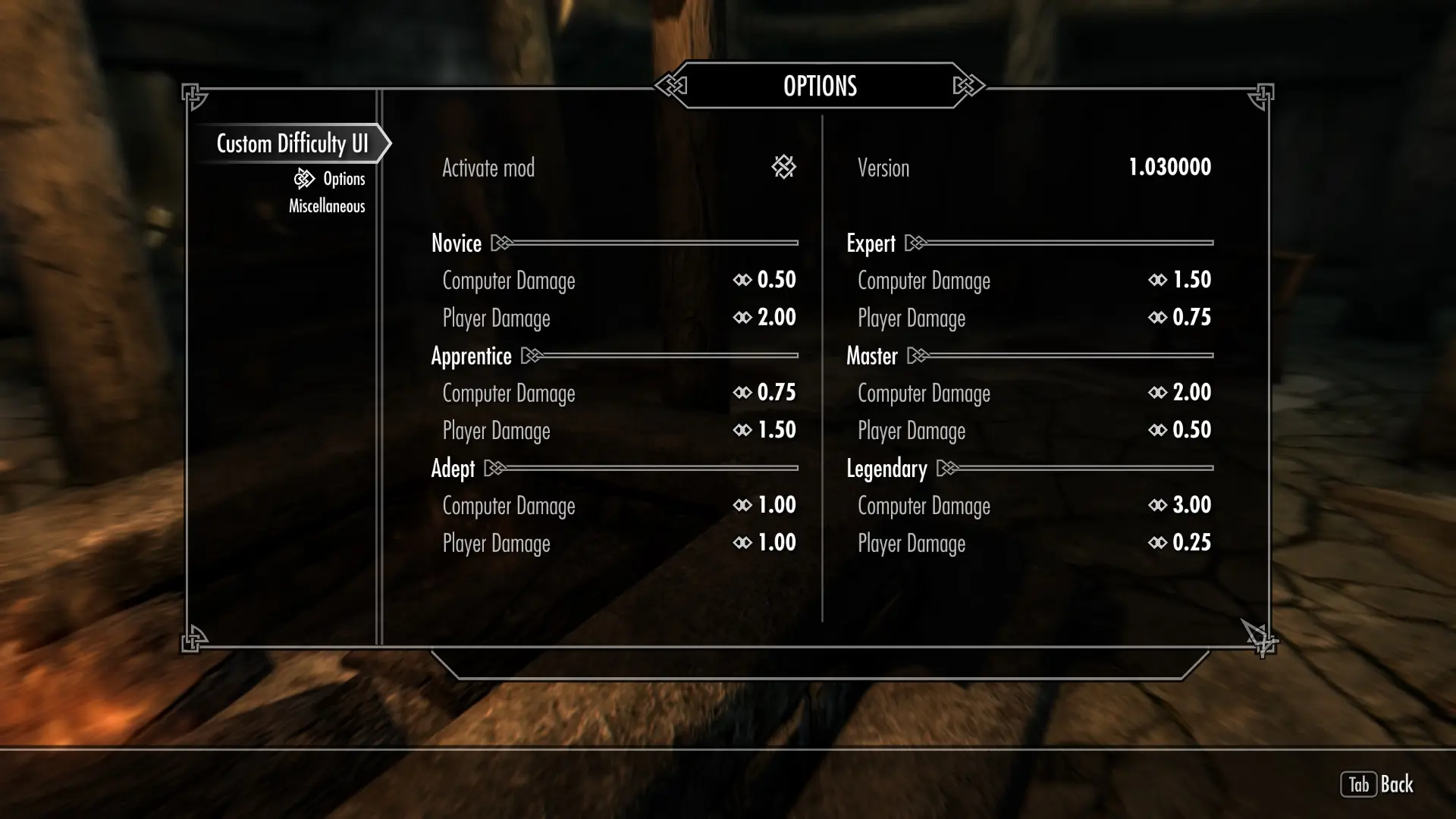
The mod allows you change damage multipliers for each kind of the game difficulty.
For instance, at the "Legendary" difficulty you will produce a hit with a damage x0. 25, while NPCs will hit you with x3 multiplier.
-
[]Powered by SkyUI (MCM only)
[
]No plans to add new featuresREQUIREMENTS
-
[]SKSE 2. 0. 6 or newer
[
]SkyUI 5. 2SECOMPATIBILITY
Conflicts with mods that do the same thing via SKSE.
INSTALLATION
For NMM, Wrye Bash/Smash users:
-
[]Download, install and activate mod as any other.
[
]Follow instructions below from p. 3-
[]Unpack the contents of the archive to your "Skyrim Special Edition/Data" folder.
[
]Check CustomDifficultyUI.esp file in Mod Manager.[]Run Skyrim Special Edition via SKSE.
[]Enter to "MOD CONFIGURATION" menu and exit: Esc -> MOD CONFIGURATION -> TAB -> TAB
[]Wait 5-10 seconds until you receive message "Custom Difficulty UI disabled".
[]Enter to "MOD CONFIGURATION" menu and customize it on your taste.
UNINSTALLING
-
[]In Mod Settings disable the mod.
[
]Save the game.[]Deactivate the mod in the Mod Manager.
[]Delete files from the "Skyrim Special Edition/Data" folder if you are not using any Mod Manager.
-
[]In Mod Settings disable the mod.
-
[]Unpack the contents of the archive to your "Skyrim Special Edition/Data" folder.
-
[]Download, install and activate mod as any other.
-
[]SKSE 2. 0. 6 or newer
Custom Difficulty UI lets players tweak damage multipliers for each game difficulty level. A straightforward gameplay tweak with 1,580 endorsements and over 100,000 downloads, last updated in 2018. Ideal for players wanting finer control over challenge without overhauling the whole game.
✨ Key Features
📊 Pros & Cons
✅ Pros
- Community favorite with 1,580 endorsements and 100k+ downloads.
- Gives you precise control over damage scaling, perfect for fine-tuning challenge.
- Lightweight and focused—does one thing and does it well.
⚠️ Cons
- Last updated in 2018, so it might not be compatible with the latest game patches.
- Only affects damage multipliers—no other difficulty tweaks like enemy health or AI.
- Potential conflicts with other mods that alter difficulty settings.
For players who want to fine-tune the game's challenge by adjusting damage dealt and taken per difficulty. Great for those who find vanilla difficulties too punishing or too easy. Skip if you're looking for a comprehensive difficulty overhaul—this only touches damage multipliers.
💡 Beginner Tips
- Check if the mod is compatible with your game version before installing, since it's from 2018.
- Test the damage multipliers on a new save to avoid ruining your current playthrough.
- If you use other difficulty mods, load this one last to ensure your custom values apply.
📊 Mod Details
- Game
- Skyrim Mods
- Author
- gh0stwizard
- Version
- 1.03
- Downloads
- 100,430
- Endorsements
- 1,580
- Category
- Gameplay
- Created
- 1/1/2018
- Updated
- 1/1/2018
🧩 Commonly Used Together
Users add these mods to the same collections — a real compatibility signal, not an AI guess.
🔧 How to Install Skyrim Mods
Download from Nexus.
📖 Full step-by-step install guide for Skyrim →
Visit the official mod page for specific installation instructions for this mod.
🎮 Need cheat codes or console commands? Check ur gaming wiki for Skyrim commands, item IDs, and more.
Keep browsing — more Skyrim mods await