Contrast Adaptive Sharpener for ENB (SE and VR)
⚪ Last updated 2020⚠️ Install Order · 6 steps
Install in this order, then this mod last — most mods fail to load without their framework and dependencies in place.
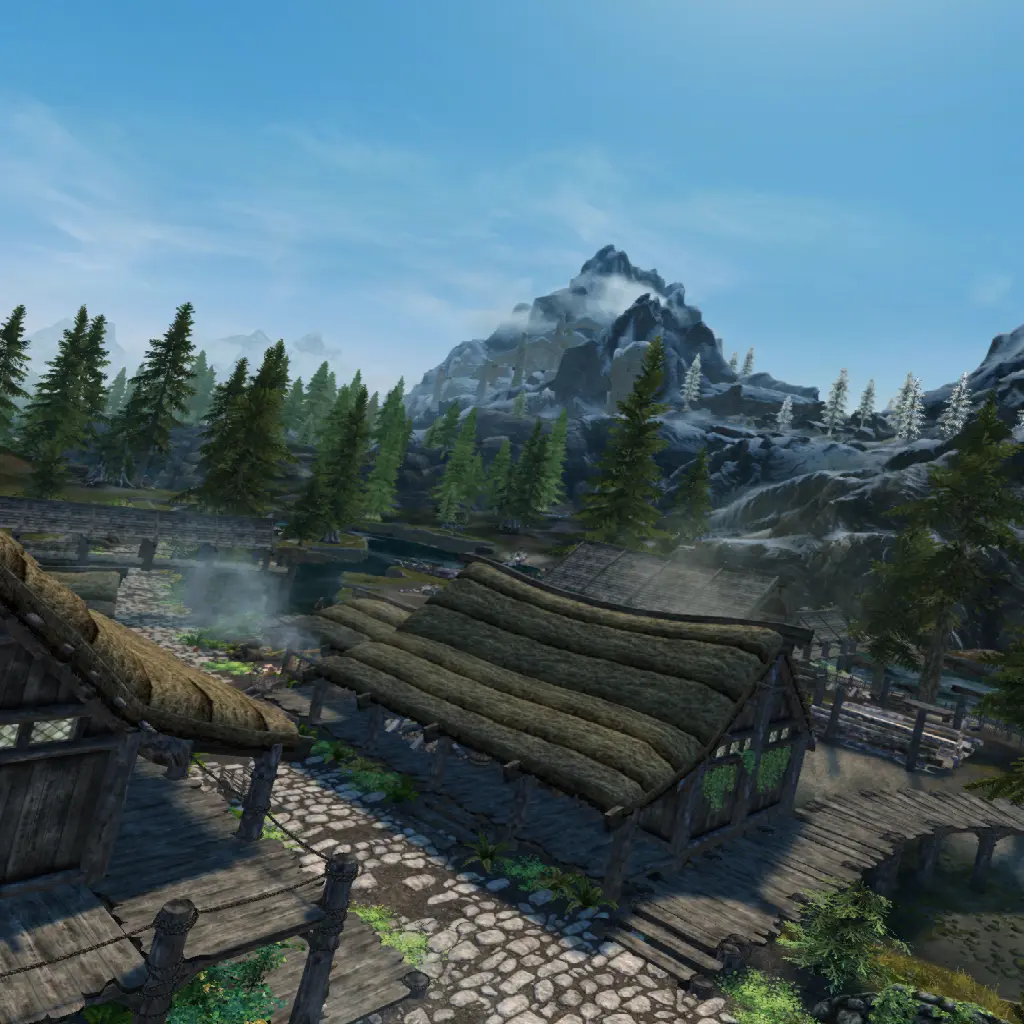
Preview
🔍 Analysis
- 👍 1.9% endorsement rate — high engagement, a strong quality signal
- 🏆 #9 of 20 VR mods in this game by downloads
📋 About This Mod
Intro
About a year ago AMD released an algorithm called Contrast Adaptive Sharpening (CAS) which respects local contrast, so it sharpens blurry parts of the image and has a lighter touch on parts that are already sharp. This is especially useful when a game uses TAA (https://gpuopen.com/fidelityfx-cas/) There's an open-sourced ReShade shader from Marty McFly here: https://gist.github.com/martymcmodding/30304c4bffa6e2bd2eb59ff8bb09d135 (he deserves most of the credit for this!)
This mod is a conversion of that sharpener to ENB. It can be added on to almost any ENB to get that ENB's color grading and effects with a sharper picture.
I primarily made this for Skyrim VR, which has a really aggressive TAA filter that makes you feel nearsighted. (SkyrimVR supports ENB, but not Reshade). It could also be useful in Skyrim SE if you don't want to run Reshade on top of your ENB just for sharpening.
How to Use
-
[]This isn't a full ENB, it's just a (modular) shader, so you'll need to have an ENB installed already
[
]Download the mod. Copy the enbeffectpostpass.fx and enbeffectpostpass.fx.ini files into your enbseries/ folder,overwriting the existing ones[]Open ENB settings in the game
[]In the game, make sure to check "EnablePostpassShader" in the left column under "Effect". If you want the sharpener to be more/less aggressive, expand "Enbeffectpostpass.fx" in the right column and adjust the sharpness amount to your taste.
[]Optional but recommended: Skyrim VR users can squeeze some more sharpness out of the image by tweaking their TAA settings. Detailed guide here: https://old.reddit.com/r/skyrimvr/comments/h8skem/adventures_in_taa_tuning/
Compatibility Notes
-
[]This works with most ENBs since by default all they do in the postpass shader is blur+sharpen the image (and this shader is a better version of that for SkyrimVR).
[]The High Fidelity ENB from SGSRules also does sharpening by default. It's quite good too :) If you want to try my sharpener with it, disable its sharpener so you're not sharpening the image twice.
FAQ
Q: I'm playing SkyrimVR, which ENB do you recommend?
A: The best setup I've found is the Luminous ENB + this sharpener. Detailed instructions here: https://old.reddit.com/r/skyrimvr/comments/hjtgjb/i_switched_enb_now_that_the_cas_sharpener_exists/fwoe4fy/
Q: My ENB preset has effects in enbeffectpostpass.fx that I want to keep, can I still use this sharpener?
A: You'd have to merge the code instead of replacing the whole file.
Acknowledgments
[]Boris Vorontsov for ENB
[]AMD and Marty McFly for CAS.fx
[]Cangar for feedback, and for publishing a setup using this sharpener with the Luminous ENB in VR
[*]Parpinator for feedback, and prop
-
[]This works with most ENBs since by default all they do in the postpass shader is blur+sharpen the image (and this shader is a better version of that for SkyrimVR).
Contrast Adaptive Sharpener for ENB (SE and VR) is a performance-friendly sharpening mod for Skyrim SE and VR, designed to reduce blurriness and allow lower supersampling while improving image clarity. With 1,274 endorsements and 68,677 downloads, it's a popular choice for VR users seeking crisper visuals.
✨ Key Features
📊 Pros & Cons
✅ Pros
- Community-approved with 1,274 endorsements and 68,677 downloads—clearly a go-to for VR users.
- Frees up performance by letting you dial down supersampling, so you can finally install that heavy graphics mod.
- Works for both SE and VR, so it's a versatile sharpening solution if you play both versions.
⚠️ Cons
- Requires ENB, so if you're not already using ENB, you'll need to set that up first.
- Last updated in 2020, so it might not be fully compatible with the latest ENB versions or game updates.
- Sharpening can introduce artifacts on some textures, especially if you push the effect too hard—tuning is key.
For SkyrimVR players who are tired of the blurry default image and want a sharper view without tanking performance. Also great for SE players who want better sharpening than vanilla ENB offers. Skip if you don't use ENB or prefer a pure reshade setup.
💡 Beginner Tips
- Make sure you have ENB installed and working before adding this mod—it's a plugin for ENB, not a standalone.
- In VR, start with a moderate sharpening strength and adjust in-game using the ENB GUI (Shift+Enter) to avoid over-sharpening.
- If you're on SE, test the sharpening with different weather mods to ensure it doesn't cause shimmering on distant objects.
📊 Mod Details
- Game
- Skyrim Mods
- Author
- rhellct - see Acknowledgments
- Version
- 1.0
- Downloads
- 68,677
- Endorsements
- 1,274
- Category
- VR
- Created
- 7/12/2020
- Updated
- 7/12/2020
🧩 Commonly Used Together
Users add these mods to the same collections — a real compatibility signal, not an AI guess.
🔧 How to Install Skyrim Mods
Download from Nexus.
📖 Full step-by-step install guide for Skyrim →
Visit the official mod page for specific installation instructions for this mod.
🎮 Need cheat codes or console commands? Check ur gaming wiki for Skyrim commands, item IDs, and more.
Keep browsing — more Skyrim mods await