Better MessageBox Controls
⚪ Last updated 2016⚠️ Install Order · 5 steps
Install in this order, then this mod last — most mods fail to load without their framework and dependencies in place.
Preview
🔍 Analysis
- 👍 2.3% endorsement rate — high engagement, a strong quality signal
- 🏆 #37 of 141 User Interface mods in this game by downloads
📋 About This Mod
You may also like: Better Dialogue Controls
In A Nutshell
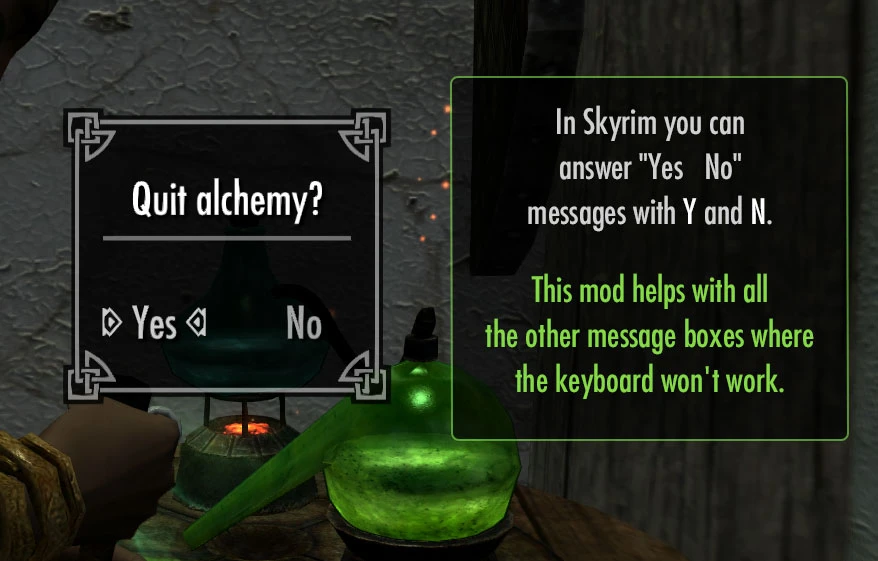
This mod lets you navigate the message boxes with the keyboard. Use Left/Right controls, and Activate to select options (typically A,D and E but it should work if you remapped those controls to other keys). Fixes the clickable area of buttons so they are easier to click.
Reviewed by Brodual at Daily Skyrim Mod Spotlight________ ________Reviewed by olivierhacking at Skyrim Mod Reviews
8yj9TDTrB10......_1uLHwLkkKo
Detailed Changes
These are the changes made to the vanilla (original) Skyrim message boxes:
- []Enabled the gamepad style controls, which lets you navigate between options with the Left/Right keys (usually WASD), and select an option with the Activate key (usually E) and Return/Enter keys. Now you can dismiss simple “Ok” message boxes by pressing a single key instead of being forced to click a tiny text label.
[
]The TAB key cycles through "Exit" type buttons, where the label matches exactly "Return", "Exit", "Done", "Cancel", "Back" or "No". This helps navigate custom menus from mods that have lots of options. While SkyUI3/MCM will alleviate this, there are still many instances where mods will continue to use message boxes (or mods that won’t update to use MCM).[]With SKSE enabled pressing ESCAPE picks the first “exit” button and selects it. Thus you can quickly exit out of most dialogs that provide an “exit” button. The recognized “exit” buttons are exactly as for the TAB key (see above). You can quickly exit out of Yes/No dialogs, and mod options. In multi level mod options usually the ESCAPE key will take you to the parent set of options, because it picks “Return”, “Back” or “Cancel”, etc. WITHOUT SKSE the ESCAPE key behaves exactly as the TAB key (I’m sorry but it was not possible otherwise to distinguish the keys as crazy as it sounds!).
[]Fixed the width of the clickable area for the buttons to properly adapt to the entire length of the button label.
[]Extended the clickable area also below the button labels, instead of only above. This makes them easier to pick with the mouse.
[]Added a subtle highlight to the focused button.
For XBox Controller/Gamepad Users
This mod may also be of interest to gamepad users: when you configure mods like Shooting Stars or Convenient Horses, instead of pressing Right multiple times to select "Return" or "Exit", which gets tedious, you can simply press ( B
Better MessageBox Controls lets you navigate message boxes with the Left/Right and Activate (E) keys, and fixes button clickable areas for easier mouse selection. A highly endorsed UI improvement for Skyrim, last updated in 2016.
✨ Key Features
📊 Pros & Cons
✅ Pros
- Huge community trust with 65,919 endorsements and 2.9M downloads.
- Adds keyboard navigation to message boxes, a huge QoL boost for PC players.
- Fixes the finicky clickable areas, making mouse selection much more reliable.
⚠️ Cons
- Last updated in 2016 — may have compatibility issues with newer Skyrim versions or mods.
- Only affects message boxes; other UI elements remain unchanged.
- No detailed documentation or install instructions provided in the description.
For Skyrim players who are tired of clicking tiny message box buttons or want to navigate menus with the keyboard. Essential for controller users who prefer keyboard shortcuts. Skip if you're happy with the vanilla UI or use a comprehensive UI overhaul that already includes these fixes.
💡 Beginner Tips
- If you use a mod manager like Vortex or Mod Organizer 2, install this mod through the manager to keep your load order clean.
- Since this mod was last updated in 2016, test it with your current Skyrim version; if you encounter issues, check the mod's comments for community patches.
- This mod is purely UI-based, so it won't affect your save game or require a new playthrough.
📊 Mod Details
- Game
- Skyrim Mods
- Author
- ecirbaf
- Version
- 1.2
- Downloads
- 2,860,025
- Endorsements
- 65,919
- Category
- User Interface
- Created
- 11/26/2016
- Updated
- 11/26/2016
🧩 Commonly Used Together
Users add these mods to the same collections — a real compatibility signal, not an AI guess.
🔧 How to Install Skyrim Mods
Download from Nexus.
📖 Full step-by-step install guide for Skyrim →
Visit the official mod page for specific installation instructions for this mod.
🎮 Need cheat codes or console commands? Check ur gaming wiki for Skyrim commands, item IDs, and more.
Keep browsing — more Skyrim mods await