Better Dialogue Controls
⚪ Last updated 2016⚠️ Install Order · 5 steps
Install in this order, then this mod last — most mods fail to load without their framework and dependencies in place.
Preview
🔍 Analysis
- 👍 1.9% endorsement rate — high engagement, a strong quality signal
- 🏆 #14 of 141 User Interface mods in this game by downloads
📋 About This Mod
You may also like: Better MessageBox Controls
In A Nutshell
Have you ever pressed the E (activate) key in a dialogue and it selected something else than you expected? Then you may find this mod useful. Think of it as a patch for the controls of the dialogue interface.
Thanks to Brodual for reviewing the mod on the Daily Skyrim Mod Spotlight ...... ...and to Gopher for covering it on Gophers Gaming Mods Channel!
fU6yGUX7Qw4......cQqS5QqmUa4
Detailed Description
This mod will be most useful for people who like to use both the keyboard and mouse, it fixes issues where the mouse just flat out prevents some keyboard controls from working as expected. If you move the mouse pointer after entering a dialogue, then you will run into the issues below:
-
[]A fairly common occurrence is when you leave the mouse pointer somewhere over the menu and you want to use the keyboard controls. If you like to switch to the keyboard navigation now and then, you will run into issues where the mouse pointer just flat out prevents you from scrolling to the top or bottom of the list with the keyboard controls.[/]
[]Another common occurrence is that as you enter the dialogue, you think the first item, next to the pointy bit, is the selected item. However when you press E, you find that the 2nd or 3rd item has been selected. This happens because the mouse pointer takes the focus away from the default option. Often times, I had to move the mouse pointer out of the way when entering the dialogues because of this.[/]
Solution:
-
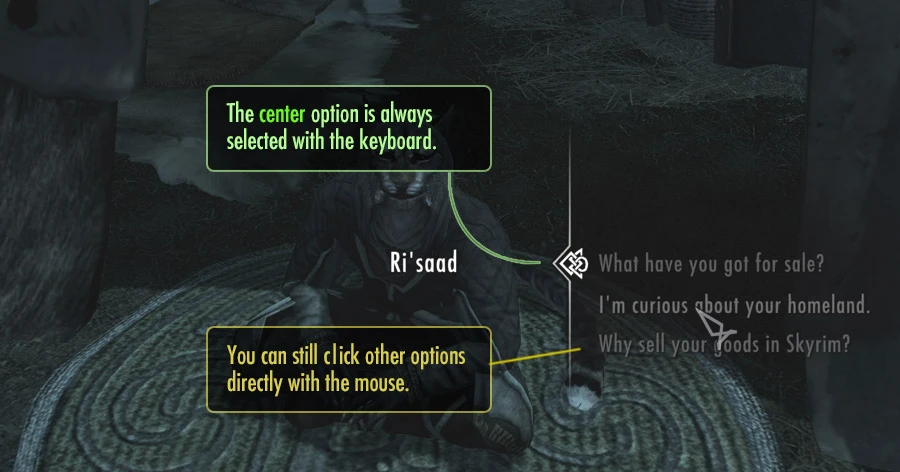
[]The mouse focus now highlights items, but does not make them active. Thus the active item is always at the center of the list (next to the arrow/pointy bit). When you enter a dialogue, the mouse pointer never takes the focus away from the default option.[/]
[]The keyboard controls lets you scroll all the way to the first or last item, no matter if the mouse pointer is hanging over the menu.[/]
[]Scrolling the list with the mousewheel, or up/down controls always maintains the center item as the active one.[/]
[]You can still click off center dialogue items with the mouse, the mouse just won’t affect the menu until you click.[/]
[]The mousewheel scrolling has a smoother transition. It happens because I changed the mousewheel scrolling to work exactly as if you pressed the up/down controls. I didn’t plan to change the mouse wheel scrolling appearance, but I thought it was nice so left it in.[/]
Also reviewed by insane0hflex on the Skyrim Mod Feature!
U7Pzxa9rE5s
-
[]The mouse focus now highlights items, but does not make them active. Thus the active item is always at the center of the list (next to the arrow/pointy bit). When you enter a dialogue, the mouse pointer never takes the focus away from the default option.[/]
Better Dialogue Controls fixes keyboard and mouse selection issues in dialogue interfaces, preventing accidental wrong choices. With 90,383 endorsements and 4.7M downloads, it's a highly popular UI improvement for players frustrated by clunky dialogue navigation.
✨ Key Features
📊 Pros & Cons
✅ Pros
- Massive community trust (90,383 endorsements, 4.7M downloads)
- Directly addresses a common frustration: picking the wrong dialogue option
- Lightweight UI fix that doesn't overhaul the whole interface
⚠️ Cons
- Last updated in 2016 — may be outdated for current game versions
- Only affects keyboard and mouse; gamepad users won't benefit
For players who primarily use keyboard and mouse and often misclick dialogue options. If you're tired of accidentally choosing the wrong response, this mod is a must-try. Skip if you use a controller or prefer full dialogue overhauls.
💡 Beginner Tips
- Since it's a UI mod, make sure to place it in the correct mod folder (e.g., Data for Bethesda games) or use a mod manager for easy installation.
- Check if the mod requires a specific game patch or DLC; if the game has updated since 2016, test in a safe save first.
- If you use other UI mods, load order matters — put this one after to ensure compatibility.
📊 Mod Details
- Game
- Skyrim Mods
- Author
- ecirbaf
- Version
- 1.2
- Downloads
- 4,693,032
- Endorsements
- 90,383
- Category
- User Interface
- Created
- 11/26/2016
- Updated
- 11/26/2016
🧩 Commonly Used Together
Users add these mods to the same collections — a real compatibility signal, not an AI guess.
🔧 How to Install Skyrim Mods
Download from Nexus.
📖 Full step-by-step install guide for Skyrim →
Visit the official mod page for specific installation instructions for this mod.
🎮 Need cheat codes or console commands? Check ur gaming wiki for Skyrim commands, item IDs, and more.
Keep browsing — more Skyrim mods await