vwr Neck Seam Fix
⚪ Last updated 2014⚠️ Install Order · 4 steps
Install in this order, then this mod last — most mods fail to load without their framework and dependencies in place.
Preview
🔍 Analysis
- 👍 5.4% endorsement rate — high engagement, a strong quality signal
- 🏆 #11 of 43 Bug Fixes mods in this game by downloads
📋 About This Mod
This mod was made using vwr Racemenu Mod Maker
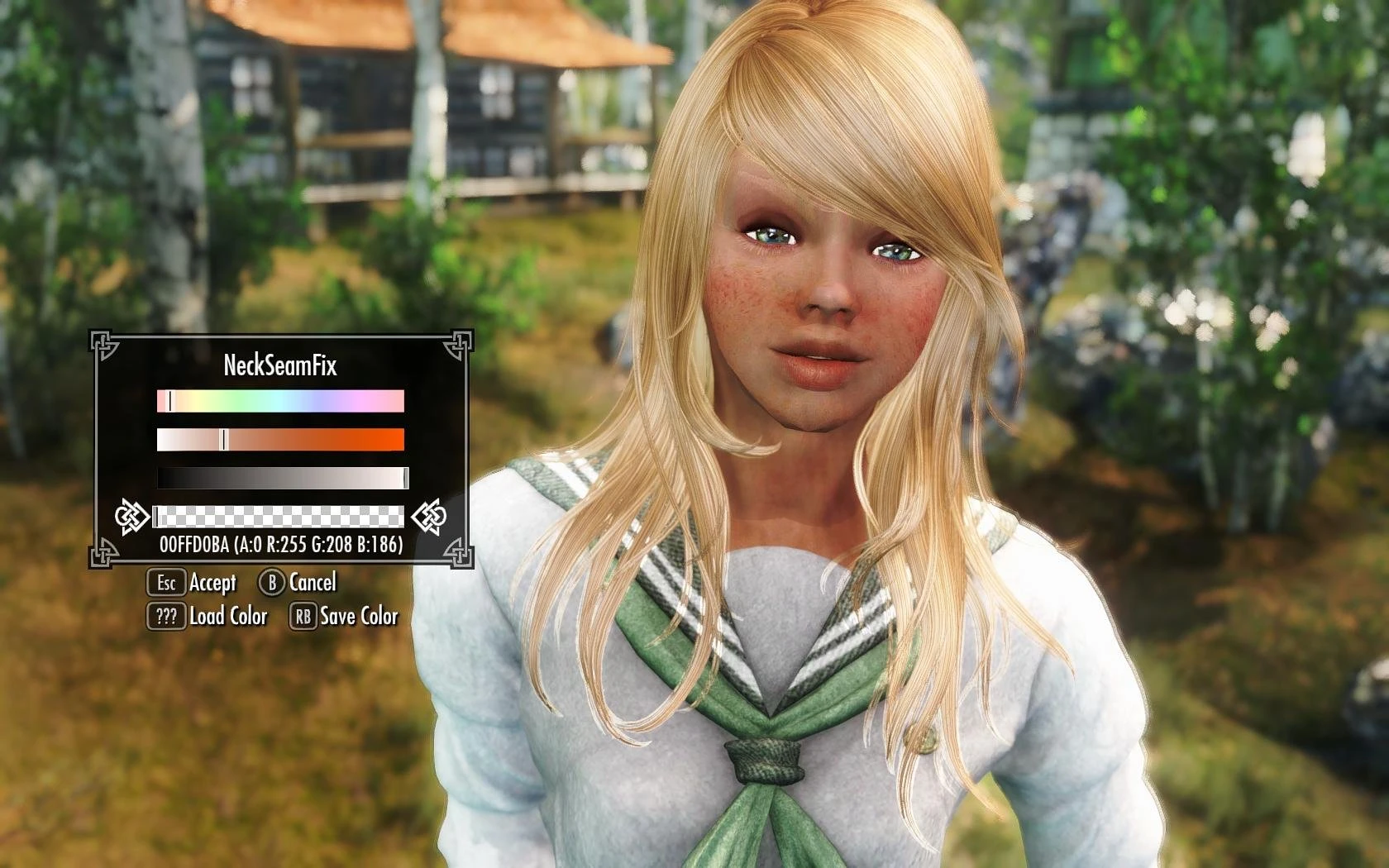
This mod is a pluign for Racemenu. It will fix neck seam issues, at the cost of slight discoloration of the player's face. Refer to the before and after images, to see the discoloration. In the aftermath, she looks a bit pale, BUT you can always add more color to the lips, freckles, and other features, to get the color back, after fixing the neck.
Requirements: SKSE "Racemenu v2-1-5" AND "Racemenu - Loose Base Scripts v2-1-1"
Install: Just copy the files to your data folder. Then activate the mod in your launcher or NMM.
- *************************************************************************************************************************
- **************************************************************************************************************************
FOR NEW CHARACTERS, ALWAYS adjust the neck seam BEFORE any other colors, IE, warpaints, lips, blush, eyeliner, etc. This way you won't have to re-adjust anything once you get your neck seam corrected.
Usage: Open the race menu by starting a new character, or using the console command "showracemenu". Navigate to the 'face paints' tab and highlight one of the listed texture slots. Press Default "T" on your keyboard to browse for a texture. Find "Neck Seam Fix" in the list, and select it. Then, select the 'still' highlighted texture slot. This will bring up the color sliders.
Let me explain it with pictures..
Adjusting the Sliders:
The top slider is #1 HUE, the second is #2 SATURATION, the third is #3 BRIGHTNESS, and the fourth is #4 TRANSPARENCY, though they are not actually labelled in-game.
Start with all sliders in or near the middle. Then, determine if your neck needs to be brighter or darker. Adjust the #3 BRIGHTNESS slider until it matches to the best of your ability. If you can't get it bright enough, then increase the #4 TRANSPARENCY slider. If it's too bright, then decrease the #4 slider. Then, begin to adjust both the #2 SATURATION slider, and the #1 HUE sliders until the color begins to match up. Now, you can fine tune each slider to your liking, until it matches seamlessly. Refer to the images to see the slider positions for a typical human skin color.
Once you get the color set, you can begin adjusting everything else, or just finish and name your character. That's it, enjoy.
Credits: Khajiitas - for the logos expired - for Racemenu
A Racemenu overlay that fixes the common neck seam issue in Skyrim without texture editing. With 2,223 endorsements and 41,336 downloads, it's a proven solution for players tired of visible neck lines on their characters.
✨ Key Features
📊 Pros & Cons
✅ Pros
- Community-approved with 2,223 endorsements
- Over 41,000 downloads show it's a go-to fix
- No texture editing means it's safe and easy
⚠️ Cons
- Last updated in 2014, so it may not work with the latest Skyrim versions
- Requires Racemenu, so you need that mod installed
- Only works for characters using Racemenu overlays, not a universal fix
For Skyrim players who are tired of the ugly neck seam on their characters and want a quick fix without messing with textures. If you already use Racemenu, this is a no-brainer. Skip if you don't use Racemenu or want a permanent texture-based solution.
💡 Beginner Tips
- Make sure Racemenu is installed and up to date before adding this overlay.
- In Racemenu, navigate to the overlay section and apply the neck seam fix overlay to your character.
- If you're using a mod manager, install this mod through it to keep your load order clean.
📊 Mod Details
- Game
- Skyrim LE Mods
- Author
- vwr
- Version
- million1
- Downloads
- 41,336
- Endorsements
- 2,223
- Category
- Bug Fixes
- Created
- 1/25/2014
- Updated
- 1/25/2014
🔧 How to Install Skyrim LE Mods
Download from Nexus.
📖 Full step-by-step install guide for Skyrim LE →
Visit the official mod page for specific installation instructions for this mod.
🎮 Need cheat codes or console commands? Check ur gaming wiki for Skyrim LE commands, item IDs, and more.
Keep browsing — more Skyrim LE mods await