TesModManager - OblivionModManager for Skyrim and Skyrim SE - Oblivion - Morrowind
⚪ Last updated 2019⚠️ Install Order · 3 steps
Install in this order, then this mod last — most mods fail to load without their framework and dependencies in place.
Preview
🔍 Analysis
- 👍 3.5% endorsement rate — high engagement, a strong quality signal
- 🏆 #44 of 85 Utilities mods in this game by downloads
📋 About This Mod
How to install: 1) Pick the setup for installer driven installation. or 2) You can pick the application only if you have a previous installation and want to extract the files by hand and copy them to the right folder.
Quick tip for fast and easy mod creation: Use the import button and pick a downloaded file from Nexus. TesModManager will try to load and download what it can from Nexus. It works the first time with most downloaded files.
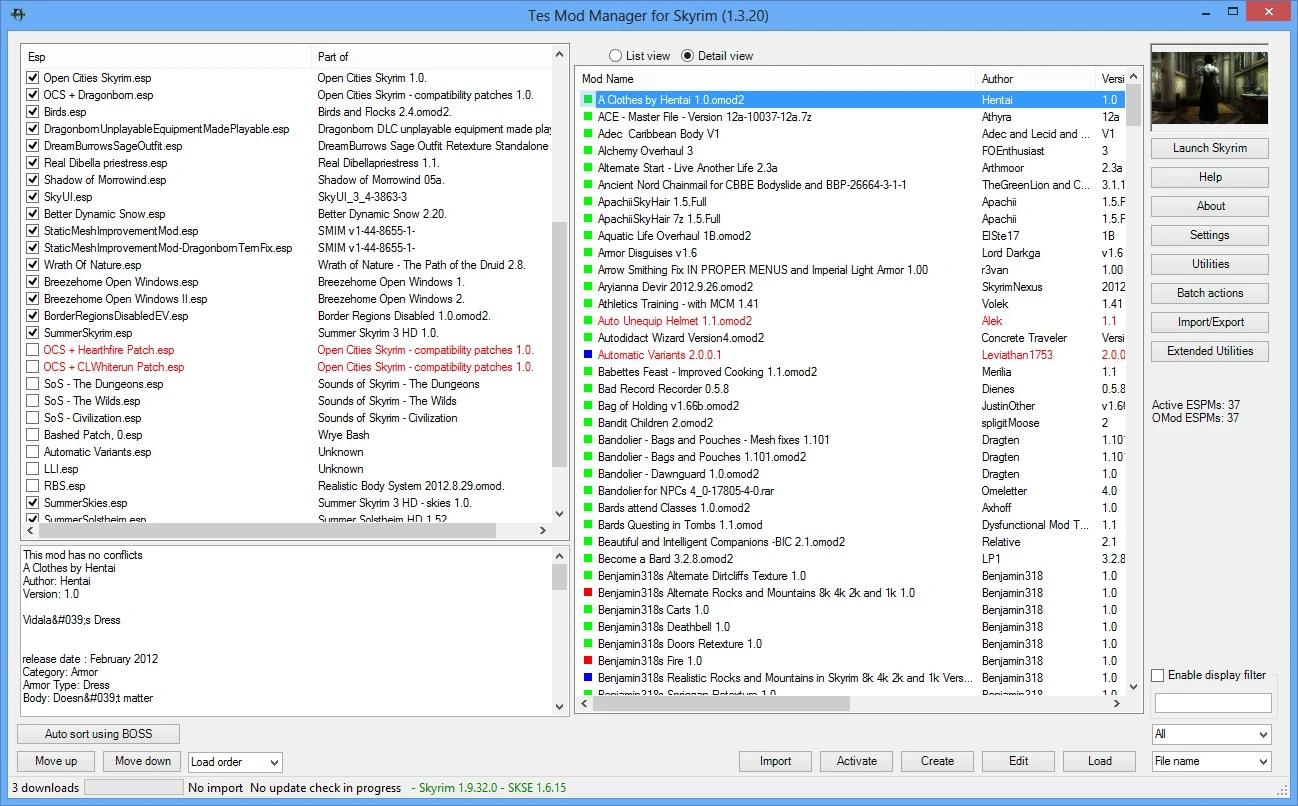
Description ----------- TesModManager is a new version of OBMM Extended that supports Skyrim SE, Skyrim, Oblivion and Morrowind. I renamed it TesModManager for this reason.
What you can do with it: create complex mods using simple script or C# scripting to control what files go where and even edit the ini files assemble mods from different folders, files and images automatically import obmm/omod mods automatically import NMM/fomod mods (supports both XML and C# fomod scripts) automatically import mods from zip/7z/rar files (some odd mods may need tweaking) use as download manager for Nexus for all supported games retrieve Mod Descriptions, Author, Version and pictures from nexusmodss. sort mods and call BOSS (if installed) to do it start skyrim using SKSE or Oblivion using OBSE installs/updates OBSE/SKSE for you install SkyProc patchers and lets you run them. Supports SUM to manage them detect and identify installed Steam mods (if they have an esp/esm) detect conflicts between mods allows you to pick the "winning" file in case of conflict using the integrated DDS viewer list data files linked to plugins group mods logically and activate them all at once export/extract mods to zip. These can be easily uploaded to nexus for others to use view, extract and create BSA files manage your save files analyzes your saves and allows you to restore mods and load order as per your save to go back to a known working configuration
This is licensed under GPL. Source code is available at https://github.com/monpetitbeurre/TesModManager
Questions: -------------- How does this compare with NMM: it does not require nexusmods access to work it helps you address conflicts it lets you preview many things about a mod it gives you deeper access to a mod's innards it analyzes mods so that it can install them even if the packaging is not great (some will still require tweaking) it manages your saves it supports Skyproc it supports omod and NMM scripts it recognizes Steam mods it installs OBSE/SKSE for you ...
How does this compare with Wrye Bash: it is simpler to use as it requires less deep mod knowledge to operate it does more for you (the part o
TesModManager is a modified version of OBMM extended that adds Skyrim support to the classic Oblivion Mod Manager. With 7,900 endorsements and 228,797 downloads, it's a popular utility for managing mods across multiple Bethesda games, though it hasn't been updated since 2019.
✨ Key Features
📊 Pros & Cons
✅ Pros
- Community-approved with 7,900 endorsements — clearly a trusted tool.
- One manager for multiple Bethesda games: Skyrim, Skyrim SE, Oblivion, and Morrowind.
- Huge download count (228k) shows it's been widely used over the years.
⚠️ Cons
- Last updated in 2019 — may have compatibility issues with newer game versions or mods.
- Based on an older mod manager, so it might lack modern features like auto-sorting or integration with current modding tools.
For veteran modders who remember OBMM and want a familiar interface to manage mods across multiple Bethesda titles. Also for players who prefer a lightweight, standalone manager without the bloat of newer tools. Skip if you need up-to-date support for the latest Skyrim updates or want a more modern mod manager like Mod Organizer 2.
💡 Beginner Tips
- Since this is a standalone executable, you can run it directly without a mod manager — just download and extract to a folder.
- If you're using Skyrim SE, make sure your game version is compatible with the 2019 build; newer updates might cause issues.
- For load order management, consider using this alongside a tool like LOOT to sort plugins, as TesModManager may not have advanced sorting.
📊 Mod Details
- Game
- Skyrim LE Mods
- Author
- monpetitbeurre
- Version
- 1.6.56
- Downloads
- 228,797
- Endorsements
- 7,900
- Category
- Utilities
- Created
- 12/31/2011
- Updated
- 11/14/2019
🔧 How to Install Skyrim LE Mods
Download from Nexus.
📖 Full step-by-step install guide for Skyrim LE →
Visit the official mod page for specific installation instructions for this mod.
🎮 Need cheat codes or console commands? Check ur gaming wiki for Skyrim LE commands, item IDs, and more.
Keep browsing — more Skyrim LE mods await