Mod Organizer
⚪ Last updated 2015⚠️ Install Order · 3 steps
Install in this order, then this mod last — most mods fail to load without their framework and dependencies in place.
Preview
🔍 Analysis
- 👍 4.4% endorsement rate — high engagement, a strong quality signal
- 🏆 #2 of 85 Utilities mods in this game by downloads
📋 About This Mod
This version of Mod Organizer is no longer maintained.
Newer Versions for both MO1 and MO2 are available at https://www.nexusmods.com/skyrimspecialedition/mods/6194
Mod Organizer
News
The bug tracker and code repository for Mod Organizer have moved.
Please post bugs to https://github.com/TanninOne/modorganizer/issues now.
Existing open bugs have been imported into that tracker although some state and formatting may have been lost.
The source code has been split into multiple projects on github. Please see here for a complete list: https://github.com/TanninOne/modorganizer
Description
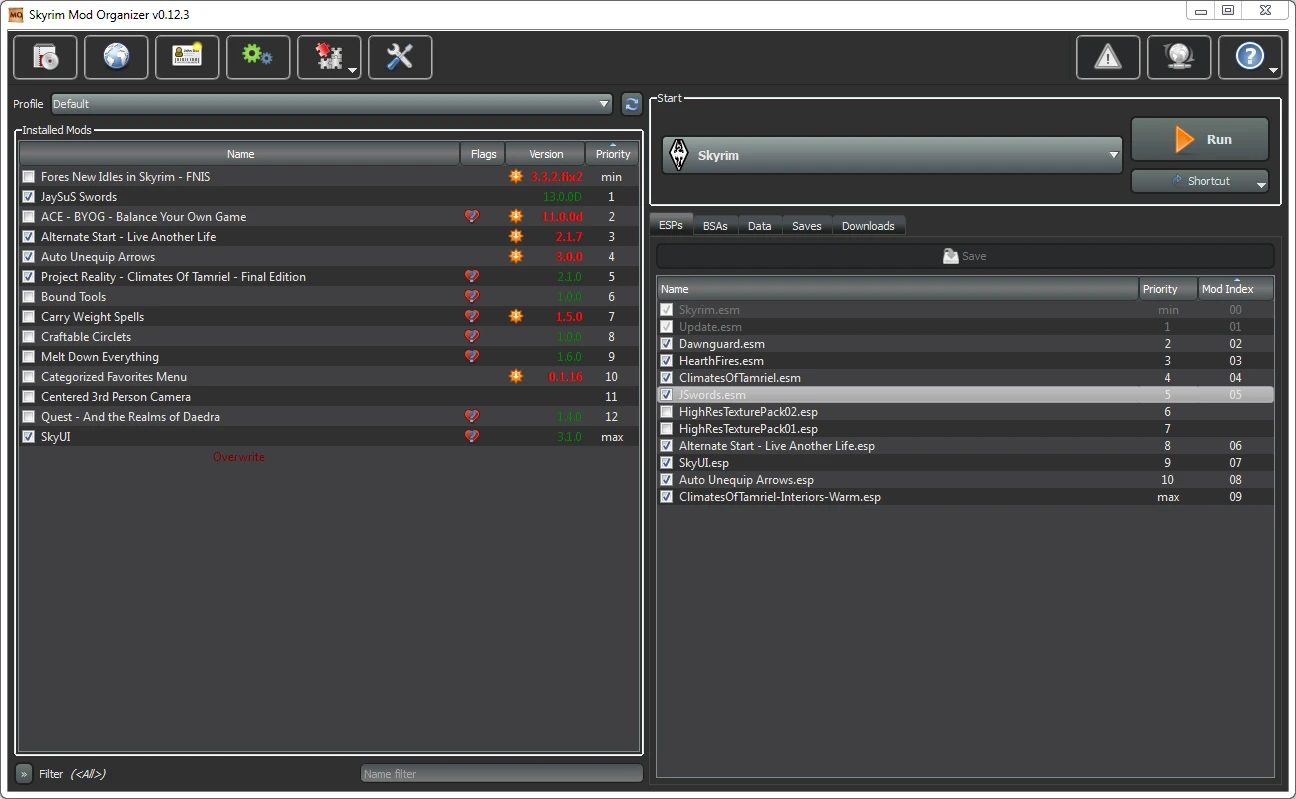
Mod Organizer (MO) is a tool for managing mod collections of arbitrary size. It is specifically designed for people who like to experiment with mods and thus need an easy and reliable way to install and uninstall them.
!!! On top of the description here, there is now a user-maintained wiki with additional information and step-by-step guides on the S. T. E. P. wiki. !!!
Features
MO has several unique features not found in any other comparable tool:
- []Mods are kept completely isolated from each other -> no more messy data directory (1)[/]
[]Profiles (2)[/]
[]Drag&Drop load order AND installation order management[/]
[]full control over the priority of BSA files (3)[/]
[]Nexus integration for easy download, installation and update of mods[/]
[]GUI support for manual installers[/]
[]partial compatibility with BAIN and fomod installers[/]
[]Savegame viewer[/]
[]active required mods from save game[/]
[]Archive Invalidation[/]
[]Categorize mods for better overview (customizable)[/]
[]easy overview of file conflicts[/]
[]complete help system[/]
[]Supports Oblivion, Fallout 3, Fallout NV and Skyrim[/]
[]no dependencies. Just unpack and go[/]
[]localization (currently: german, spanish, french and chinese)[/]
[]automatic self-updates[/]
[]BSA unpacking
[/]
Mod Isolation (1):
------------------
What mod isolation means is that each mod is installed into its own directory outside the actual data directory.
Through some magic MO then shows the game (and any other 3rd party tool that works on the data directory) a "virtual"
data directory that is a merger of the actual data directory and all the mod directories.
This way no file ever get overwritten when you install a mod and your data directory can remain in a vanilla state.
You can simply change the "installation order" of mods from the gui and deinstall or temporarily deactivate one
Mod Organizer is a utility for managing mod collections of any size, offering a centralized solution for organizing and maintaining game mods. With over 208,000 endorsements and 4.7 million downloads, it's a widely adopted tool, though it hasn't been updated since 2015.
✨ Key Features
📊 Pros & Cons
✅ Pros
- Massive community trust (208k endorsements) — this is the gold standard for mod managers
- Proven track record with 4.7 million downloads — clearly the go-to for many modders
- Handles mod collections of any size — from a few tweaks to hundreds of mods
⚠️ Cons
- Last updated in 2015 — that's ancient in modding terms, so expect compatibility issues with modern games
- Being a utility, it's not a mod itself — you'll still need to find mods to manage
For veteran modders who remember the golden age of MO and want a classic tool. For anyone managing large mod lists who values a proven, community-endorsed utility. Skip if you need modern game support or prefer a more actively maintained manager.
💡 Beginner Tips
- Since it's from 2015, check if your game is even supported before installing — many modern games won't work with it.
- If you're new to modding, consider a more current manager like Mod Organizer 2, which is actively maintained.
- Look up community guides for setup — the original description is sparse, so you'll need external help.
📊 Mod Details
- Game
- Skyrim LE Mods
- Author
- Tannin
- Version
- 1.3.11
- Downloads
- 4,701,356
- Endorsements
- 208,509
- Category
- Utilities
- Created
- 11/24/2011
- Updated
- 9/5/2015
🔧 How to Install Skyrim LE Mods
Download from Nexus.
📖 Full step-by-step install guide for Skyrim LE →
Visit the official mod page for specific installation instructions for this mod.
🎮 Need cheat codes or console commands? Check ur gaming wiki for Skyrim LE commands, item IDs, and more.
Keep browsing — more Skyrim LE mods await