Skyrim Performance Monitor
⚪ Last updated 2021⚠️ Install Order · 3 steps
Install in this order, then this mod last — most mods fail to load without their framework and dependencies in place.
Preview
🔍 Analysis
- 👍 6.5% endorsement rate — high engagement, a strong quality signal
- 🏆 #41 of 85 Utilities mods in this game by downloads
📋 About This Mod
Skyrim Performance Monitor
- By Sir Garnon
Description:
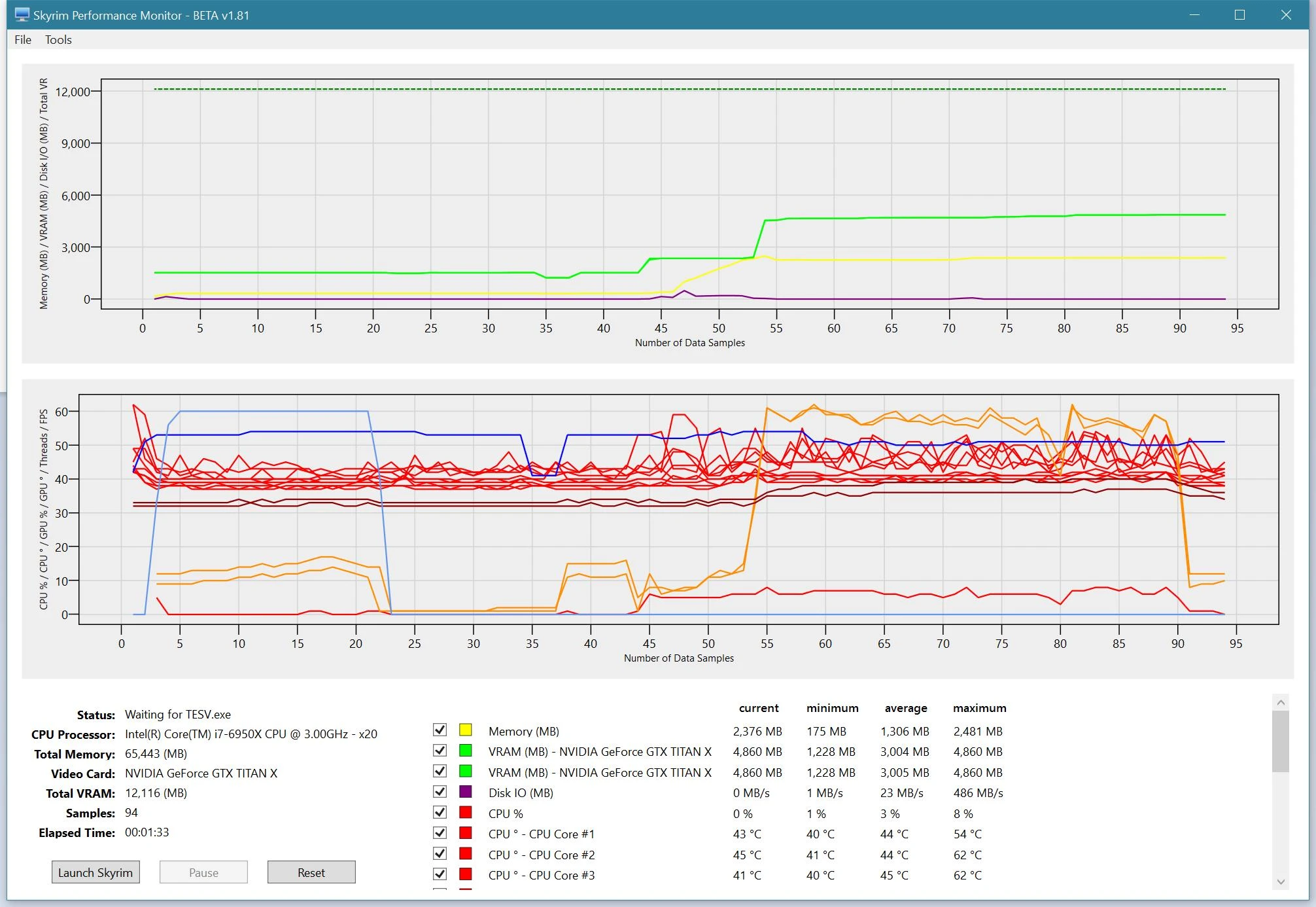
The Skyrim Performance Monitor is a utility used for tracking Skyrim’s system resource usage as it relates to INI settings and installed mods.
SPM Currently monitors the following resources:
-
[]Memory
[
]VRAM[]Disk I/O
[]CPU Temperature
[]GPU Temperature
[]Threads
Main Features:-
[] Graphs and In-Game Display for Memory, VRAM, Disk I/O, CPU, GPU, GPU Temperature, and Threads resource usage, and also for FPS.
[] Ability to save and replay past performance runs for use in comparing different configurations.
[] Displays a list of common performance related INI settings.
[] Ability to Pause monitoring while Skyrim is running.
[] Ability to capture Screenshots, useful for posting.
Featured by Gopher, Using SPM to Troubleshoot Skyrim's Memory Usage:
LyTDCCCYuZk
Featured by GamerPoets, Skyrim Performance Monitor: Start to Finish:
37IWvRaNhOA
In-Game Counter Configuration:
Support for dynamically customizing the Graphs and In-Game Counter Colors, Font Size, and Display Order:
In-Game Font and Font size can be changed:
New in v3. 5, keyboard mappings reference for the in-game counter hotkeys:
Requirements:
-
[]Windows 7, Windows 8, Windows 10
[
]Microsoft . NET Framework v4. 5 (Vista, Windows 7, Windows 8, Windows 10)Installation:
To install, simply run the two installer programs:
-
[]"Setup.exe"
IMPORTANT NOTE! Please remember to completely uninstall any previous versions first.
You may also need to install the latest Microsoft . NET Framework (required):
- [
- Microsoft . NET Framework v4. 5 (Vista, Windows 7, Windows 8)
Use the Windows Control Panel option "U
-
[]"Setup.exe"
-
[]Windows 7, Windows 8, Windows 10
-
[] Graphs and In-Game Display for Memory, VRAM, Disk I/O, CPU, GPU, GPU Temperature, and Threads resource usage, and also for FPS.
Skyrim Performance Monitor is a utility that tracks Skyrim's memory, VRAM, disk I/O, CPU, GPU, GPU temperature, threads, and FPS, helping players optimize INI settings and mod setups. With over 16,000 endorsements and 247,000 downloads, it's a trusted tool for performance tuning.
✨ Key Features
📊 Pros & Cons
✅ Pros
- Community favorite with 16k endorsements and a quarter-million downloads
- Covers every major metric you'd want—CPU, GPU, VRAM, temps, and FPS
- Perfect for diagnosing which mod or INI tweak is tanking your performance
⚠️ Cons
- Last updated in April 2021—might not play nice with the latest Skyrim updates or mods
- It's a monitoring tool, not a fixer—you'll still need to tweak settings yourself
- No built-in logging or export features mentioned, so you'll have to watch live
For Skyrim modders who obsess over performance and want to see exactly what's eating their VRAM or CPU. If you're troubleshooting stutters or trying to squeeze out more FPS, this is your go-to. Skip it if you just want to play the game without digging into metrics.
💡 Beginner Tips
- Run the monitor while playing to see real-time FPS and resource usage—it'll help you spot bottlenecks.
- Use it to compare different INI settings side-by-side to find the best balance for your rig.
- Keep an eye on GPU temperature to avoid overheating during long modded sessions.
📊 Mod Details
- Game
- Skyrim LE Mods
- Author
- Sir Garnon
- Version
- 4.6
- Downloads
- 247,343
- Endorsements
- 16,171
- Category
- Utilities
- Created
- 1/18/2012
- Updated
- 4/12/2021
🔗 Required By 1 Mod
These mods list this mod as a dependency.
🔧 How to Install Skyrim LE Mods
Download from Nexus.
📖 Full step-by-step install guide for Skyrim LE →
Visit the official mod page for specific installation instructions for this mod.
🎮 Need cheat codes or console commands? Check ur gaming wiki for Skyrim LE commands, item IDs, and more.
Keep browsing — more Skyrim LE mods await