Skyrim Audio Converter
⚪ Last updated 2012⚠️ Install Order · 3 steps
Install in this order, then this mod last — most mods fail to load without their framework and dependencies in place.
Preview
🔍 Analysis
- 👍 5.0% endorsement rate — high engagement, a strong quality signal
- 🏆 #46 of 85 Utilities mods in this game by downloads
📋 About This Mod
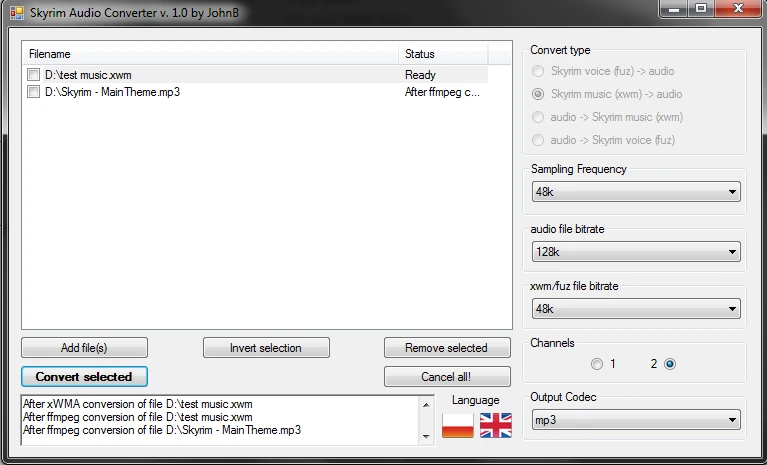
=================================================== Skyrim Audio Converter (Feb 08, 2012) =================================================== This handy tool allows you to work with audio files used in Skyrim (xwm and fuz) fast and easy. It\'s biggest advantage is that you can specify different options for each file on the list. It means, basically, that you can load 5 files on the list, deselect 2 of them and set, for example, first one to be converted from ogg to 96k bitrated xwm, the other, as it is in fuz format, to be extracted into mp3 format, with audio rate 44. 1k but only 1 channel, and leave the last one untouched. The files you are converted simultaneously, using separated threads, so you don\'t have to worry that some big audio file will slow down the whole conversion proccess. The following list summarizes the features of Skyrim Audio Converter: - a lot of formats in/out (aiff, mp3, flac, aac, ogg, wav) - choosing parameters of conversion for each file separately - asynchronous conversion (multithreaded) - can convert both xwm (music) and fuz (voice) files - easy and friendly GUI - handles multi-files selection and multi-files drag\'n\'drop ================================================ Installation/Uninstallation ================================================ None needed. To uninstall, just delete the whole program folder. ================================================ Compatibility ================================================ If you happen to have problems on your x64 Windows 7, just download the optional file. Everything should be fine. ================================================ Known Issues ================================================ When converting many files (40+) the program can freeze and seem to not respond. Just leave it for a moment, it should finish the work normally. ================================================ Credits ================================================ - Agnahim for fuz_extractor (extracting and creating fuz files) - ffmpeg developers for their fantastic tools - Microsoft for xWMAEncode (coding/decoding xwm files) ================================================ Version history ================================================ 1. 0 -Initial release. 1. 0. 1 -Added blank lip file for easier fuz creating (into both package and as an optional file) 1. 0. 2 -Fixed small language switching bug -Fixed window scalling -Fixed bug for changing conversion type swithing when leaving lip file empty -Added possibility to keep .lip file when converting fuz files to audio -Added INI file that allows users to specify base converting options and language ================================================ Enjoy! JohnB
Skyrim Audio Converter is a utility that lets you convert audio files between Skyrim's xwm and fuz formats and common formats like MP3, FLAC, and OGG. It supports per-file conversion settings and asynchronous processing. Ideal for modders who need to edit or create custom sounds for Skyrim.
✨ Key Features
📊 Pros & Cons
✅ Pros
- Huge community trust with over 10,000 endorsements and 200k downloads.
- Supports a wide range of audio formats, making it flexible for modders.
- Per-file settings give you control over each conversion.
⚠️ Cons
- Last updated in 2012 — may not work with newer Skyrim versions or Windows systems.
- Utility mod, not for players — only useful if you're creating or editing audio mods.
For Skyrim modders who need to convert audio files for custom sounds, music, or dialogue. If you're just playing the game, you don't need this. Skip if you're not comfortable with command-line or basic audio tools.
💡 Beginner Tips
- If you're modding Skyrim, use this tool to convert custom audio to .xwm format before placing it in the Data folder.
- For dialogue mods, remember that .fuz files contain both audio and lip-sync data — convert carefully.
- Test converted files in-game to ensure they play correctly, especially if you changed sample rates.
📊 Mod Details
- Game
- Skyrim LE Mods
- Author
- JohnB
- Version
- 1.0.2
- Downloads
- 202,862
- Endorsements
- 10,138
- Category
- Utilities
- Created
- 2/8/2012
- Updated
- 2/16/2012
🔧 How to Install Skyrim LE Mods
Download from Nexus.
📖 Full step-by-step install guide for Skyrim LE →
Visit the official mod page for specific installation instructions for this mod.
🎮 Need cheat codes or console commands? Check ur gaming wiki for Skyrim LE commands, item IDs, and more.
Keep browsing — more Skyrim LE mods await